What should you look for when buying?
Mini PC with a separate monitor
A good fit if: You already have a suitable screen or want to choose one specifically for your window-side desk, and you have limited space for a computer case.
Things to consider: The monitor connection, operating system and box contents must suit the exact configuration. A screen and input devices aren’t necessarily included.
All-in-one desktop
A good fit if: You want to buy the computer and screen together, and the display is easy to read and adjust where you plan to use it.
Things to consider: You’re tied to the screen that comes with the computer. The all-in-one label alone doesn’t tell you how the display will perform by a window.
Slim or larger desktop
A good fit if: The ports and specifications of your chosen model matter more than having the smallest possible case.
Things to consider: Allow space for both the computer case and screen. A larger size alone doesn’t mean a PC will be easier to upgrade later.
First, decide where you want to position your screen by the window. Then check the operating system, ports and everything included with the specific model.
| What matters to you |
What to check before buying |
Who is this important to? |
| Screen visibility by a window |
Assess the screen in typical daylight at your intended desk; check how adjustable it is and what finish the display has. |
If I want to avoid distracting reflections or sharp changes in brightness while studying, I’ll consider the screen’s position and sun protection. Around 36% of consumers prioritise a window-side spot where the screen is easy to read. |
| Python workflow |
Check that the operating system on the exact model works with your preferred editor and installation method; check any specialist course tools separately. |
If I want to use an editor, Python and learning materials on my system, I’ll check that the tools I plan to use are compatible. Around 29% of consumers prioritise a Python workflow that suits their needs. |
| Space and ports |
Check the video outputs and USB ports against your existing devices; also allow room for the computer and power supply. |
With a small desk, I want to keep using the devices I already own, so I need compatible ports. Around 21% of consumers prioritise space requirements and device compatibility. |
| Total cost of your workspace |
Make a note of any screen, keyboard, mouse and cables you already have; check the scope of any optional extra services. |
If I still need devices to put together a complete study setup, I’ll compare everything I need rather than just the PC case. Around 14% of consumers prioritise predictable overall costs. |
Joybuy products for a compact study setup
The Joybuy products below are mini PCs, with a monitor to be chosen separately. Before buying, check that the operating system, ports and box contents suit your screen setup and the learning tools you plan to use.
 No image available
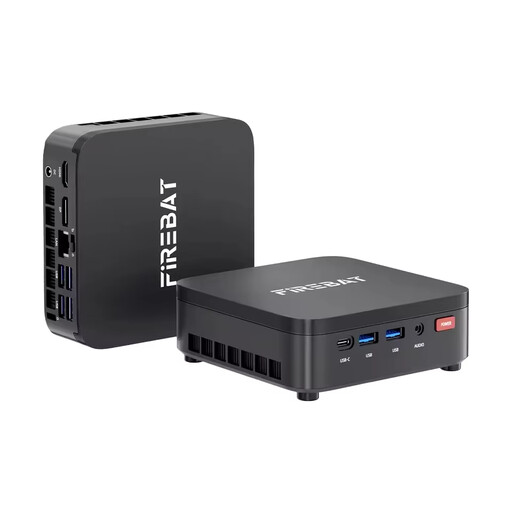
FIREBAT R3 Mini PC, AMD Ryzen 3 4300U, 16 GB RAM, 512 GB SSD
The mini PC design lets you choose and position your screen separately.
Listed in the product title: Windows 11 Pro, 16 GB LPDDR4 RAM, 512 GB M.2 SATA SSD, Wi-Fi 6 and Bluetooth 5.2.
Joybuy
 No image available
Ninkear L12 Pro Mini PC, Intel i9-12900HK
This mini PC can be paired with a screen positioned separately.
Listed in the product title: 16 GB DDR4 RAM, 1 TB SSD, USB 4.0 and dimensions of 130 × 127,5 × 52 mm. The operating system is listed as Windows 10/11; Ubuntu compatibility is also mentioned.
Joybuy
 No image available
Ninkear M7 Mini PC, Intel Core i7-1185G7
The compact design lets you choose a separate screen and position it to suit your window-side desk.
Listed in the product title: 16 GB DDR4 RAM, 512 GB SSD, Wi-Fi 6 and support for three displays. Windows 10/11 and Ubuntu are listed as compatible operating systems.
Joybuy
 No image available
Ninkear L20 Mini PC, Intel Core Ultra 5 226V
This mini PC can be set up separately from the screen.
Listed in the product title: 16 GB RAM, Windows 11, Wi-Fi 6 and Bluetooth 5.3. The SSD is listed as either 512 GB or 1 TB; support for three 4K screens is also mentioned.
Joybuy
 No image available
SOYO M5 Mini PC, AMD Ryzen 4300U
The mini PC design makes it easy to create a compact setup with a separately positioned screen.
Listed in the product title: Windows 11, 16 GB LPDDR4 RAM, 512 GB SSD, Wi-Fi 5 and support for three 4K displays.
Joybuy
Frequently asked questions
Do I need a gaming PC for my first Python exercises?
VS Code’s minimum requirements don’t call for a gaming PC. Microsoft recommends a processor of at least 1.6 GHz and 1 GB RAM for the editor. These figures don’t cover the full requirements of a PC running several applications at once. Check the requirements for your courses and any other software you plan to use, too.
How should I set up my screen by a bright window?
Assess the screen’s position in typical daylight and look out for distracting reflections or sharp changes in brightness. A separately chosen monitor gives you more flexibility over its position than the fixed display on an all-in-one. Also consider whether sun protection would be useful in your workspace.
What should I consider when installing Python?
Check that the instructions match the operating system and installation method you plan to use. For the Python Install Manager, the Python Software Foundation lists Windows 10 or Windows Server 2022 and later versions. This applies to that particular installation method, not every way of using Python.
What are my rights in Germany if a product is faulty or I change my mind after buying online?
Your statutory rights are against the seller and are separate from any optional warranty. Online consumer purchases generally come with a 14-day right to cancel, subject to the terms and exceptions of the specific contract. Germany’s consumer advice centre explains these differences and rights.
Where can I take an old desktop PC in Germany?
Electrical waste must not go in your household rubbish. Germany’s Federal Ministry for the Environment lists local collection points and, subject to the relevant legal requirements, returns to retailers. Whether a particular retailer has to accept your old device, and how the return works, depends on those requirements.


