For your first Python scripts at an adjustable-height desk, a mini PC with a separately positioned monitor is a natural starting point if space is limited. An all-in-one is a good fit if you want to buy the computer and screen together, provided you can adjust the display to suit both sitting and standing. A tower is worth considering if specific upgrade plans matter more to you than a compact case. Whichever form factor you choose, check the operating system, the memory actually installed, the connections and what’s included with the exact version.
Which form factor suits you?
Python beginners with limited desk space
If you want to use an editor, Python and learning resources at your sit-stand desk, a small computer can free up valuable surface space. Remember to allow for a monitor that you can position to suit your workspace. The Chartered Institute of Ergonomics and Human Factors recommends setting the screen at a height that allows you to keep your head relaxed and in a neutral position.
Beginners without an existing study setup
If you don’t yet have a complete workspace, check the monitor, keyboard, mouse and operating system as well as the computer. What’s included with mini PCs and barebones models depends on the exact version; the product family name alone won’t tell you what’s in the box.
Learners with specific upgrade plans
If you want to add or replace particular components later, check the actual slots and upgrade options available on the exact model. A compact form factor alone doesn’t tell you how easy a computer is to upgrade.
What to look for when buying
Mini PC with a separate monitor
A good fit if: you have limited space or want to position the monitor and computer independently.
Things to consider: you’ll need to have or budget for a monitor and input devices; specifications and upgrade options vary by model.
All-in-one PC
A good fit if: you want to buy the computer and screen as one unit, and can adjust the display to suit your sitting and standing positions.
Things to consider: the screen and computer are combined, so check the adjustment and upgrade options on the specific version.
Tower desktop
A good fit if: you want to add specific components later and have a suitable place for the case.
Things to consider: allow for space for the case, cable management and a separate monitor; upgrade options depend on the model.
| What you’re looking for |
What to check before buying |
Who it matters to most |
| Desk space and monitor positioning |
Check where the case can go, that the connections and inputs are suitable, and that cables can be routed safely throughout the desk’s range of movement. |
If I want to position my screen comfortably when switching between sitting and standing, I pay particular attention to where it can go and the available connections. Around 36% of consumers put this first. |
| A complete setup |
Check that the exact version includes an operating system, RAM, SSD, monitor and input devices. |
If I want to get started with learning Python straight away, I want to know in advance if anything is missing or needs extra setup. Around 29% of consumers prioritise a setup that’s as complete as possible. |
| Upgrade options |
Check the requirements of the tools you plan to use, as well as which slots are actually free and which components can be replaced. |
If I already have specific upgrades in mind, I compare the relevant slots rather than looking at case size alone. Around 21% of consumers prioritise this flexibility. |
| Total cost and requirements |
Budget for all the components and peripherals you need; distinguish voluntary warranty cover from your statutory rights. |
If I still need a monitor or input devices, I want to work out the cost of a complete study setup and know who to contact if something is faulty. Around 14% of consumers put this first. |
Common buying mistakes
-
Assuming a barebones model is a complete PC that’s ready to use
A barebones version may not include essential components such as RAM, an SSD or an operating system. A familiar product family name doesn’t guarantee what’s included.
Check the full model and version name, along with the details of the operating system, memory and storage. Allow for any missing parts and the setup they’ll require.
Depending on the version, you may need to pay for extra components and spend time setting them up.
-
Assuming a small case means an ergonomic workspace
When you change the desk height, you also need to be able to position the screen comfortably. With an all-in-one, the computer and screen are connected.
Check that you can adjust the specific screen to suit both sitting and standing. Also plan how you’ll manage the cables throughout the desk’s range of movement.
If you can’t position your existing screen comfortably, you may need a different monitor or a suitable mount.
-
Taking an editor’s minimum requirements as requirements for your entire setup
Microsoft’s published recommendation for Visual Studio Code applies to the editor, not to all the other programmes you may run at the same time or to future projects.
Compare the requirements of the tools you actually plan to use, and consider which programmes you’ll run at the same time.
-
Confusing the manufacturer’s warranty with your statutory rights
Your statutory rights and a voluntary warranty are different. The Verbraucherzentrale (German consumer advice centre) explains the distinction.
Keep your proof of purchase and the warranty terms. If the product is faulty, the seller is generally the point of contact for your statutory rights.
Brands worth considering
GEEKOM
The A5 Pro with a Ryzen 5 7530U is an example of a well-equipped mini PC for a workspace with a separate screen.
- COMPUTER BILD described the tested version as compact and noted that its memory could be upgraded.
- The keyboard and mouse weren’t included with the test unit. These details don’t necessarily apply to other A5 Pro versions.
MSI
The Cubi NUC 1M range is worth considering if you want a compact setup with a separate screen.
- MSI lists VESA 100 × 100 mm compatibility and two SO-DIMM slots for the range.
- Processor and operating system options vary, so check the specifications of the specific offer.
GMKtec
The NucBox M6 Ultra gives you the choice between an equipped mini PC and a barebones version.
- GMKtec offers a barebones option without RAM, an SSD or an operating system, as well as versions with different specifications.
- Before buying, check which components are actually included with the version you’ve selected.
ASUS
The ExpertCenter PN64 shows why it’s important to check the exact memory configuration and operating system when comparing compact desktop ranges.
- ASUS specifications list different memory configurations.
- The range is listed as “No preinstalled OS”; check what’s included with the specific configuration on offer.
Dell
Dell’s desktop range includes towers and all-in-one systems, giving you different form factors to compare.
- The specific product range can help you compare a separate case with a system that has an integrated screen.
- Check the upgrade options and screen adjustment on the specific model.
Joybuy products
These product cards feature mini PCs for a study setup with a separately chosen screen. Check which components are included with each version and whether the screen is suitable for your sit-stand workspace.
 No image available
SOYO Y5Pro mini PC, Intel Core i5 8250U/8350U, 8 GB DDR4, 256 GB SATA SSD
A compact mini PC for a workspace with a separately positioned screen; check that its connections are compatible with your monitor.
The product title lists Windows 11, 8 GB DDR4 and a 256 GB SATA SSD.
View at Joybuy
 No image available
THUNDEROBOT Mini-PC Workstation AI Max+ 395, 128 GB RAM, 1 TB SSD
If you’re specifically looking for a configuration with a generous amount of listed memory and SSD storage, compare this version with the requirements of the tools you actually plan to use.
The product title lists 128 GB LPDDR5X at 8000 MT/s and a 1 TB SSD.
View at Joybuy
 No image available
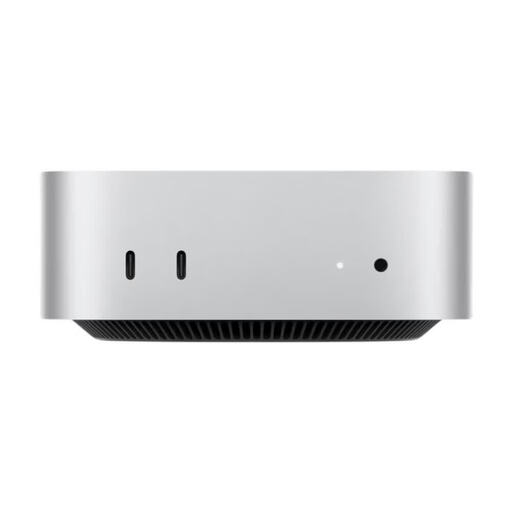
Apple Mac mini M6, 16 GB Unified Memory, 256 GB SSD
This mini PC version lists macOS as its operating system; check that it’s compatible with the learning tools you need.
The product title lists a 12-core CPU, a 12-core GPU, HDMI and Thunderbolt 4.
View at Joybuy
 No image available
Apple Mac mini A3534 M6, 32 GB Unified Memory, 1 TB SSD
If you want to compare a Mac mini version with more listed memory and SSD storage, check that the tools you plan to use are compatible with macOS.
The product title lists a 12-core CPU, a 12-core GPU, HDMI and Thunderbolt 4.
View at Joybuy
 No image available
MaxMini B3 mini PC, Intel N4100, 8 GB LPDDR4, 256 GB SSD
A mini PC for use with a separately positioned screen; compare the listed specifications with the requirements of your learning tools.
The product title lists a clock speed of up to 2.4 GHz.
View at Joybuy
Frequently asked questions
Do I need a gaming PC for my first Python exercises?
Not just for Python or Visual Studio Code. Microsoft recommends a processor of at least 1.6 GHz and 1 GB RAM for the editor. These figures don’t indicate what you’ll need to run other programmes at the same time or work on more demanding projects.
Is Python already installed on a Windows desktop?
Windows doesn’t include a Python installation supported by the system. The Python Software Foundation explains how to install it separately; also check whether the specific PC includes an operating system at all.
How should I set up my screen and keyboard when switching between sitting and standing?
Adjust the screen so you can keep your head relaxed and as neutral as possible, and check the work surface position for both postures. The German Federal Institute for Occupational Safety and Health recommends switching between sitting and standing rather than standing continuously.
What are my rights in Germany if something is faulty or I want to cancel an online purchase?
For faulty goods, your statutory rights are against the seller and are separate from any voluntary warranty. Online purchases generally come with a 14-day right to cancel; exceptions may apply, and the specific terms of the contract should be checked. The Verbraucherzentrale (German consumer advice centre) explains these rights and how they differ.
Is the CE marking an independent quality mark?
No. Where the relevant EU rules require CE marking, the manufacturer uses it to declare that the product meets the applicable requirements; it isn’t a general quality mark. The European Union explains that not every product needs to carry a CE marking. The requirements that apply depend on the specific device version.


