
Lieferung heute & morgen

Qualitätsgarantie
App herunterladen
Kategorien
QD-OLED technology marks a significant leap forward in display development for gaming applications. By combining self-emissive organic light-emitting diodes (OLED) with a Quantum Dot (QD) conversion layer, it redefines key image quality parameters like color volume, contrast, and response time. This article breaks down the technical criteria for selecting a QD-OLED monitor and presents a selection of models for various user profiles.
Choosing the right monitor depends on a careful consideration of technical specifications. The following criteria are essential for making an informed decision.
Resolution determines pixel density and, consequently, image sharpness. The choice depends directly on the primary use case and the performance of your existing hardware.
These two values are crucial for motion clarity and latency in fast-paced games.
Modern ports and features significantly expand a monitor's functionality.
Based on the technical criteria above, we have curated a selection of QD-OLED monitors for specific use cases.
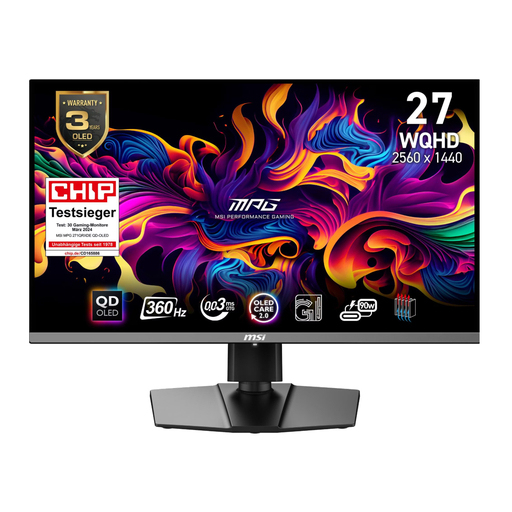
[10€ off with Code: M10] MSI MPG 271QRXDE QD-OLED 26.5 Inch WQHD QD-OLED 16:9 360 Hz Gaming Monitor
Why We Recommend It: This model is engineered for maximum performance in competitive gaming. The combination of a 360Hz refresh rate and a WQHD 1440p resolution delivers an extremely fluid and responsive experience without overburdening the graphics card with 4K demands. The VESA ClearMR 13000 certification confirms its exceptionally high motion clarity.
Pros:
Best For: Esports athletes and serious PC gamers for whom refresh rate and minimal latency are the top priority.
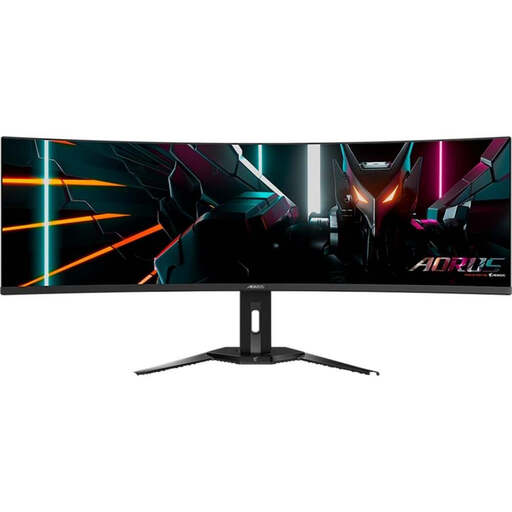
[10€ off with Code: M10] Gigabyte Aorus Curved Gaming Monitor CO49DQ OLED - 5120x1440 (DQHD), 1800R, 144Hz, 0.03ms, KVM, FreeSync Premium Pro, HDMI 2.1
Why We Recommend It: The Aorus CO49DQ offers the ultimate level of immersion with its 49-inch Super-Ultrawide 32:9 panel. The screen area is equivalent to two 27-inch WQHD monitors without a distracting bezel in the middle. The 1800R curve wraps around the user's field of view. Its integrated KVM switch also makes it a powerful tool for multitasking.
Pros:
Best For: Users of simulation games (racing, flight sims) and professionals who need an ultra-wide, seamless workspace for content creation or working with multiple windows side-by-side.

[10€ off with Code: M10] MSI MPG 321CURXDE 31.5 Inch 4K (UHD) Curved QD-OLED 16:9 240 Hz Gaming Monitor
Why We Recommend It: This model combines high resolution with high speed. The 4K (UHD) resolution on a 31.5-inch screen provides a razor-sharp image, while the 240 Hz refresh rate is more than sufficient for even fast-paced games. With VESA DisplayHDR True Black 400 and a peak brightness of up to 1000 nits (according to the manufacturer), it is perfectly suited for displaying HDR content.
Pros:
Best For: High-end PC gamers and next-gen console owners who seek uncompromising image quality for visually demanding games without sacrificing a high refresh rate.
The models presented here cover specific user profiles. If your requirements for size, resolution, or price differ from these models, you can find a wider selection of devices in our main category.
Discover more models in the category: OLED Computer Monitors
1. What is the technical difference between QD-OLED and WOLED? WOLED (White OLED) panels use white OLEDs with a color filter to produce red, green, and blue. In contrast, QD-OLED panels use a blue OLED light source, which is converted into highly pure red and green by a layer of quantum dots. The blue light passes through directly. This approach can lead to a wider color volume and higher brightness in saturated colors.
2. What is the risk of burn-in on modern QD-OLED monitors? The risk has been significantly reduced through technical measures. Manufacturers like MSI and Gigabyte implement multi-level protection systems ("OLED Care"). These include the automatic detection and dimming of static elements (like taskbars), pixel-shifting algorithms that imperceptibly move the image, and regular panel maintenance cycles that run in standby mode. With normal, varied use (gaming, multimedia), the risk is low.
3. Do I need a specific graphics card for a 240Hz or 360Hz monitor? Yes, to take full advantage of the high refresh rate at native resolution, a powerful graphics card is required. For a WQHD 1440p monitor with 360 Hz, a high-end GPU (e.g., NVIDIA GeForce RTX 4080/4090 or comparable AMD models) is recommended to achieve consistently high frame rates in demanding games. For a 4K monitor with 240 Hz, the requirements are correspondingly even higher.