What should you look for when buying?
First decide which input movement you want to practise, then check that the space it needs and its system compatibility suit your setup.
| What matters when buying |
What to check |
Who is it important to? |
| Input method and practice goal |
Decide whether you want to practise moving the stick or pressing individual directional buttons. If available, check the input sequence registered in the game. |
If I want to play with a stick later, I want to practise that movement too. Around 33 % of consumers focus on having the right quarter-circle input. |
| Playing surface and space |
Compare the case size and playing surface with your desk or lap. Also check whether you can position the cable or receiver conveniently. |
For long sessions, I need room for my hands and a surface that suits the way I sit. Around 27 % of consumers prioritise having a suitable space to practise. |
| System and connection |
Check the full model name against the manufacturer’s compatibility information for your console or version of Windows. The documented PS5 setups for the MAYFLASH F500 Elite require an adapter and compatible firmware. |
If I play on a particular system, the exact version needs to be compatible before I plan for any extra accessories. Around 27 % of consumers prioritise compatibility with their gaming system. |
| Initial cost and maintenance |
Check whether the case can be opened to access its components, and what accessories your system requires. |
When weighing up the initial cost and future access to components, I want to understand both in advance. Around 13 % of consumers put affordability and maintenance first. |
Joybuy products for this type of practice
A gamepad alternative for practising quarter-circle inputs with thumb movements instead of an arcade stick lever.
 No image available
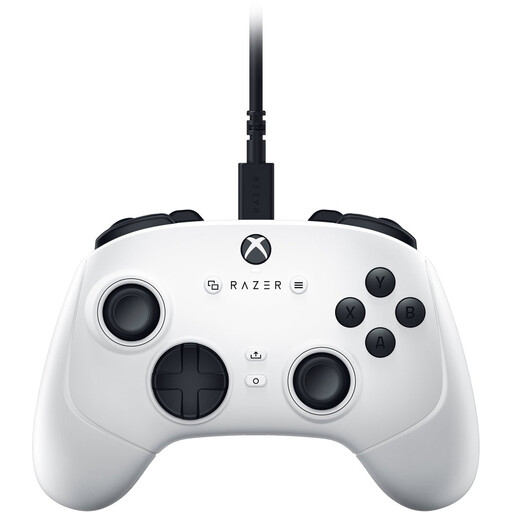
Razer Wolverine V3 Tournament Edition White
As a gamepad, it’s an option for practising thumb movements, but it won’t train you to move an arcade stick lever.
Named in the product title: analogue thumbsticks, PC, Xbox Series S and Xbox Series X.
View at Joybuy
Frequently asked questions
How can I tell if I’ve entered a quarter-circle correctly while practising?
Practise the sequence down, down-forward, forward from the other player side too. If your game has an input display, compare the registered directions with the sequence you intended. Capcom documents an Input History display for Street Fighter 6.
Will a PS4 arcade stick automatically work with every PS5 game?
No. Check the exact version and the game. PlayStation Support explains that officially licensed specialist controllers, including arcade sticks, are supported with PS5 games and supported PS4 games. For the MAYFLASH F500 Elite, MAYFLASH specifies separate adapter and firmware requirements.
What should I check before a long practice session?
Check that the controller sits securely in your playing position, that there’s enough room for both hands and that cables or wireless receivers are positioned conveniently. Manufacturer information about the case and wrist rest can’t replace trying the fit for yourself.
What are my rights in Germany if a controller bought online doesn’t fit or is faulty?
For a distance purchase made by a consumer, there is generally a 14-day cancellation period from the day the goods are received; exceptions and possible return costs should be taken into account. Your Europe, the European Union’s information portal, distinguishes this right to cancel from the statutory guarantee for faulty goods: goods bought from a trader are generally covered by a statutory guarantee of at least two years. A voluntary warranty is separate.


