What to look for when buying
First, check how much room your desk offers for a keyboard and mouse, and which connections your device supports. Then decide whether quiet typing, customisable keys or a separate number pad matters most to you.
| Priority |
What to check when buying |
Most important for |
| Mouse space |
Keyboard width, available desk space and whether you actually use the number pad. |
If I use my mouse to place terrain and objects, I want enough room to move it beside the keyboard. Around 31% of consumers put having clear mouse space first. |
| Quieter typing |
The exact model and switch variant; manufacturers’ claims about quiet keys are not based on a comparable noise measurement. |
If other people are studying or working in the room, I want to be considerate while labelling my map. Around 25% of consumers prioritise a quieter room. |
| Customisable inputs |
Whether the commands you want can be mapped in your map-making software, and compatibility with your software and operating system. |
If I want quicker access to frequently used commands when drawing a map, I first check that my specific software supports them. Around 19% of consumers put customisable inputs first. |
| Hand position |
Width and depth, the position of your mouse and keyboard, and whether you can use a split keyboard comfortably. |
During longer sessions, I want to be able to position my keyboard, mouse and hands comfortably on my desk. Around 13% of consumers prioritise a comfortable hand position. |
| Number entry |
How often you enter sequences of numbers and whether a wider model and your mouse will fit on your desk. |
If I often enter sequences of numbers while working on my map, a separate number pad may matter more than extra mouse space. Around 12% of consumers put direct number entry first. |
Keyboards at Joybuy
This Joybuy selection includes compact and TKL keyboards that leave you more room to move your mouse, as well as models with different connection types and key variants.
 No image available
Inateck Foldable Mini Keyboard with Touchpad, QWERTZ, N0153BK
The foldable mini design with an integrated touchpad is an option if you’d rather not use a separate mouse.
Three Bluetooth channels; listed as compatible with Windows, iPadOS and Android. The product description says it offers quiet typing.
View at Joybuy
 No image available
CHERRY STREAM KEYBOARD TKL, US layout with Euro symbol
The TKL format leaves out the number pad and may suit you if you want more room for your mouse.
Wired via USB; six multimedia hotkeys. CHERRY describes the SX scissor mechanism used in the STREAM range as quiet. The listed layout is US with a Euro symbol.
View at Joybuy
 No image available
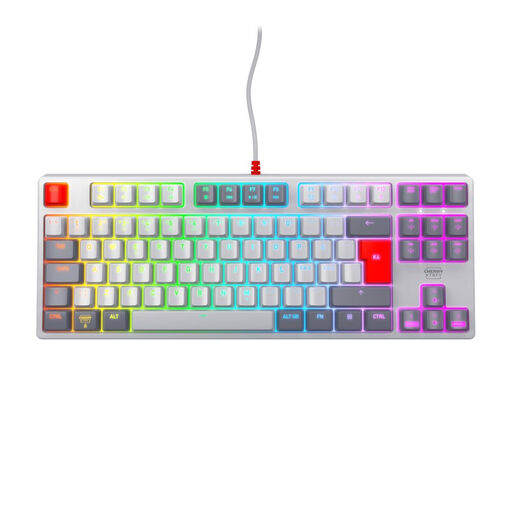
CHERRY XTRFY K4V2 TKL, MX2A Red, Pan-Nordic
The TKL format leaves out the number pad and is an option if you want to make room for mouse movement on your desk.
Wired USB-A connection; MX2A Red switches; Pan-Nordic QWERTY layout.
View at Joybuy
 No image available
CHERRY MX-LP 2.1 Wireless, 65%, German QWERTZ
The 65% format is a compact option if you want to save mouse space and are looking for a German QWERTZ layout.
Connects via Bluetooth, 2.4 GHz or USB-C; RGB backlighting. Listed as a low-profile model with MX Speed switches.
View at Joybuy
 No image available
Logitech MX Mechanical, German QWERTZ, Tactile Quiet
This variant may suit you if you’re looking for a German QWERTZ layout and want to explore customisable shortcuts.
Bluetooth and Logi Bolt; Smart Backlighting. The product description lists Tactile Quiet switches and customisable shortcuts through Logi Options+.
View at Joybuy
Frequently asked questions
Do I need a number pad for a digital quest map?
Not necessarily. If you mainly use your mouse to design and only enter numbers occasionally, a TKL keyboard leaves you more space. If you enter number sequences often, a model with a number pad may be more practical. Check that it fits on your desk alongside your mouse.
What should I check before connecting and setting it up?
Compare the listed layout of the specific variant with your typing habits, and check that your device supports its USB connection or Bluetooth. For custom key mappings, your map-making software and operating system must also be compatible; according to Perixx, the downloadable software for the PERIBOARD-335 is designed for Windows.
Is a keyboard described as quiet always the quietest choice for a shared room?
No. A manufacturer’s claim about quiet typing is not a direct comparison with other keyboards. Check the exact switch variant and whether the claim applies to the specific model.
Are a warranty and statutory consumer rights the same thing?
No. Your statutory rights are against the seller, while a warranty is an additional voluntary service with its own terms. If a product is faulty, the first step may be a repair or replacement, as explained by the Verbraucherzentrale (German Consumer Advice Centre).
How should I dispose of an old keyboard and removable batteries?
The Federal Environment Agency advises against putting electrical waste in household rubbish. Take it to a recycling centre, for example. Removable batteries should be placed separately in battery collection boxes.


