What should you look for when buying?
Start by comparing key noise and the typing feel you want. Then check that the layout and size suit the keys used in your game and the space available on your desk.
| Buying priority |
What to look for |
Who will find this most important? |
| Key noise |
Check the switch type, whether it has a click mechanism and any claims about sound dampening. If possible, listen to the keyboard being used in comparable conditions. |
If someone is sleeping beside me, I want to keep disruption from repeated keystrokes to a minimum. Around 36% of consumers prioritise typing as quietly as possible. |
| Access to in-game keys |
Check that your game’s key assignments work with the UK layout and that you have the function, navigation and number keys you need. |
If I often switch between building, camera and management controls, I want the shortcuts I need close at hand. Around 29% of consumers prioritise direct access to in-game keys. |
| Size and mouse space |
Compare the width with the space available on your desk, and check which keys are missing from TKL or 75% layouts compared with a full-size keyboard. |
If my desk is small, I want enough room for my mouse without missing keys I need. Around 21% of consumers prioritise available space. |
| Extra features |
Once you’ve found the right switches and layout, consider whether you’ll actually use macro keys or customisable lighting. |
If I’m mainly looking for a keyboard that suits my needs, I don’t want to pay for extras I’ll hardly use. Around 14% of consumers prioritise keeping costs down and avoiding unnecessary features. |
Related products at Joybuy
This selection includes keyboards for quiet typing, compact desks and different typing preferences. Pay particular attention to how the layout and exact switch type match your needs.
 No image available
Logitech 920-012404 Ergonomic Wave, German QWERTZ
For shoppers looking specifically for membrane keys described as quiet and a German QWERTZ layout. This is described as an ergonomic keyboard, not a gaming model.
The product name lists membrane keys, Bluetooth, a cushioned palm rest and connectivity with multiple devices. It is described as optimised for macOS, iPadOS and iOS.
View at Joybuy
 No image available
CHERRY MX-LP 2.1 Wireless, German QWERTZ, 65%
For shoppers who prefer a compact gaming layout with German QWERTZ and are comfortable using the layout of a 65% model.
The product name lists low-profile MX Speed switches, three connection options (2.4 GHz, Bluetooth and USB-C), RGB lighting and a 65% layout.
View at Joybuy
 No image available
Ticktype EVO75 Custom, ISO-DE, 75%
For shoppers looking for a compact mechanical layout with German ISO keys who are happy to switch to the layout of a 75% model.
The product name lists tri-mode connectivity, hot-swap, ISO-DE layout, 75%, VIA compatibility and Creamy Rye switches.
View at Joybuy
 No image available
Logitech MX Mechanical, Tactile Quiet, German QWERTZ
For shoppers looking for mechanical switches described as Tactile Quiet and a German QWERTZ layout.
The product name lists Bluetooth, Logi Bolt and adaptive white backlighting. The switch description isn’t a comparative noise measurement.
View at Joybuy
 No image available
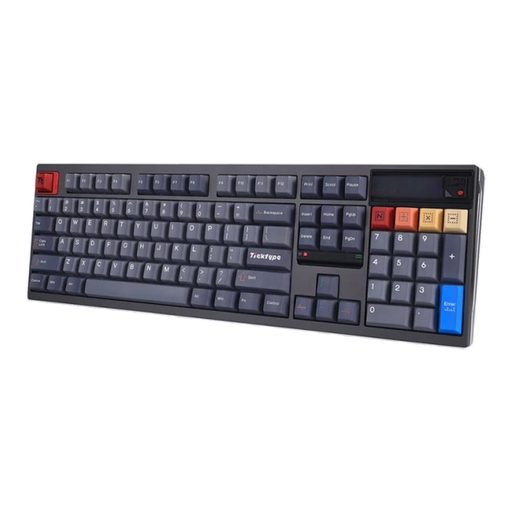
Ticktype DP104 Custom, full-size, US layout
For shoppers who want a full-size layout with 108 keys and are comfortable using a US layout. The listed layout isn’t German.
The product name lists Silent Tactile switches, tri-mode connectivity and hot-swap. The switch description doesn’t guarantee that the keyboard will be inaudible.
View at Joybuy
Frequently asked questions
Which keyboard is least likely to disturb someone else in the bedroom?
A keyboard described as quiet isn’t automatically inaudible. SteelSeries and Logitech describe certain models as whisper-quiet; be quiet! lists Silent Linear switches and dampening layers. These are manufacturer claims, not comparative noise measurements.
Do I need a number pad for a zoo-building game?
Not necessarily. Check the shortcuts in the specific game you play and your own habits before giving up the number pad. Frontier’s published list relates to Planet Zoo and doesn’t show that a number pad is generally needed for other games.
What should I look for in the keyboard layout?
Check that the version on offer has the German layout you want, along with the function, navigation and number keys you need. The model name alone doesn’t always tell you whether a product variant has German QWERTZ.
What should I check to make sure a product complies with German requirements?
Check which markings and product information are required for the specific keyboard. The Bundesnetzagentur lists CE marking, manufacturer details, required German-language instructions and declarations of conformity among the points to check. Wireless models must also meet the relevant requirements for radio equipment. A CE marking isn’t an independent quality mark.
What should I do if the keyboard is faulty or I want to dispose of my old one?
If a product is faulty, the seller is generally your point of contact for your statutory rights. The Verbraucherzentrale explains the two-year statutory warranty period and additional information requirements for sales contracts from 31 July 2026, covering the choice between repair and replacement. According to the Umweltbundesamt, old electrical equipment should be disposed of through separate collection.


