What should you prioritise in a shared bedroom?
Quiet mouse with few controls
A good fit if: Being considerate of the person sleeping takes priority, and you usually use the keyboard for extra in-game commands. CHERRY describes the GENTIX SILENT as quiet; it has three buttons and no thumb buttons.
What to consider: Check that you have the required USB-A port and can route the cable neatly where you use the mouse.
Mouse described as quiet, with a scroll wheel or extra buttons
A good fit if: You switch between maps and large overviews, or want to assign extra buttons to specific in-game actions. Logitech describes the M650 as featuring SilentTouch and SmartWheel; Razer says the Pro Click Mini has quiet switches and seven programmable buttons.
What to consider: These claims do not confirm that every control is quiet, or that the specific game supports the assignments you want.
Gaming mouse with a large button array
A good fit if: Having in-game commands close at hand matters more, and you have checked that you can reach the buttons and that your game supports them. Razer and SteelSeries each list twelve side buttons on specific models.
What to consider: No quiet-click profile is confirmed here for these button-heavy models. Lots of buttons are no substitute for a comfortable fit.
The percentages below refer to consumers choosing a mouse for management games in a shared bedroom. Each row represents the buyer's single top priority.
| Priority |
What to check before buying |
Who it matters most to |
| Click noise |
Check the claims for the specific model and, if possible, test the main buttons, wheel and side buttons individually in a quiet room. |
When I play while someone else is sleeping in the same room, I want to keep operating noise to a minimum. Around 36% of consumers would make quiet operation their top buying priority. |
| Scrolling and in-game commands |
Check that your game supports the assignments you want and that you can reach the buttons comfortably. |
When I often navigate maps, menus or overviews, a suitable scroll wheel and easy-to-reach extra buttons are essential. Around 29% of consumers would put navigation and easily accessible in-game commands first. |
| Fit |
Compare the size and handedness of the exact version with your hand. |
During long gaming sessions, I want to reach the wheel and buttons comfortably and choose a mouse that suits my hand. Around 21% of consumers would make fit their top buying priority. |
| Connection and power supply |
Check the ports, wireless connection, what's included and the battery type for the specific version. |
If I need to use the mouse with my existing computer and factor in battery changes, the connection and power supply are key considerations. Around 14% of consumers would put these factors first. |
Joybuy mouse selection for management games
This selection includes mice specifically described as quiet, as well as gaming models with programmable buttons. Check that the noise level, button assignments and connection suit your setup for each version.
 No image available
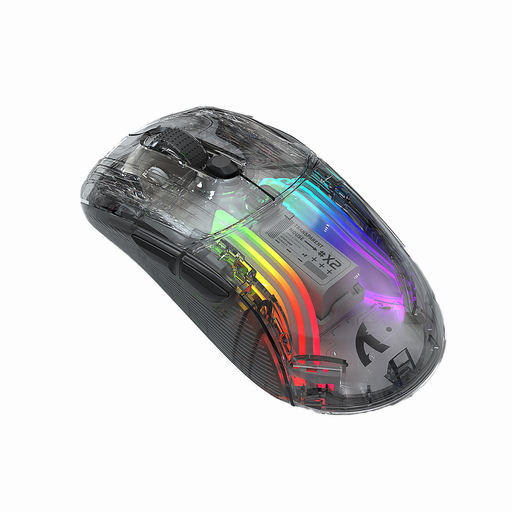
KINSI X2 wireless Bluetooth mouse, 3 modes
The product description mentions quiet clicks and gaming use. If bedroom noise is a concern, check the scroll wheel and side buttons separately.
Connects via 2.4 GHz wireless or Bluetooth; five DPI settings from 800 to 2400; ambidextrous shape and built-in rechargeable battery.
View at Joybuy
 No image available
NAXSIR 3-in-1 gaming mouse
If you want to trigger in-game actions directly from your mouse, the product description lists seven programmable buttons and macros. Check that your game supports them.
USB-C cable, 2.4 GHz wireless or Bluetooth; switchable scroll wheel; quiet microswitches according to the product description; right-handed shape; 500 mAh battery.
View at Joybuy
 No image available
ATTACK SHARK X11 Wireless Gaming Mouse
The product description lists five programmable buttons for frequently used actions. Check that you can reach them easily and that your game supports the assignments.
PAW3311 sensor; up to 22,000 DPI; 2.4 GHz wireless, Bluetooth 5.2 or USB-C cable; charging dock and grip tapes according to the product details.
View at Joybuy
 No image available
HOFOTEK M311 Silent Office Mouse, 2.4G+BT
If quiet clicks and wireless use matter to you, the product description lists Silent-Touch buttons as well as 2.4 GHz wireless and Bluetooth. Check the scroll wheel and other buttons separately.
Five DPI settings from 800 to 4000; connects to up to three devices; 62 g; one AA battery according to the product description.
View at Joybuy
 No image available
AULA SC620 Wireless Gaming Mouse
If you want to assign several in-game actions, the product title lists seven programmable buttons. Check that they’re easy to reach and supported by your game.
Bluetooth 5.0, 2.4 GHz wireless or USB-C; PixArt PAW3311 sensor; up to 12,000 DPI; 67 g; 400 mAh battery.
View at Joybuy
Frequently asked questions
How do I set up a mouse for management games?
Connect the mouse using the connection or wireless method specified for that particular model. If you want to assign actions to side buttons, check both the mouse software and the settings in the game. A particular number of programmable buttons doesn’t guarantee support for a specific in-game action.
Is a mouse advertised as quiet completely silent in a bedroom?
No. A manufacturer's claims about quiet switches don’t prove that every control is silent. Check the main buttons, scroll wheel, middle click and, where applicable, side buttons individually in your setup.
What should I bear in mind with a mouse that uses AA batteries?
Check the battery type and what's included with the specific version, and allow for replacing the batteries later. The German Environment Agency recommends disposing of used batteries and rechargeable batteries at collection points in shops or local authority collection points, not in household waste.
What are my rights when buying online from a business in Germany?
For most online purchases of goods from businesses in Germany, you generally have a 14-day right to cancel, starting from delivery. Exceptions and possible return costs should be taken into account. New faulty goods are covered by a statutory minimum two-year warranty. This is separate from any additional manufacturer's guarantee.


