Considerate night-time gamers
You play while someone else in your bedroom needs peace and quiet, and you can carry out most game commands using the keyboard. A mouse with explicitly quiet buttons is an obvious place to start.


If the other person in your bedroom needs peace and quiet, and you carry out most game commands using the keyboard, a mouse with explicitly quiet buttons is a sensible place to start. A gaming mouse isn’t automatically quiet; if you want to assign extra commands to the mouse, check that its buttons suit your game and are easy to reach. Assess the main buttons, side buttons and scroll wheel separately, as information about individual switches doesn’t tell you how noisy the whole mouse is.
You play while someone else in your bedroom needs peace and quiet, and you can carry out most game commands using the keyboard. A mouse with explicitly quiet buttons is an obvious place to start.
You want to assign frequently used, game-supported commands to easy-to-reach mouse buttons, and you’re happy to check how noisy each one is.
You want to choose a comfortable shape and a wired or wireless setup that works in your space for longer gaming sessions. The right connection depends on the specific model.
| What to consider | What to look for | Who will find this especially important? |
|---|---|---|
| Click noise | Assess the main buttons, side buttons and scroll wheel separately; don’t assume ‘quiet’ means silent. | If I play at night while someone else needs peace and quiet, I want to keep repeated clicks to a minimum and can carry out many commands using the keyboard. Around 42% of consumers who prioritise quiet clicks put this first. |
| Game commands | Check which functions the specific game lets you assign to mouse buttons and whether the buttons are easy to reach. | I want to trigger frequently used commands directly from the mouse, but only if the game supports those bindings. Around 25% of consumers give top priority to easily accessible commands. |
| Fit | Match the model’s size to your grip; if you’re left-handed, check that the mouse is available in a suitable version. | For longer gaming sessions, I want a mouse whose shape suits my hand and grip. Around 17% of consumers put fit first. |
| Connection and space | Make sure your setup has room for the cable and can accommodate the receiver, power supply and any free ports you need. | If I have limited desk space, I want a connection that’s practical to use there. Around 16% of consumers prioritise having the right wired or wireless setup. |
be quiet! describes the main switches on the DARK PERK ERGO as having a quiet sound profile; however, an independent PC Guide review found the clicks on the same model noticeable. These descriptions don’t tell you how noisy it will be in a bedroom or how loud the side buttons and scroll wheel are.
Where possible, try the mouse in a quiet environment, and check the side buttons and scroll wheel too.
A gaming ranking doesn’t automatically tell you whether the operating noise will be disruptive in a shared bedroom.
Use rankings as a guide to models at most, and check game requirements and noise levels separately.
According to the manufacturer, the CHERRY STREAM MOUSE COMFORT uses a USB receiver. Make sure the connection and power supply suit your setup.
Before buying, check that you have a suitable free port and find out how the specific model is powered.
With a battery-powered model, replacing the batteries is also part of ongoing use.
The GENTIX SILENT and STREAM MOUSE COMFORT are everyday mice specifically designed with quiet buttons, while the MC 2.1 is a wired gaming mouse.
The DARK PERK ERGO combines gaming features with a sound profile for the main switches that the manufacturer describes as quiet.
The Basilisk V3 X HyperSpeed is aimed at gamers who want to use assignable controls.
The Signature M650 is a quiet everyday option available in different sizes; the PRO X2 SUPERSTRIKE is more focused on gaming features.
This selection includes gaming mice for digital board game adaptations, with models offering programmable buttons and a range of wired and wireless connections. A product name or manufacturer’s description of quiet clicks doesn’t guarantee that the main buttons, side buttons and scroll wheel will be unobtrusive in a shared bedroom.
 No image available
For gamers looking for a wireless gaming mouse with programmable buttons.
The product description lists a weight of 64 g, a Focus Pro 30K sensor and five programmable buttons. It says the design is for right-handed users.
 No image available
For gamers considering extra assignable mouse buttons and a wired connection.
The product description lists 11 programmable buttons, a Focus+ sensor and an adjustable scroll wheel with tilt-click. It describes the mouse as ergonomically shaped for right-handed users.
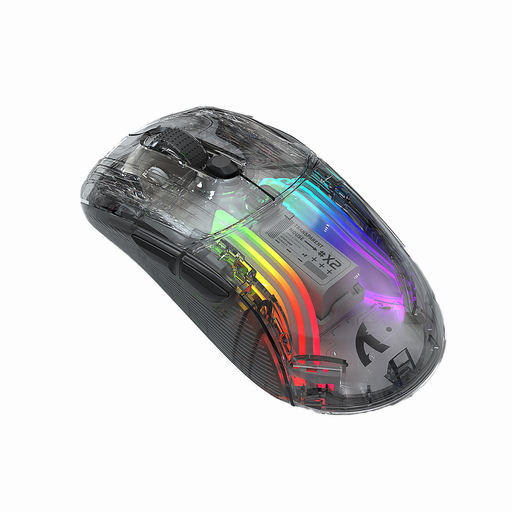 No image available
For anyone looking to compare a mouse with several connection modes.
The product description lists three connection modes, a rechargeable battery and 2400 DPI. The product title describes the mouse as quiet, but that doesn’t guarantee it will be quiet in your bedroom.
 No image available
For gamers comparing several connection options and programmable buttons.
The product description lists a wired connection, 2.4 GHz wireless and Bluetooth, up to 12,800 DPI and seven programmable macro buttons. It describes the micro-switches as quiet, but you should still check how noisy the mouse is in the environment where you plan to use it. According to the description, the ergonomic shape is designed for right-handed users.
 No image available
For gamers looking for a wireless gaming mouse with extra programmable buttons.
The product title lists a PAW3311 sensor, 22,000 DPI, 2.4 GHz, Bluetooth and USB-C connections, and five programmable buttons. According to the title, an RGB charging dock is included.
First, check which commands the specific game lets you assign to mouse buttons. Extra buttons are only useful if you need those commands and can reach the buttons easily; the number of buttons listed doesn’t confirm compatibility with the game.
Check the connection method and power supply for the specific model. According to CHERRY, the CHERRY STREAM MOUSE COMFORT uses a nano USB receiver and displays the battery status; according to Logitech, the Logitech Signature M650 supports Bluetooth Low Energy or a Logi Bolt receiver.
If a product is faulty, your statutory rights should be raised with the seller. A guarantee is separate and is based on voluntary guarantee terms. The Verbraucherzentrale lists repair or replacement as possible remedies.
No. Under the German rules explained by the Umweltbundesamt, waste electrical equipment must be collected separately from unsorted household waste. Remove the batteries if possible and dispose of them separately; you can take the old device to a recycling centre or a suitable retail take-back point, among other options.