What should you consider when choosing?
Start by checking the noise level and layout. Then compare the keyboard with your most-used IDE commands, and finally decide which size and connection best suit your workspace.
| Consideration |
What to look for |
Who is this important to? |
| Typing noise around other people |
Check the specific switch type and the returns policy. A clicky version isn’t quiet just because it belongs to the same model range. |
When I’m typing alongside other people, I want to disturb them as little as possible while keeping work and navigation keys within easy reach. Around 36% of consumers rank typing noise as their main buying consideration. |
| Shortcuts and key layout |
Check your IDE commands, function keys and special characters against the specific layout. JetBrains notes that PyCharm may not recognise some shortcuts correctly with a non-English layout. |
When I often switch between code and profiling results, I want my usual shortcuts and characters to be easy to access without having to hunt for them. Around 29% of consumers put shortcut use first. |
| Space and connection |
Check whether you need a number pad, which USB port is available and whether you’re allowed to use Bluetooth on your work device. |
If my workspace is tight or I switch between devices, I want to choose a size and connection that suit how I work every day. Around 21% of consumers prioritise space and connectivity. |
| Hand position during longer typing sessions |
Check whether a split layout, the available desk space and the switch type you prefer are right for you. |
During longer typing sessions, I want to know whether a different hand and arm position suits the way I work. Around 14% of consumers say hand position is their most important buying consideration. |
Keyboards for this use
This Joybuy selection includes compact wired keyboards, as well as models designed for quiet typing or switching between devices. Pay particular attention to the stated layout and connection type.
 No image available
Foldable Bluetooth keyboard with wireless mouse
The foldable design may suit you if you want to keep your keyboard’s footprint small at a shared desk.
Three connection modes and connections to up to three devices. USB-C charging; the product name states compatibility with Windows, Android and iOS.
The product description mentions quiet scissor keys. Check that the specific key layout works with your IDE shortcuts.
Joybuy
 No image available
CHERRY KW 9200 MINI
The compact design could suit a small desk or a workspace where you switch between devices.
CHERRY SX scissor switches, four connection channels and a rechargeable battery. The stated layout is UK English QWERTY.
Check in particular that this layout works with your special characters and IDE shortcuts.
Joybuy
 No image available
CHERRY STREAM KEYBOARD TKL
A compact wired option if you can manage without a number pad.
USB connection, CHERRY SX scissor switches and six multimedia keys. The stated layout is English (US) with a euro symbol.
CHERRY describes the STREAM KEYBOARD TKL as quiet. Check that the US layout works for the commands you use regularly.
Joybuy
 No image available
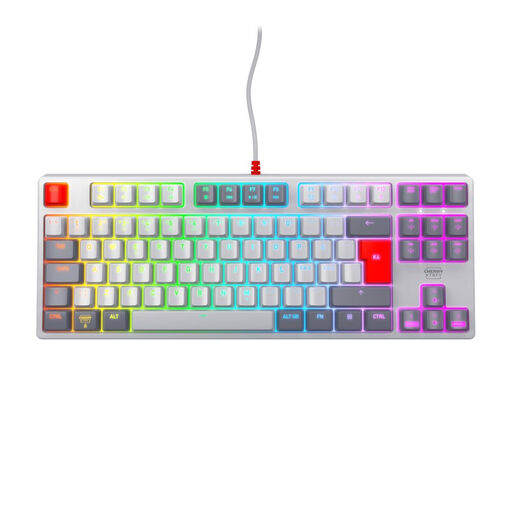
CHERRY XTRFY K4V2 TKL, MX2A Red
This wired TKL keyboard could suit you if you’re looking for a compact design with linear switches.
MX2A Red switches, USB connection and RGB lighting. The stated layout is Pan-Nordic QWERTY.
Check that the key assignments work for your language and IDE shortcuts.
Joybuy
 No image available
CHERRY XTRFY K4V2 TKL, German QWERTZ
This wired TKL keyboard could be a good starting point if you need a German QWERTZ layout and a compact design.
MX2A Red switches and RGB lighting. The TKL layout has no number pad.
Check the key layout against the commands and special characters you use often in your IDE.
Joybuy
Frequently asked questions
Will a faster keyboard make my slow script run faster?
No. A keyboard can make it easier to enter commands, while profiling examines how a programme performs at runtime and can help you identify bottlenecks. Changing your keyboard alone won’t speed up the script.
What should I set up before my first profiling run?
First, check that your IDE recognises the commands you need with the selected keymap and keyboard layout. If you want to remap keys, also check whether you can use the relevant manufacturer software on your work computer. Managed devices may require approval.
Who can help if there’s a fault, and do I need an extended warranty?
If you buy from a business seller in the EU, you generally have a legal guarantee of at least two years from the date you receive the goods, provided by the seller. Your Europe explains that this right isn’t replaced by a manufacturer’s guarantee or a paid-for add-on.
Are all versions of a keyboard described as quiet equally quiet?
No. Check the exact switch type. Perixx offers quiet linear and quiet tactile versions of the PERIBOARD-335, as well as a clicky version. A description of one quiet option doesn’t apply to every version.
Which layout details matter for IDE shortcuts?
Compare the key assignments with the commands and special characters you actually use. JetBrains notes that PyCharm may not recognise some shortcuts correctly with a non-English layout.


