
Lieferung heute & morgen

Qualitätsgarantie

Willkommens-Angebote freischalten: KOSTENLOSE Lieferung | Bis zu 80 % RABATT | Kostenlose 30-Tage-JoyPlus-Testphase
App herunterladen
A mechanical keyboard offers a precise and satisfying typing experience that can boost productivity. However, the characteristic clicking sound is often disruptive in office environments or a quiet home office. The search for a "quiet mechanical keyboard" can be misleading, as many models labelled as such are still too loud for professional use. Before you make a decision, you should be aware of the most common pitfalls that can lead to a bad purchase.
To make an informed decision that will genuinely improve your workday, you should focus on objective technical parameters rather than marketing promises.
The mechanical switch determines both the typing feel and the noise level. For a mechanical keyboard for the office, two types are particularly relevant:
The connection method and key layout are crucial for seamless integration into your workflow.
The physical design and smart features can significantly impact the user experience.
Here are some recommendations tailored to specific user needs that avoid the pitfalls mentioned.

Why This Fits Their Persona: Ideal for professionals and developers who need a high-quality, quiet, and feature-rich keyboard for a multi-device workflow. Its professional design fits into any modern office.
The tactile quiet switches are specifically designed for office environments. Instead of RGB effects, it focuses on smart illumination and seamless multi-device connectivity for up to three devices.
Sleek low-profile design for high ergonomics; dual connectivity via Bluetooth and the Logi Bolt USB receiver; long battery life and USB-C fast charging.

Why This Fits Their Persona: Perfect for developers who seek a compact yet fully functional keyboard. The 75% layout saves desk space without sacrificing arrow and function keys.
Equipped with quiet Sea Salt switches (linear), which are optimised for fast typing and a low noise profile. The focus is on functionality, like the volume knob and the German QWERTZ layout, not on superfluous gimmicks.
Hot-swappable switches allow for easy customisation or repair; five-layer sound dampening for an even quieter typing experience; practical rotary knob for media control.
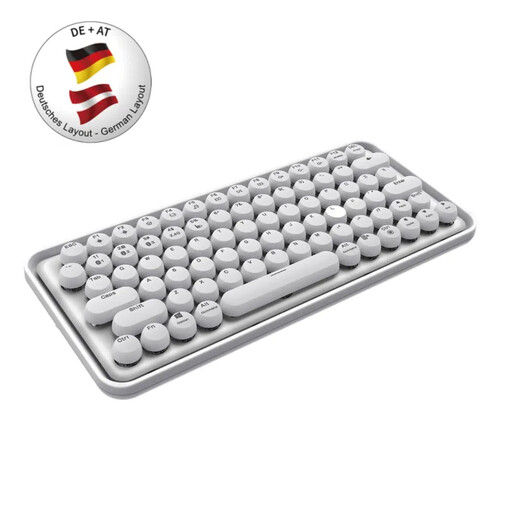
Why This Fits Their Persona: For users who value aesthetics and want a keyboard that is both functional and a design statement. Ideal for creative workspaces and users who frequently switch between different devices.
It offers a quiet typing experience, according to the manufacturer, and reliable multi-device connectivity for PCs, tablets, and smartphones. The design is elegant and functional, without the distraction of loud gaming features.
Unique design with round keycaps; smart switching between Bluetooth 3.0, 5.0, and 2.4 GHz; integrated rechargeable battery for wireless freedom; German QWERTZ layout.
We have compiled a comprehensive, up-to-date list of products that meet these strict selection criteria and applicable regulations.
Always disconnect the keyboard from the computer before cleaning. Use canned compressed air to remove dust and crumbs from between the keys. The surface of the keycaps can be wiped with a lightly damp microfibre cloth. Avoid aggressive cleaning agents and prevent liquid from entering the housing, as this can damage the mechanics and electronics.
A low-profile mechanical keyboard uses flatter keycaps and switches with a shorter travel distance. This results in a lower overall keyboard height and can promote a more ergonomic wrist posture, similar to that on a laptop. Conventional mechanical keyboards have longer key travel, which some users appreciate for its pronounced tactile feedback, but it can also lead to greater wrist flexion.
In most cases, no special software is required. Switching between devices is done directly via dedicated keys on the keyboard after the devices have been paired once via Bluetooth or the USB receiver. However, some manufacturers, like Logitech with Logi Options+, offer optional software that allows you to customise key assignments, lighting effects, and other advanced features.