
Lieferung heute & morgen

Qualitätsgarantie

Willkommens-Angebote freischalten: KOSTENLOSE Lieferung | Bis zu 80 % RABATT | Kostenlose 30-Tage-JoyPlus-Testphase
App herunterladen
Finding the right keyboard for your office or home office can be a challenge. While mechanical keyboards are prized for their precise typing feel and durability, their characteristic clicking sound is often disruptive in a quiet work environment. A quiet mechanical keyboard for the office offers the perfect compromise: the tactile feedback and reliability of a mechanical keyboard, combined with a subtle sound profile.
This article serves as a guide to help you make an informed choice. It highlights the key criteria for selecting a quiet mechanical keyboard and introduces several models well-suited for professional use.
To make a well-informed decision, several technical aspects should be considered. These features determine not only the noise level but also your comfort and efficiency during daily work.
The switches beneath the keycaps are the heart of any mechanical keyboard. They define the typing feel and the noise level. For office environments, two types are particularly relevant:
Switches with a loud clicking sound ("Clicky Switches") are generally unsuitable for open-plan offices or quiet workspaces.
Modern workspaces demand flexibility. Using a wireless mechanical keyboard creates a clutter-free desk and allows for more versatile positioning. Many models also offer multi-device Bluetooth keyboard functionality, enabling you to seamlessly switch between multiple devices like a PC, laptop, and tablet. Look for stable connection options such as Bluetooth 5.0 or a dedicated 2.4 GHz wireless receiver (dongle).
Long workdays call for ergonomic tools. A low-profile mechanical keyboard can reduce wrist strain thanks to its shorter key travel and flatter design. A backlit keyboard for work is also beneficial, as it makes typing easier in various lighting conditions. Models with smart backlighting that automatically adjusts to ambient light are especially convenient.
Here is a selection of keyboards that cater to different needs in terms of functionality, design, and sound profile.

Why it stands out: The Logitech MX Mechanical is engineered specifically for professional use. It combines a low-profile design with quiet, tactile mechanical switches, integrating seamlessly into any productive workspace.
Pros:
Who it's for: Professionals, developers, and creatives looking for a reliable, quiet, and feature-rich multi-device Bluetooth keyboard for both Windows and macOS.
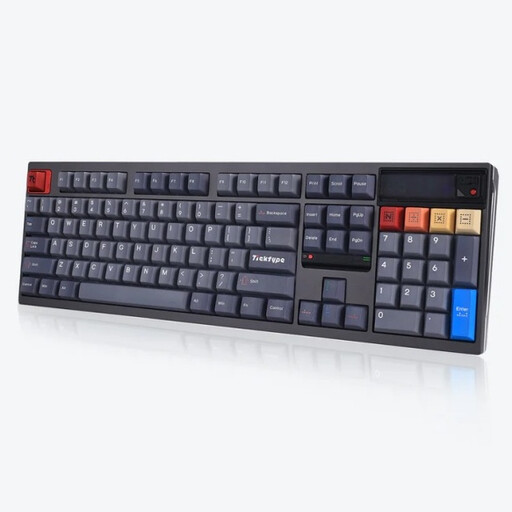
Why it stands out: The Ticktype DP104 is an enthusiast-grade model designed for customisation and a premium typing experience. Its leaf-spring mount and silent tactile switches deliver an exceptionally dampened and soft feel.
Pros:
Who it's for: Power users and programmers looking for a keyboard for programming that values customisation, a premium feel, and an extremely quiet typing sound.

Why it stands out: The AJAZZ AK980 V2 is a feature-packed model that bundles many premium features into one package. With a TFT display, a rotary knob, and multi-layer sound dampening, it's built for both productivity and comfort.
Pros:
Who it's for: Users seeking a versatile and customisable wireless mechanical keyboard with modern features like a display and hot-swappable sockets.
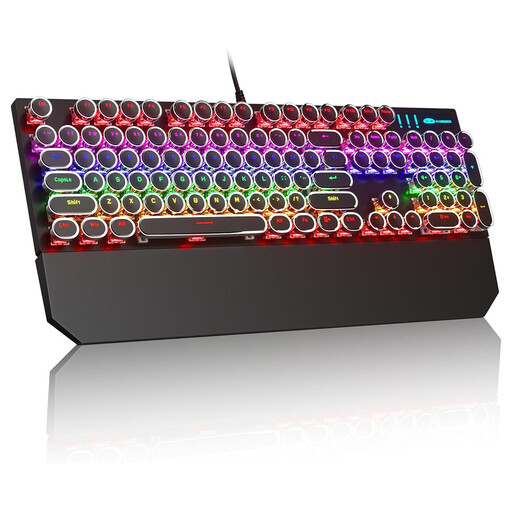
Why it stands out: This model stands out with its unique retro design featuring round keycaps reminiscent of classic typewriters. It's aimed at users who appreciate a striking aesthetic.
Pros:
Who it's for: Users in a home office or private office who prefer strong tactile and audible feedback and want a keyboard with a distinct visual style. It's worth noting that Blue switches are known for their loud, clicky sound, making them unsuitable for open-plan offices.
Haven't found the right model yet? For more options, accessories like wrist rests, or custom keycaps, take a look at our comprehensive category for Mechanical Keyboard Accessories.
1. What makes a mechanical keyboard quiet? The sound level is primarily determined by the switch type. Linear and special "silent" tactile switches are the quietest. Additionally, internal dampening materials (foam), pre-lubed stabilisers and switches, and solid case construction all contribute to noise reduction.
2. Are mechanical keyboards good for programming? Yes, many developers prefer mechanical keyboards. The precise tactile feedback helps reduce typos, and the durability of the switches is beneficial for intensive daily use. A keyboard for programming often benefits from programmable keys and an ergonomic layout.