If click sounds might disturb the other person, a mouse specifically described as quiet is a sensible starting point – as long as its buttons and connection suit your game. If you often want to assign game commands to mouse buttons, a programmable gaming mouse may be a better fit; however, its button specifications don’t prove that clicks are quiet. Also check the fit in your hand, the scroll wheel and the exact model variant.
Which mice are right for you?
Considerate night-time gamers
If you play beside someone who’s sleeping or resting, a mouse specifically described as quiet may matter more than lots of extra buttons. Logitech lists SilentTouch for certain models, such as the Signature M650 and M330 Silent Plus; this doesn’t mean gaming mice in general are quiet.
Game commands on mouse buttons
If you want to access frequently used commands directly from your mouse, check how many buttons can be programmed and the game’s hotkeys. Age of Empires IV support explains how to remap hotkeys; Logitech lists 11 programmable buttons for the G502 HERO.
Consider fit and navigation
If you play for long sessions or often navigate maps, consider the mouse’s size, whether it’s designed for left- or right-handed use, and how easy the scroll wheel and middle button are to use. Logitech offers different sizes and a left-handed version of the M650; a Total War guide describes using the scroll wheel and middle button to navigate the map.
What should you look for when buying?
Mouse specifically described as quiet
A good fit if: keeping click sounds to a minimum is the priority and you don’t need many extra mouse buttons.
The trade-off: SilentTouch claims apply to specific Logitech models. They don’t guarantee how loud the mouse will be in your room, how well it will perform for gaming or whether it has lots of programmable buttons.
Gaming mouse with programmable buttons
A good fit if: you want to access frequently used game commands directly from your mouse and match the button assignments to the game’s controls.
The trade-off: button specifications don’t guarantee quiet clicks; also check that you can reach the buttons comfortably.
Wireless gaming mouse with a configurable scroll wheel
A good fit if: wireless use and different scrolling modes matter more than a specifically advertised silent click.
The trade-off: Razer describes selectable scrolling modes for the Basilisk V3 Pro 35K; the manufacturer’s claims don’t guarantee quiet clicks or a comfortable fit for you.
| Priority |
What to check |
Who it matters most to |
| Click sound |
Look for a quietness claim for the exact variant; don’t assume the main buttons, side buttons and scroll wheel are all equally quiet. |
If I play at night next to someone else, I want to keep click sounds to a minimum. Around 36 % of consumers prioritise explicitly quiet clicks. |
| Programmable buttons |
Check programmability, the software required and the hotkey settings for the game you play. |
If I want to access frequently used commands directly from my mouse, having the right button assignments matters more than having as many buttons as possible. Around 29 % of consumers prioritise game commands on mouse buttons. |
| Fit and navigation |
Check whether the mouse suits your hand, its size, and how easy the scroll wheel and side buttons are to reach. |
If I play for long sessions or use the map frequently, I need a mouse that fits my hand and has controls I can reach easily. Around 21 % of consumers prioritise fit and map controls. |
| Connection and gaming setup |
Check the available ports, space for a receiver and the connection used by the specific mouse. |
If I share my gaming setup with someone else, I want to make sure the cable or wireless connection is practical for the space. Around 14 % of consumers put having the right connection first. |
Avoid common buying mistakes
-
Assuming “gaming” means “quiet”
The documented gaming features of the G502 HERO and Basilisk V3 Pro 35K don’t include proof of reduced click sounds. Logitech lists SilentTouch for certain other models.
Check that the quietness claim applies to the exact variant on offer. Don’t assume that sensor or button specifications tell you how loud the mouse is.
-
Assuming similarly named model variants are identical
The wired Basilisk V3 35K is not the same model as the wireless Basilisk V3 Pro 35K. Similar names don’t replace checking the exact variant and its features.
Before buying, compare the full model name, connection and features you need.
-
Focusing only on the number of extra buttons
Extra buttons are only useful if you can assign the commands you need to them. Age of Empires IV support notes that button assignments may conflict.
First decide which commands you need, then check how you can assign them and whether the buttons are easy to reach.
Relevant brands to help you choose
Logitech
Worth comparing if you’re weighing up everyday mice specifically described as quiet, such as the Signature M650 and M330 Silent Plus, against gaming mice such as the G502 HERO.
- Logitech lists SilentTouch for certain M650 and M330 models; for the G502 HERO, the manufacturer lists 11 programmable buttons.
- The SilentTouch claim for everyday models doesn’t automatically apply to the G502 HERO and doesn’t prove that gaming models have quiet clicks.
Razer
The Basilisk V3 Pro 35K is a wireless gaming option for anyone interested in a configurable scroll wheel.
- Razer describes several scrolling modes for this model.
- The manufacturer’s claim isn’t an independent comfort test and doesn’t prove that clicks are quiet. Other Basilisk variants aren’t necessarily technically identical.
SteelSeries
The Aerox 5 Wireless is a gaming option if you’re looking for programmable buttons and wireless use.
- SteelSeries lists nine programmable buttons for this model.
- The button specification doesn’t tell you how loud the clicks are or whether the mouse will fit your hand.
Corsair
The Scimitar RGB Elite could suit anyone who wants to assign commands to lots of mouse buttons.
- Corsair lists 17 programmable buttons for the Scimitar RGB Elite, which can be assigned using iCUE.
- The documented button assignments don’t prove that every button will be easy to reach for every hand or that the clicks are quiet.
Mice at Joybuy
This selection includes programmable gaming mice for game commands and map controls, as well as a Logitech Signature M650 L specifically described as quiet.
 No image available
Razer Basilisk V3 35K, wired
A wired gaming mouse for players who want to assign commands to mouse buttons.
The product title lists 11 programmable buttons and an optical sensor with 35,000 DPI. It connects via wired USB, so make sure the cable suits your gaming setup.
View at Joybuy
 No image available
AULA SC620, wireless gaming mouse, white
A wireless gaming mouse for players looking for programmable buttons and several connection options.
The product title lists seven programmable buttons, a PixArt PAW3311 sensor with 12,000 DPI and a weight of 67 g. It also lists Bluetooth 5.0, 2.4 GHz connectivity and USB-C, as well as a 400-mAh battery and 8KHz.
View at Joybuy
 No image available
Logitech Signature M650 L, graphite
A wireless mouse specifically described as having quiet clicks, for when keeping click sounds to a minimum is the priority.
Logitech claims SilentTouch reduces click sounds by 90 %. For this M650 L variant, Bluetooth Low Energy and Logi Bolt are listed; the product title describes it as a version for large hands.
View at Joybuy
 No image available
Logitech G G502 HERO
A wired gaming mouse for players who want to assign several commands to mouse buttons.
The product specifications list 11 programmable buttons, a HERO sensor with up to 25,600 DPI and a dual-mode scroll wheel. The USB cable is 2.1 m long.
View at Joybuy
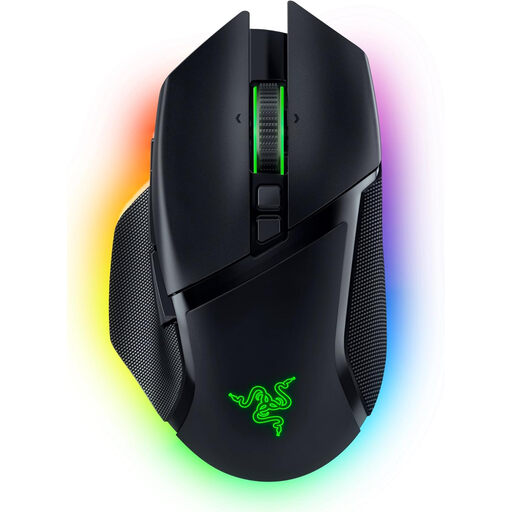 No image available
Razer Basilisk V3 Pro, wireless gaming mouse
A wireless gaming mouse for players who want to switch between scrolling modes and assign commands to extra buttons.
The product specifications list a Focus Pro 30K sensor, a HyperScroll tilt wheel with several scrolling modes and 10+1 programmable buttons. Connectivity options listed are 2.4 GHz wireless, Bluetooth and USB-C.
View at Joybuy
Frequently asked questions
How do I set up mouse buttons for strategy games?
First check the hotkey settings for the specific game, then see which buttons you can assign using the mouse software. Age of Empires IV support describes a mode that lets you remap all hotkeys and notes that assignments may conflict; Logitech lists G HUB for assigning buttons on the G502 HERO.
Should I check the scroll wheel on a quiet mouse too?
Yes, if your game uses the scroll wheel or middle button frequently. A Total War guide lists both controls for navigating the map; a claim about reduced click sounds doesn’t automatically tell you how loud every other input is.
What are my rights when buying online in Germany if the mouse doesn’t fit or is faulty?
According to Verbraucherzentrale, online contracts generally come with a 14-day right to cancel, which you must notify the retailer about. Your statutory rights if the product is faulty are separate; a guarantee is voluntary. Check the terms of your specific contract and any exceptions.
Can an old mouse or its battery go in household waste?
No. The German Federal Ministry for the Environment states that old electrical equipment must be taken to an authorised collection point; old batteries must not be disposed of with household waste either. Batteries from old devices can be returned to retailers or local authority collection points.


