Which mouse is right for you?

Considerate evening gamers

If you play in a shared bedroom, a mouse specifically described as quiet may matter more than extra gaming buttons. Logitech says the MX Master 3S has 90% quieter clicks than the MX Master 3, measured from a distance of one metre.

Settlement builders who click a lot

If you want to trigger frequent actions that can be mapped in your game using the mouse, check how many extra buttons there are and how easy they are to reach. Razer lists 10+1 programmable buttons for the Basilisk V3, while Logitech describes two scroll modes on the G502 X.

Players with long building sessions

If you spend a long time at your desk, check that the shape and grip suit your hand and the space available. The German Federal Institute for Occupational Safety and Health points out that sustained static postures while working at a computer can lead to awkward positions; that doesn’t mean any particular mouse shape will automatically be right for you.

What should you look for when buying?

Consideration What to check when buying Who it matters to
Click and scroll noise Check the information about the main buttons and scroll wheel separately. Assess manufacturer comparisons only against the specific reference model named. When I’m building in the evening, I want to disturb the other person as little as possible with repeated clicks. Around 36% of consumers prioritise quiet input.
Extra buttons and scroll controls Count the game actions you need and check whether they can be assigned using the mouse software, and whether the buttons are easy to reach. If I want to trigger frequent commands while building a settlement directly with my thumb or an extra button, practical button mapping matters most to me. Around 29% of consumers prioritise command controls.
Comfort during extended use Check the grip, hand support and room to move at your own desk; a high DPI figure says nothing about fit. During longer building sessions, I want to hold the mouse comfortably and move my arm freely at my desk. Around 21% of consumers pay particular attention to fit and space.
Wired, wireless and power Check cable routing, whether you need a receiver and your preferred connection mode; compare battery life only for the relevant mode and the specified lighting settings. If I want as few cables as possible in the way at a shared desk, the connection matters to me. Around 14% of consumers prioritise a cable-free setup.

Common misconceptions

  • Assuming optical gaming switches mean quiet clicks

    A switch technology or fast actuation does not prove that a mouse clicks quietly. Logitech compares the MX Master 3S with the MX Master 3; that doesn’t establish how it ranks against the gaming mice mentioned here.

    Look specifically for information about the noise from the main buttons and scroll wheel. When comparing products, check which reference model and test conditions are specified.

  • Choosing the mouse with the most side buttons

    Extra buttons are only useful if you can reach them comfortably and assign the actions you want in your game. Corsair’s adjustable 12-button panel is therefore most relevant if you really plan to use several thumb-button mappings.

    First, make a note of the actions you use most often, then check the number, position and mapping options for the buttons.

  • Assuming the longest advertised battery life applies in every mode

    Corsair lists different maximum battery lives for Bluetooth and 2.4 GHz; both figures apply with RGB lighting switched off.

    Only compare battery life for the connection mode and lighting settings you actually plan to use.

Key brands to consider

Logitech

The MX Master 3S is a productivity mouse specifically promoted for its quiet clicks; the wired Logitech G502 X offers two scroll modes.

  • Logitech says the MX Master 3S has 90% quieter clicks than the MX Master 3; the measurement was taken from a distance of one metre.
  • This manufacturer claim is not a noise comparison with Logitech G mice. No comparable quiet-click claim is available here for the G502 X.

Razer

The wired Basilisk V3 is aimed at buyers who want several programmable controls and two scroll modes.

  • Razer lists 10+1 programmable buttons and two scroll modes for the Basilisk V3.
  • The number of buttons and scroll features do not mean it will be quieter or better for every settlement-building game.

Corsair

The SCIMITAR ELITE WIRELESS SE may suit players who want to control lots of actions wirelessly using side buttons.

  • Corsair lists an adjustable 12-button side panel.
  • Whether that many buttons are worthwhile depends on how many mappings you actually use. Battery life varies by wireless mode, and the figures apply with RGB switched off.

SteelSeries

According to the manufacturer, the Aerox 5 Wireless has nine programmable buttons, including five side controls.

  • Its button count offers a middle ground between a few extra controls and a particularly large number of them.
  • The manufacturer’s information about the buttons and weight does not tell you how loud the clicks are or whether the mouse will fit a particular hand.

Mice at Joybuy

This selection includes mice specifically described as having quiet clicks, as well as gaming models with programmable controls for different settlement-building needs.

HOFOTEK M311 Silent Office Mouse in white and grey

HOFOTEK M311 2.4G+BT Silent Office Mouse

The product details mention quiet clicks and several DPI settings, which may help if you want to be considerate of someone else while gaming.

2.4 GHz and Bluetooth connectivity; can connect to up to three devices, according to the product description. The title specifies an AA battery.

Weight is listed as 62 ± 5 g.

View at Joybuy

Logitech MX Master 3S Bluetooth Edition in graphite

Logitech MX Master 3S Bluetooth Edition

If quiet clicks and frequent scrolling matter to you, this model combines Quiet Clicks with a MagSpeed scroll wheel, according to the product description.

Seven programmable buttons and Bluetooth connectivity. The scroll wheel offers a fast and a precise mode, according to the description.

The ergonomic shape described is designed for right-handed users; check that the button mapping and connection work with your game and PC.

View at Joybuy

Philips 3000 Series SPK7378B/00 with Silent Click

Philips 3000 Series SPK7378B/00

The product title specifies Silent Click, making this an option if you’re looking for a mouse with clicks explicitly described as quiet.

2.4 GHz connection with USB receiver; the title specifies 1600 DPI and the EU version.

View at Joybuy
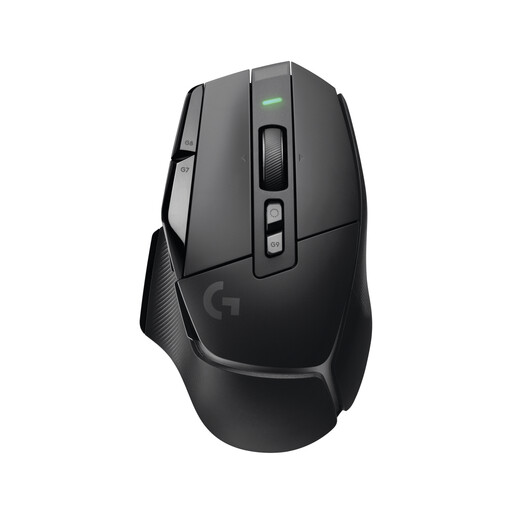
Logitech G G502 X LIGHTSPEED Wireless Gaming Mouse

Logitech G G502 X LIGHTSPEED Wireless

This gaming model may suit you better if you want several assignable actions and different scroll modes; that doesn’t tell you whether its clicks are quiet.

The product description lists 13 programmable controls, five onboard profiles and an adjustable DPI switch.

LIGHTSPEED wireless connection; according to the description, advanced customisation through Logitech G HUB requires internet access.

View at Joybuy

Logitech G G502 HERO High Performance Gaming Mouse

Logitech G G502 HERO High Performance

If you want to assign frequent game actions to buttons and switch between two scroll modes, the product description lists features to do just that.

Eleven programmable buttons, a scroll wheel with two modes, an adjustable DPI range and a customisable weight system.

Wired USB connection with a 2.1 m cable.

View at Joybuy

Frequently asked questions

Is a high DPI figure enough for precise building and selecting?

No. A high maximum DPI figure on its own doesn’t tell you whether a mouse suits your grip or preferred pointer speed. Check that you can adjust the sensitivity to suit you; Logitech says the MX Master 3S can be customised using Logi Options+.

Can I use extra buttons for building actions?

That depends on whether the game and the mouse software allow the mappings you want. Razer lists programmable buttons for the Basilisk V3, but you can’t assume they’ll work for specific building actions without knowing the game.

What should I set up after connecting the mouse?

Start by setting a pointer speed that lets you select things accurately, and only assign buttons you actually need. On the Basilisk V3, the automatic switching between scroll modes described by Razer requires activation in Razer Synapse.

What return and warranty rights apply when buying online?

For a typical online purchase from a trader in the EU, you generally have a 14-day withdrawal period from delivery, as explained by Your Europe. This is separate from the legal guarantee: Your Europe says goods bought in the EU are covered by a minimum two-year guarantee from the seller. Exceptions and the seller’s status may matter in individual cases.

Can I put an old mouse in household waste?

No. The German Environment Agency explains that waste electrical and electronic equipment must be collected separately. Find out where your local collection point is.