Considerate evening gamer
You’re building or exploring a world while someone else in the same bedroom needs peace and quiet. Quiet main buttons matter more to you than lots of extra buttons.


If you’re building or exploring while someone else in the room needs peace and quiet, first look for main buttons specifically advertised as quiet, and check the scroll wheel too. If you often want to assign your own commands, extra buttons may matter more – but make sure they’re easy to reach and that the clicking noise will suit your surroundings.
You’re building or exploring a world while someone else in the same bedroom needs peace and quiet. Quiet main buttons matter more to you than lots of extra buttons.
You play for longer sessions and want the shape, grip and easy-to-reach controls to suit your hand.
You want to assign frequently used game commands to mouse buttons rather than relying solely on the default controls.
When you’re building and exploring in a shared bedroom, quiet operation, a comfortable fit, extra commands or flexible connectivity are usually the main priorities.
Best for: When you need to be considerate of someone who’s sleeping or concentrating on work, and standard mouse buttons are enough for you.
Consider: A basic office mouse may have fewer readily available gaming buttons; claims about quiet main buttons don’t tell you anything about the scroll wheel.
Best for: When you often want to assign game commands to the mouse and can easily reach the extra buttons.
Consider: More assignable buttons don’t mean quieter clicks; check noise and ease of use separately from the gaming features.
Best for: When a cable restricts your movement or you want to switch between supported connection types.
Consider: Check that your computer supports the connection you want, and that the receiver and power options suit your setup.
| What matters | What to check before buying | Who it matters most to |
|---|---|---|
| Click noise | Look for a specific claim about quiet buttons and, if possible, try the main buttons and scroll wheel in your own surroundings. | If you play while someone is sleeping or concentrating on work, quiet operation is a priority; around 31% of consumers prioritise quiet clicks. |
| Comfort during long sessions | Check the handedness, shape and reach of the main and side buttons; try it with your usual grip if possible. | For longer building sessions, you’ll want to hold the mouse comfortably and reach the buttons you need; around 25% of consumers put a comfortable fit first. |
| Your own game commands | Count only the commands you need, check where the extra buttons are and find out whether the manufacturer’s software is required for the mappings you want. | If you want to assign frequently used inputs to the mouse, the buttons need to be both easy to reach and genuinely assignable; around 25% of consumers prioritise custom game commands. |
| Desk connectivity | Check the USB connection, whether a receiver is included, your computer’s Bluetooth support and the charging or battery setup. | If you want to avoid cables or switch between devices, the right connection is essential; around 19% of consumers put connection flexibility first. |
Extra gaming buttons and buttons specifically advertised as quiet are two different features. Claims about gaming functions alone don’t prove that a mouse clicks quietly.
If quiet operation matters, look for a specific claim about the buttons and, if possible, check the scroll wheel in your own surroundings too.
According to Logitech, the compatible Logi Bolt receiver isn’t included with the MX Anywhere 3S. If your computer uses it for the wireless connection you want, you may need to buy a receiver separately.
Before buying, compare the supported connection type, available ports and what’s included with the specific model.
Logitech G502 HERO, G502 LIGHTSPEED and G502 X LIGHTSPEED are different model names, so don’t assume they’re the same just because their names are similar.
Check the full model name, connection type and version against the specific product listing.
The range covers office mice specifically described as quiet, as well as the M50 Wireless gaming mouse.
The MX Anywhere 3S is a compact office mouse, while the G502 HERO is a wired gaming mouse with programmable buttons.
The Aerox 5 Wireless has programmable buttons, while the Aerox 3 Wireless is described as a lightweight mouse with wireless connectivity.
The Basilisk V3 Pro 35K is designed for users who want a configurable scroll wheel and plenty of controls.
This selection includes quiet office mice as an alternative for noise-conscious users, as well as gaming mice with programmable buttons or multiple connection options. Gaming features alone don’t tell you how loudly a mouse clicks.
 No image available
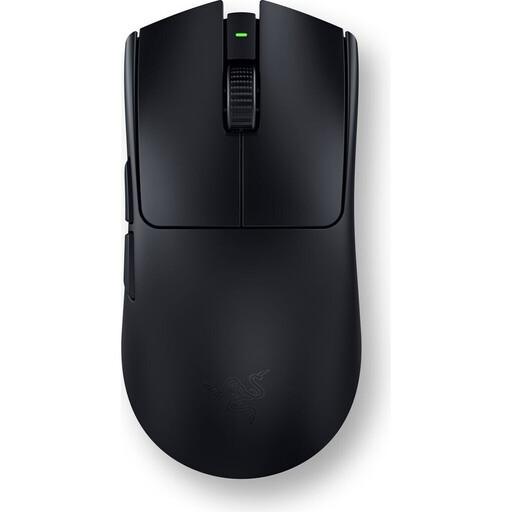
A gaming mouse for custom game commands; check that the extra buttons suit your grip.
54 g; ambidextrous design; six programmable buttons. Customisation via Razer Synapse.
 No image available
An office mouse option for when quiet matters in a shared room; if needed, check the button and scroll wheel noise in your own surroundings.
Described as having quiet clicks; 2.4 GHz wireless; 55 g.
 No image available
An office mouse option for quiet use and several wireless connection options; check that it’s compatible with your computer.
Described as having quiet clicks; 2.4 GHz wireless and Bluetooth; connects to up to three devices; 1×AA battery.
 No image available
A wireless gaming mouse for custom button mappings and flexible connectivity; check that the connection and software you want are compatible with your setup.
USB, 2.4 GHz wireless and Bluetooth; custom button mappings and macros via driver software; ergonomic shape for medium to large hands.
 No image available
A wireless gaming mouse with programmable buttons; before buying, check that the buttons are easy to reach for your hand.
Seven programmable buttons; Bluetooth, 2.4 GHz and USB-C; 67 g.
No. Minecraft describes a mouse and keyboard as its standard controls, and lets you change the mappings in the options menu. Extra buttons are worth considering if you want to assign particular commands to the mouse; test the setup with your game and operating system.
Check the connection types supported and what’s included with the specific model. The MX Anywhere 3S supports Bluetooth; according to Logitech, the compatible Logi Bolt USB receiver isn’t included. CHERRY also lists 2.4 GHz wireless and wired modes for the M50 Wireless.
For a fault, statutory consumer rights against the seller are separate from a voluntary warranty. The Verbraucherzentrale explains that you can initially ask for the issue to be put right through a repair or replacement; the rights that apply in a particular case depend on the purchase and the fault.
For electrical and wireless products within its remit, the Bundesnetzagentur checks, among other things, CE marking, manufacturer details and whether the required instructions are provided in German. According to the Umweltbundesamt, an old mouse must not go in household waste; remove any batteries that can be taken out and dispose of them separately.