Quiet late-night gamers
You play while someone else in the room needs peace and quiet, so you want to consider the main buttons and scroll wheel when choosing a mouse.


If the other person in your bedroom needs peace and quiet, an everyday mouse specifically described as quiet is a sensible place to start. If you want to trigger lots of in-game commands directly, a gaming mouse with more programmable buttons may suit your play style better. Logitech lists SilentTouch for the Signature M650, while CHERRY describes the GENTIX SILENT as having quiet-click buttons. For gaming models, consider the main buttons, side buttons and scroll wheel separately: PC Guide describes the DARK PERK ERGO’s clicks as clearly audible, even though the manufacturer says it has a quiet sound profile.
You play while someone else in the room needs peace and quiet, so you want to consider the main buttons and scroll wheel when choosing a mouse.
You want to assign repeated in-game commands to extra mouse buttons and weigh the benefits against the possibility of click noise.
Your first priority is finding a size, shape and connection that suit your hand and desk.
A good fit if: Quiet matters more to you than having lots of extra gaming buttons. Logitech lists SilentTouch for the Signature M650; CHERRY describes the GENTIX SILENT as having specially designed quiet-click buttons.
The trade-off: According to CHERRY, the GENTIX SILENT has three buttons and no thumb buttons. Also check separately how noisy the wheel and side buttons are on the specific mouse.
A good fit if: You want customisable buttons and take the manufacturer's description of the sound profile into account. be quiet! lists five assignable buttons for the DARK PERK ERGO.
The trade-off: PC Guide describes this model’s clicks as clearly audible. So don’t assume that quiet-sounding main switches mean the mouse is quiet overall, as independently confirmed.
A good fit if: You want to trigger lots of in-game commands directly from your mouse. Logitech G lists eleven programmable buttons for the G502 HERO.
The trade-off: Having lots of buttons doesn’t answer the question of noise. Check the main buttons and scroll wheel, and count how many assignments you actually need.
| Buying priority | What should you look for? | Who is it most relevant to? |
|---|---|---|
| Click noise | Check information about the main buttons, scroll wheel and side buttons separately. | If you play while someone else in the room needs peace and quiet, click noise is your top priority; around 40 % of consumers with this main concern feel the same way. |
| Fit | Check the mouse against your hand size, whether you need a left- or right-handed version, and how it feels to hold. | For long gaming sessions, you want a mouse that fits your hand rather than choosing on sound profile alone; around 30 % of consumers put fit first. |
| Assignable buttons | Count the commands you need, then check button positions and whether you need specific software. | If you want quick access to repeated in-game commands, the number of buttons you can usefully assign matters; around 20 % of consumers prioritise this. |
| Connection | Check the ports available, whether you need a receiver, and how you’ll manage the cable. | If only certain connections are practical at your desk, your mouse should be compatible; around 10 % of consumers put this connection requirement first. |
be quiet! describes the DARK PERK ERGO’s main switches as having a quiet sound profile; PC Guide, however, says the clicks are clearly audible.
Assess the main buttons, side buttons and scroll wheel separately. If possible, check the noise in conditions similar to how you’ll use the mouse in your bedroom.
A high DPI or lots of buttons doesn’t, by itself, make a mouse better for turn-based games in a shared room.
First decide how important quiet and a good fit are, then count the in-game commands you actually want to trigger with your mouse.
The Signature M650 comes in different sizes and hand variants. The CHERRY GENTIX is not the same model as the GENTIX SILENT.
Check the product page for the full model name, hand variant and the specific switch technology listed.
For a shared-bedroom comparison, consider the Signature M650 everyday mouse and separate gaming models from Logitech G.
The GENTIX SILENT is a wired everyday mouse to consider if quiet-click buttons and a straightforward design are your priorities.
The DARK PERK ERGO combines gaming features with the manufacturer’s description of its main switches’ sound profile.
The Pro-Click-V2 range is worth comparing if an ergonomic shape and programmable buttons matter to you.
These Joybuy products include everyday mice described as quiet, as well as mice with extra buttons for in-game commands.
 Image unavailable
Its name describes it as a Silent Office Mouse, making it an option if you’re looking for a mouse intended for quiet environments. Check how its sound profile suits the way you’ll use it.
The product name lists multiple DPI settings, a white-and-grey finish and a 1×AA battery.
 Image unavailable
If extra buttons and a scroll wheel are important for how you use your mouse, check this version against the specific button assignments you need and how noisy it is when scrolling.
The product name lists Quiet Clicks, a MagSpeed scroll wheel and an 8K DPI sensor. According to the product description, its ergonomic shape is designed for right-handed users.
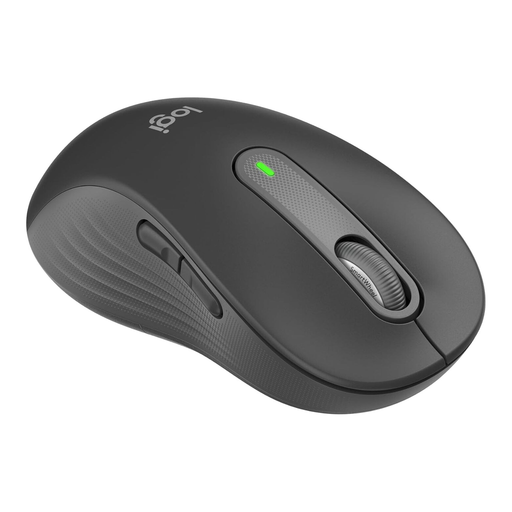 Image unavailable
According to the product name, this version is designed for larger left hands; check that the hand variant and grip suit your needs.
The product name lists Silent Clicks, customisable side buttons and Bluetooth. Check the main buttons, scroll wheel and side buttons individually against your noise requirements.
 Image unavailable
If you’re looking for a mouse for larger hands, this version, identified as the M650 L, is worth considering.
The product name lists Quiet Clicks, customisable side buttons and Bluetooth. Also consider the noise from the scroll wheel and how well the mouse fits your hand.
 Image unavailable
If you want to trigger lots of in-game commands directly from your mouse, this gaming model may be worth considering. Check that the button positions suit the assignments you need.
Logitech G lists eleven programmable buttons for the G502 HERO. This doesn’t confirm that it has quiet switches, so pay particular attention to the main buttons and scroll wheel.
Yes, if the basic features and a few extra commands are enough for you. If you need lots of commands you can assign directly, compare the buttons with what you actually need; the word “gaming” doesn’t tell you how noisy a mouse is.
Check that your computer supports the USB port or Bluetooth you need, or the receiver supplied for the mouse. For extra in-game commands, also check which software and settings the specific model requires.
For a standard online purchase by a consumer in Germany, you generally have 14 days from receiving the goods to cancel the contract. The Verbraucherzentrale gives this as the cancellation period; check the cancellation information and the terms of any additional voluntary returns for your specific purchase.
No. The Verbraucherzentrale distinguishes statutory consumer rights, which apply when goods are faulty and are claimed against the seller, from an additional voluntary manufacturer’s warranty with its own terms.