If clicks might disturb someone else in the bedroom, look first for buttons explicitly described as quiet, and check the middle click and scroll wheel too. If you often zoom and move the in-game camera, an easy-to-reach scroll wheel and well-placed extra buttons are important. However, a gaming label or a longer feature list doesn’t guarantee quiet operation.
Which mouse might suit you?
Considerate evening gamers
You share a bedroom and want to keep clicking noise down without giving up the controls you need in your game. Quiet-button claims are a useful starting point, but also check the middle click and scroll wheel in your own surroundings.
Frequent map and camera navigation
You often zoom, pan or rotate the view and want the scroll wheel, middle click and relevant shortcuts to be easy to reach. Transport Fever 2’s game documentation lists the scroll wheel and middle mouse button for camera control.
Gamers at a shared desk
You rearrange your workspace or play for long stretches. The shape of the mouse, button placement, cable routing and power supply can all matter just as much as in-game controls.
What to look for when choosing
Mouse with buttons explicitly described as quiet
A good fit if: Being considerate of someone who’s asleep or working comes first, and the mouse still offers the controls you need for your game.
The trade-off: A productivity mouse designed for quiet use isn’t necessarily built for gaming features. Claims about individual buttons also don’t tell you how noisy every other control will be in the room.
Gaming mouse with an advanced scroll wheel or extra buttons
A good fit if: You frequently control the camera or want to assign commands to easy-to-reach buttons.
The trade-off: Extra scroll modes and buttons don’t guarantee quiet clicks or an advantage in every game. Also check that the features are comfortable to reach.
| What matters |
What to check before buying |
Who’s most concerned |
| Clicking and operating noise |
Look for details about quiet buttons, and assess the main clicks, middle click and scrolling separately. |
When I play in a shared bedroom, I want to disturb others as little as possible. Around 36% of consumers put low noise levels first. |
| Camera control and shortcuts |
Check your game’s controls and how easy it is to reach the scroll wheel, middle click and programmable buttons. Transport Fever 2 uses the scroll wheel to zoom and the middle mouse button, when held down, to rotate and tilt the camera. |
When I often zoom or move the camera, I want the controls I need to be easy to reach. Around 29% of consumers prioritise in-game control. |
| Comfort during longer gaming sessions |
Consider your hand size, preferred grip, handedness and the position of the side buttons on the specific model. |
When I play for longer, I want a mouse that fits my hand, with important buttons within easy reach. Around 21% of consumers prioritise comfort and fit. |
| Connection and power supply |
Check the cable, supported wireless connections and power source for the exact model. For wireless mice, also check whether you need a receiver. |
When I often rearrange our shared workspace, I want to plan for cables and power accordingly. Around 14% of consumers put this setup first. |
Avoid common buying mistakes
-
Assuming ‘gaming’ means quiet clicks
A large number of buttons or different scroll modes won’t tell you how loud the main buttons, middle click or scroll wheel are.
If quiet operation matters, look for a specific claim about quiet buttons and check the other controls separately.
-
Focusing only on the maximum DPI
A high maximum sensor resolution won’t tell you whether the mouse fits your hand or whether the buttons you need are easy to reach.
First compare the shape, grip and button placement with your needs and the controls used in your game.
-
Assuming similarly named models are identical
The wired Basilisk V3 35K and wireless Basilisk V3 Pro 35K are different models. G502 LIGHTSPEED and G502 X LIGHTSPEED are different products too.
Before ordering, check the full model name, connection type and features of the specific version.
-
Choosing wireless without checking the power supply
Wireless on its own doesn’t tell you whether a model uses batteries or a rechargeable battery. Replacing batteries and charging involve different day-to-day routines.
Check the power source and connection options for the exact version, rather than comparing wireless technology alone.
Brands and product ranges at a glance
Logitech / Logitech G
Logitech positions the Signature M650 as a productivity mouse with SilentTouch; the G502 LIGHTSPEED is a separate wireless gaming range.
- Logitech lists SmartWheel and options for different hand sizes for the M650.
- The M650’s features don’t support a general claim about the noise levels of Logitech G mice. G502 LIGHTSPEED and G502 X LIGHTSPEED are different models.
Razer
Razer lists quiet mechanical switches for the Pro Click Mini. According to the manufacturer, the wired Basilisk V3 35K offers extensive scrolling and configuration options.
- The manufacturers’ individual product information can help you compare controls and product ranges.
- These claims aren’t independent sound measurements. The Basilisk V3 35K and Basilisk V3 Pro 35K differ in areas including their connection type.
CHERRY / CHERRY XTRFY
CHERRY describes the GENTIX SILENT as a straightforward wired mouse; the XTRFY M50 Wireless is a gaming mouse with several connection options.
- For the GENTIX SILENT, CHERRY lists special buttons without a click sound; for the M50 Wireless, it lists a tilting 4D scroll wheel.
- The GENTIX SILENT has three buttons. The M50 Wireless doesn’t come with a quiet-click guarantee.
SteelSeries
The Aerox 5 Wireless may be worth considering if easy-to-reach in-game commands are your priority.
- SteelSeries lists nine programmable buttons and a five-button side panel.
- These manufacturer claims don’t prove low click noise or particular suitability for a shared bedroom.
Joybuy product selection
This selection includes wired and wireless gaming mice with different scroll wheel and extra-button features. If low noise levels matter, check the middle click and scroll wheel separately, even on models explicitly described as quiet.
 No image available
Razer Viper V3 Pro Wireless Esports
A wireless gaming mouse for a flexible desk setup; the product name alone doesn’t tell you how loud the clicks are.
The product name lists a weight of 54 g, a Focus Pro 35K sensor and 8000 Hz.
View at Joybuy
 No image available
Razer Basilisk V3 35K Wired
A wired gaming mouse for players who want extra buttons and scroll wheel features; these features don’t guarantee quiet clicks.
The product name lists a USB cable connection, eleven programmable buttons and an adjustable scroll wheel with tilt-click.
View at Joybuy
 No image available
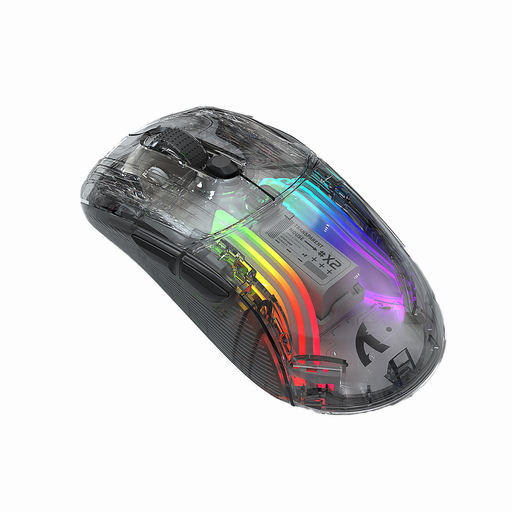
KINSI X2 Wireless Bluetooth Mouse
The product name describes this model as a gaming and office mouse, and labels it ‘Silent’. Check the clicks, middle click and scrolling in your own surroundings.
The title lists three modes and a rechargeable battery; check the exact version for its connection options.
View at Joybuy
 No image available
NAXSIR 3-in-1 Gaming Mouse
A gaming mouse for players who want a choice of connection types or programmable macro buttons.
The product name lists wired, 2.4 GHz and Bluetooth connections, plus seven programmable macro buttons.
View at Joybuy
 No image available
ATTACK SHARK X11 Wireless Gaming Mouse
A wireless gaming mouse for a flexible desk setup; programmable buttons are only useful if the assignments work in your game.
The product name lists 2.4 GHz, Bluetooth and USB-C connections, five programmable buttons and a weight of 62 g.
View at Joybuy
Frequently asked questions
Do I need a mouse with lots of buttons for Transport Fever 2?
Not necessarily. Transport Fever 2’s documentation lists right-click, middle-click and the scroll wheel for basic camera functions. Extra buttons are useful if you can assign the commands you want to them and reach them comfortably.
How do I set up the mouse for zooming and rotating?
First, check the controls in the game. Transport Fever 2’s documentation lists the scroll wheel for zooming and the middle mouse button, when held down, for rotating and tilting. You can check the button assignments in the controls menu.
What power supply should I check for a wireless mouse?
Check whether the specific model uses batteries or a rechargeable battery, and what connection options it offers. This helps you factor power and desk space into your choice when sharing a workspace.
Can I put an old mouse in the household rubbish?
No. The German Environment Agency advises that waste electrical equipment should be collected separately and taken to an appropriate collection or take-back point. Where possible, remove any batteries and return them separately.


