
Lieferung heute & morgen

Qualitätsgarantie

Willkommens-Angebote freischalten: KOSTENLOSE Lieferung | Bis zu 80 % RABATT | Kostenlose 30-Tage-JoyPlus-Testphase
App herunterladen
Compact, quiet, and energy-efficient—a Mini PC promises the full power of a desktop computer in a book-sized footprint. But the market is crowded, and not every device advertised as "powerful" delivers on its promise. Many buyers invest in a PC that soon turns out to be too slow, poorly equipped, or noisy.
As your Joybuy Product Recommendation Officer, I'm here to help you separate marketing hype from reality. In this guide, I'll show you the three most common pitfalls when buying a Mini PC and what to really look for in the technical specifications to make an informed decision.
Before you buy a Mini PC, you should be aware of these typical problems that often only become apparent after the purchase.
To avoid these pitfalls, focus on three crucial technical features.
The choice of processor determines the performance of your Mini PC.
Modern features are crucial for future-proofing.
Here are some configurations tailored to specific user groups that avoid the pitfalls mentioned.
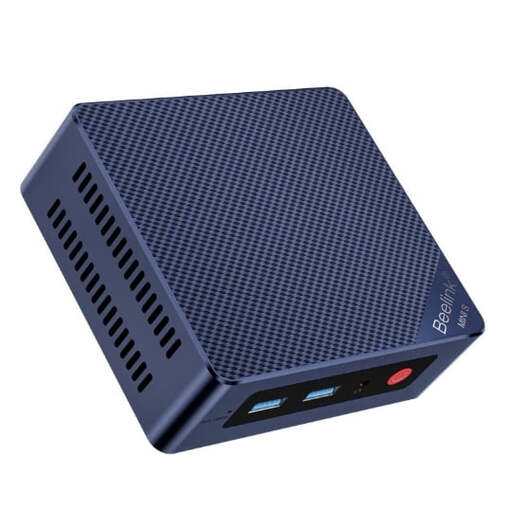
Why It's a Good Fit: Ideal for users seeking a reliable and quiet PC for everyday office tasks, web browsing, and 4K streaming. It replaces a bulky old tower PC and frees up desk space.
With 12 GB of LPDDR5 RAM, Wi-Fi 6, and four USB 3.2 Gen2 ports, this model sidesteps the common traps of inadequate connectivity and insufficient RAM that plague many entry-level devices.
Offers features like 2.5Gb Ethernet and a dual-HDMI output for two 4K monitors, which are not a given in this price range. Includes Mini PC Windows 11 Pro.
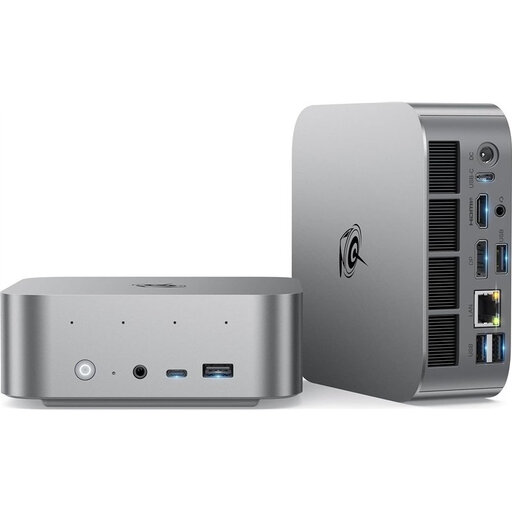
Why It's a Good Fit: For users who need a powerful yet compact PC for demanding multitasking, video editing, or as a gaming Mini PC for current titles in 1080p.
The high-performance AMD Ryzen 7 processor and powerful Radeon 780M graphics unit prevent the performance trap. The cooling system is designed for a 65W TDP, which counteracts thermal throttling and excessive noise.
Combines high computing power with future-proof connectivity like USB4 (supports 4K@240Hz) and 24 GB of fast LPDDR5X RAM. The AI-enhanced microphone is a plus for video conferences.

Why It's a Good Fit: For power users and developers who need maximum performance for AI applications, virtualization, and driving up to four monitors. A true AI PC in a mini form factor.
This model sets a new standard and avoids all pitfalls: the Ryzen AI 9 processor offers enormous performance, while USB4, Wi-Fi 6E, dual 2.5G LAN ports, and even an Oculink port for external GPUs guarantee maximum connectivity.
The combination of a 10-core processor with a powerful NPU, 24 GB of DDR5 RAM, a 1 TB PCIe 4.0 SSD, and the ability to drive four displays is exceptional in this form factor.
If you prefer to configure or upgrade your PC yourself, you can find suitable components with us that meet strict quality and compatibility standards.
The noise level heavily depends on the model and workload. Many devices designed as a Mini PC for office use are engineered to be a quiet desktop PC and are virtually silent at idle or during light tasks (often under 30 decibels). More powerful models, like a gaming Mini PC, can become audible under full load. Pay attention to the manufacturer's specifications regarding the cooling system and noise levels.
Yes, it's possible with the right models. Entry-level PCs are only suitable for very undemanding or older games. However, a gaming Mini PC equipped with a modern AMD Ryzen Mini PC processor and an integrated graphics unit like the AMD Radeon 760M or 780M can run many current games smoothly at 1080p resolution on medium settings. For high-end 4K gaming, however, they are not a replacement for a tower PC with a dedicated graphics card.
A Mini PC is significantly more energy-efficient. While a typical Mini PC consumes between 15 and 65 watts depending on the model and workload, a conventional desktop tower can easily draw 200 to 500 watts or more. This makes the Mini PC a cost-effective alternative, especially if the computer runs for many hours a day.