What to consider when choosing
The University of Leicester’s East Midlands Oral History Archive recommends using a lapel microphone rather than a table microphone for interviews, to pick up less room echo. Next, decide whether one voice is enough or whether you need the questions to be clear as a separate voice too.
Lapel microphone for a smartphone or computer
A good choice if: you want to record a quiet speaking voice from close range and your device has a suitable microphone input.
Things to consider: Clothing or cables may rustle audibly; the connection and positioning need to suit your recording device and the conversation.
Handheld recorder with built-in microphones
A good choice if: you’d rather not use a separate voice microphone and can place the recorder close to the speaker, on a stable surface in a quiet room.
Things to consider: Room echo and handling or table noise depend on where you place it; a test recording is still essential.
Two microphones on separate inputs
A good choice if: you want both questions and answers to be clear, or to edit each voice separately later.
Things to consider: You’ll need extra microphones, cables and setup; the inputs must be compatible with the microphones.
| What matters |
What to check before buying |
Who is this important to? |
| Recording a quiet voice clearly |
Secure the microphone close to the speaker and test it at the recording location. |
If I want to record a quiet speaking voice, I want to position the microphone close to the speaker and listen for clothing or cable noise in a test recording. This is the main concern for around 42% of consumers. |
| Recording questions and answers |
Check the number and type of microphone inputs, and test both voices in a sample conversation. |
If both the questions and the memories matter to me, I want to record both voices clearly and be able to edit them separately if needed. This applies to around 25% of consumers whose main concern is capturing both speakers. |
| Recording on the go, with minimal fuss |
Test the setup at the actual location and make sure the device is securely positioned or attached. |
If I record in different places, I want to check that the voice is clear without a complicated setup. Around 17% of consumers prioritise a straightforward, portable setup. |
| Saving and backing up the recording |
Check the file format, storage media, power supply and playback. |
After a long interview, I want to be able to find, play and back up the file. For around 16% of consumers, having a reliable process for managing files is the main concern. |
Lapel microphones for interviews at Joybuy
The Joybuy picks below include lapel microphones for interviews, with different connection options and transmitter configurations. Before buying, check that the microphone, receiver and recording device are compatible.
 No image available
Wireless lavalier set, 2 transmitters, 2.4 GHz, USB-C and Lightning
For interviews with two people, if your recording device supports one of the listed connection options.
Listed in the product title: two transmitters, 2.4 GHz, USB-C and Lightning.
View at Joybuy
 No image available
Moman MA6 lavalier microphone, 6 m, 3.5 mm
For one person speaking, if your recording device has a compatible 3.5 mm microphone input.
Listed in the product title: 6 m, omnidirectional microphone and 3.5 mm connection.
View at Joybuy
 No image available
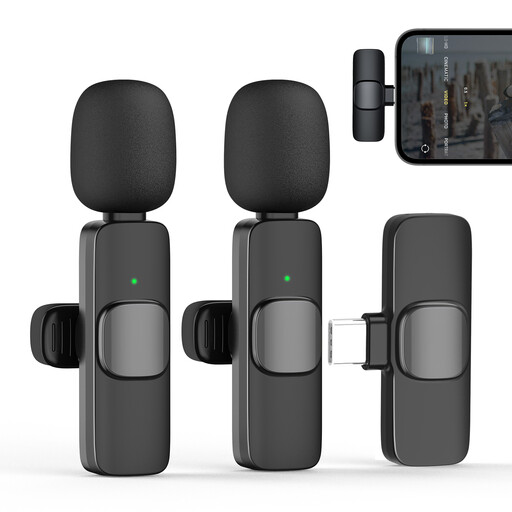
Moman CP1X(C) lavalier microphone, Type-C, 2.4 GHz (1TX&1RX)
For close-range recording, if your smartphone, tablet or laptop supports the Type-C connection listed in the product title.
Listed in the product title: 2.4 GHz, one transmitter and one receiver.
View at Joybuy
 No image available
Moman MS1X(C) lavalier microphone for USB-C Android phones (2TX&1RX)
For one or two people speaking, when recording with a compatible USB-C Android phone.
Listed in the product title: 2.4 GHz, two transmitters and one receiver.
View at Joybuy
 No image available
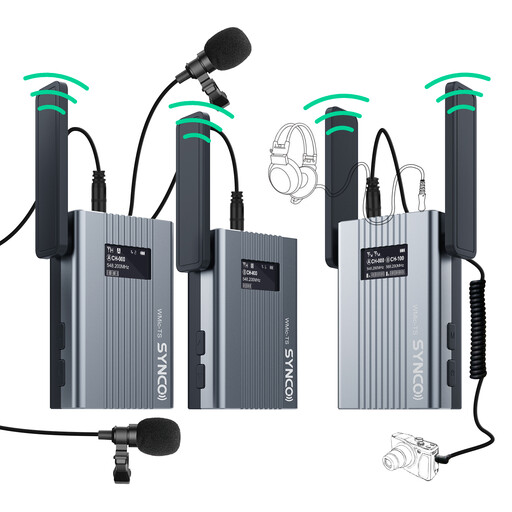
SYNCO UHF lavalier microphone system with real-time OLED monitor
For interviews where you want to monitor the sound while recording using the monitor listed in the product title.
Listed in the product title: UHF and a transmitter weight of 62 g. Check in advance that the transmitter and receiver are compatible with your recording device.
View at Joybuy
Frequently asked questions
Where should I position the microphone when recording someone who speaks quietly?
Attach a lapel microphone around the lapel area and test its position before the conversation. Listen for the voice, clothing and cable noise. If you’re using a table microphone, place it as close as possible to the person speaking.
Can I connect the Shure MVL or XS Lav USB-C to any smartphone?
No. The connection needs to be compatible with your smartphone and its recording function. The XS Lav USB-C uses USB-C; Shure specifies that the MVL needs a suitable 3.5 mm connection or compatible CTIA-compliant adapter.
What should I do before a longer interview and when backing up the file?
Make a test recording at the planned location and listen back to it. If you’re using a recorder, check the storage media and power supply, then test that you can play back and back up the finished file.
Can I record a private oral history interview in Germany without the speaker knowing?
Recording another person’s non-public speech without authorisation is a criminal offence under § 201 StGB. Before you start, check that you’re allowed to record and agree how the recording will be used; any later publication needs to be considered separately.
Does silence count as consent under data protection law if I plan to process the recording later?
No, not if consent is the legal basis you’re relying on: the Data Protection Conference does not consider silence to be consent. Whether the GDPR applies to a personal recording or a particular archive project, and which legal basis applies, depends on the specific circumstances.


