
Lieferung heute & morgen

Qualitätsgarantie

Willkommens-Angebote freischalten: KOSTENLOSE Lieferung | Bis zu 80 % RABATT | Kostenlose 30-Tage-JoyPlus-Testphase
App herunterladen
A keyboard's typing sound can be a critical factor for workplace concentration—both for you and your colleagues. In office environments, during software development, or while creating content, a loud keyboard is often a distraction. At the same time, many professionals don't want to give up the precise and satisfying feel of a mechanical keyboard. This is coupled with the desire for a clean, cable-free desk and the flexibility to switch seamlessly between multiple devices like a PC, laptop, and tablet.
This guide is here to help. We will present a selection of models and explain the key features to look for when searching for a quiet wireless mechanical keyboard, helping you make an informed decision that meets your professional needs.
Choosing the right keyboard depends on specific technical features. Here are three key aspects that can influence your decision.
The heart of any mechanical keyboard is its switches. For a quiet work environment, quiet tactile switches are an excellent choice. They provide a noticeable tactile bump when a key is actuated, but without an audible click. This gives you clear feedback on your keystrokes without the disruptive noise profile of a loud "clicky" switch. Linear switches are another quiet alternative, but they offer no tactile bump and feel consistently smooth throughout the keypress.
For users who regularly switch between a desktop PC, a MacBook, and perhaps an iPad, multi-device Bluetooth functionality is essential. Models with this capability can be paired with up to three devices simultaneously, and switching between them is often done with a single keypress. In addition to Bluetooth, many keyboards also offer a connection via a 2.4 GHz USB receiver (dongle), which ensures an exceptionally stable, low-latency connection—ideal for demanding tasks.
For users in English-speaking regions, a mechanical keyboard with a QWERTY layout is essential to ensure all characters are in their familiar positions. Pay close attention to this detail when selecting a product. Additionally, low-profile mechanical keyboards are gaining popularity. Thanks to their slimmer build and shorter key travel, they promote a more natural wrist posture and can enhance ergonomics during long workdays.
Based on the criteria above, we have compiled a selection of keyboards that are well-suited for professional use.

Why It Stands Out: The Logitech MX Mechanical is specifically designed for professional use. It combines a low-profile design with quiet, tactile mechanical switches, making it an excellent choice for the office. The German QWERTZ layout and smart backlighting, which automatically adjusts to ambient light, underscore its focus on productivity. Seamless integration into the Logitech ecosystem with the Logi Bolt USB receiver and Logi Options+ software enables an efficient workflow across multiple devices.
Pros:
Who It's For: Professionals, developers, and content creators looking for a reliable, premium office keyboard with a German layout who value an established ecosystem.
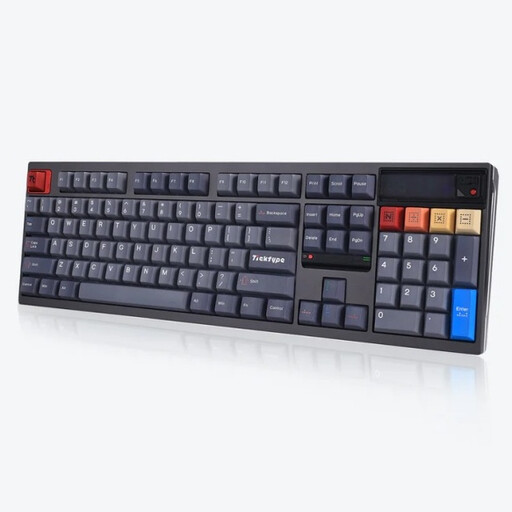
Why It Stands Out: The Ticktype DP104 is aimed at enthusiasts who value customisation and a robust construction. The case is crafted entirely from aluminium, and its hot-swappable capability allows you to change switches without soldering. A special feature is its leaf spring gasket mount, which provides a dampened and flexible typing feel. The customisable pixel display offers room for personalisation, while the 8000 mAh battery promises exceptionally long usage. Please note that this model comes with a US (ANSI) layout.
Pros:
Who It's For:Keyboard enthusiasts and developers who want maximum control over their typing experience, are comfortable with a US layout, and are looking for an extremely robust and customisable keyboard.

Why It Stands Out: The AJAZZ AK980 V2 is a feature-rich model in a compact 98% form factor, which integrates a number pad into a space-saving design. Standout features include the integrated TFT colour display for showing system information or GIFs and the convenient rotary knob for controlling volume or lighting. The gasket-mount structure, with five layers of sound-dampening foam, effectively minimises noise. With a 10,000 mAh battery, it sets a new standard for battery life. This model is shipped with a QWERTY layout.
Pros:
Who It's For: Power users and programmers who appreciate a feature-packed keyboard with extras like a display and rotary knob, and who prefer a compact layout that includes a number pad.
Choosing a keyboard is a highly personal decision that depends on your typing habits and individual preferences. If the models presented here don't perfectly match your requirements, there are many more options to explore.
Discover more models in our comprehensive Keyboards category.
The sound level is primarily determined by the type of mechanical switches. Quiet tactile or linear switches, unlike "clicky" switches, do not produce a loud clicking sound. Additionally, internal dampening materials like foam or silicone, as well as the case construction (e.g., "gasket mount"), help to reduce vibrations and sound.
Yes, many modern wireless keyboards are designed with multi-device Bluetooth functionality. They can be paired with multiple operating systems like Windows, macOS, Linux, iPadOS, and Android. Switching between devices is typically done via a dedicated key or a key combination.
Yes, a low-profile mechanical keyboard can offer ergonomic benefits. Its reduced height means the wrist is bent at a less severe angle, promoting a more neutral posture and potentially reducing strain during long workdays. The shorter key travel can also enable faster keystrokes, which can be an advantage for heavy typists.