
Lieferung heute & morgen

Qualitätsgarantie

Willkommens-Angebote freischalten: KOSTENLOSE Lieferung | Bis zu 80 % RABATT | Kostenlose 30-Tage-JoyPlus-Testphase
App herunterladen
A quiet wireless mouse can be a sensible choice in an open-plan office, library or when working late in the evening. However, everyday usability depends on more than the promise of “Silent” operation. Some models only reduce the noise of the left and right mouse buttons, while the scroll wheel or middle button remain clearly audible. Others look ergonomic in product images but do not suit your hand size or preferred hand.
This buying guide from the Joybuy Product Recommendation Officer explains the most important criteria and shows which models suit different usage scenarios.
With a silent mouse, it should be clear which controls are designed to operate quietly. Descriptions often refer only to the main buttons. The scroll wheel, side buttons or clicking the scroll wheel may still be audible. If you are looking for a mouse for the office or home office, check the product description for specific information about the buttons and scroll wheel.
A wireless mouse can connect via a 2.4 GHz USB receiver, Bluetooth or both. A USB receiver requires a free USB-A port. Bluetooth is often more convenient with a tablet or a modern MacBook. If you use several devices, a multi-device mouse with a switching button can be a practical choice.
Also check whether the receiver can be stored inside the mouse. This reduces the risk of losing the small adapter while out and about.
DPI indicates how far the mouse pointer moves across the screen in response to a particular movement. A high resolution can be useful with large monitors or precision workflows. For word processing and web browsing, however, lower settings are often sufficient. What matters is whether the DPI can be adjusted and whether the sensor works reliably on the surface you use.
Before buying, check which devices you want to connect:
A mouse for Windows and Mac should also support the operating system you use. If additional software is required, for example for assigning buttons or adjusting DPI, check whether it is also available for macOS.
An ergonomic mouse will not necessarily suit every user equally well. For larger hands, a short, flat body can result in the hand being bent at an awkward angle. Left-handed users need either a symmetrical shape or a model specifically designed for the left hand.
Important comparison factors include length, width, height and weight. A compact wireless computer mouse is easy to carry, while a larger body can provide more support during long working sessions. With a trackball, the mouse itself barely moves; the cursor is controlled with the thumb. This can be useful on small desks, although it takes a little time to get used to.
A mouse with long battery life may run on AA or AAA batteries or have an integrated rechargeable battery. Replaceable batteries can be changed quickly while you are out and about. A USB-C rechargeable battery avoids the need to buy batteries regularly, but it does need to be charged.
Pay attention to:
Actual battery life depends, among other things, on usage, wireless standard and power-saving mode. Manufacturer figures should therefore be treated as a guide.
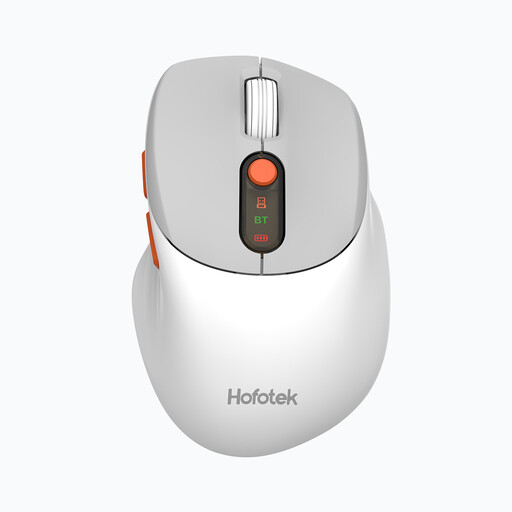
Why this product suits this profile: The M311 combines a 2.4 GHz receiver with Bluetooth 5.1 and, according to the product details, can switch between up to three devices. This makes it suitable for straightforward office and home-office setups involving different devices.
The product details list several DPI settings ranging from 800 to 4000. This means users are not limited to a single pointer sensitivity. The AA battery is included.
62 g weight, optical sensor, compatibility with Windows, macOS and Android, plus connection to up to three devices.
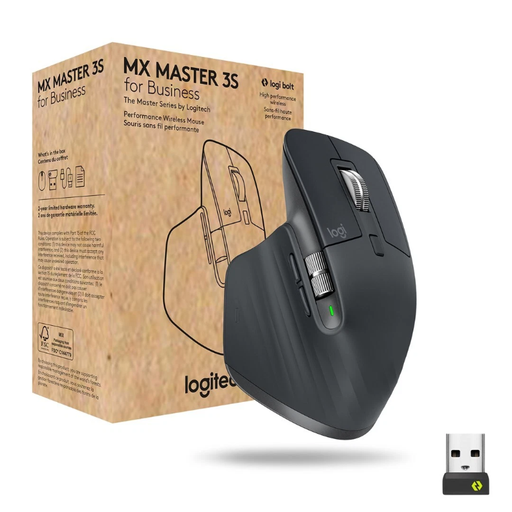
Why this product suits this profile: This model is designed for right-handed users who work with lots of documents and need additional buttons. It supports Bluetooth and Logi Bolt, and can switch between up to three devices.
The specifications list seven programmable buttons, a sensor offering up to 8000 DPI and a USB-C rechargeable battery. This makes it easy to compare the features with your working style before buying.
MagSpeed scroll wheel, up to 8000 DPI, multi-device support and stated battery life of up to 70 days.
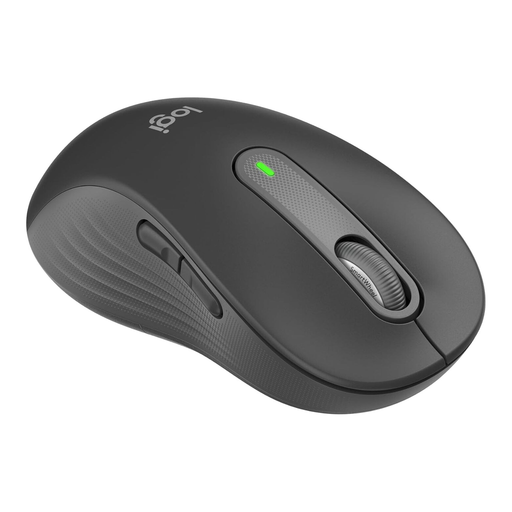
Why this product suits this profile: This model is specifically designed for large left hands. Its contoured shape, side grips and customisable side buttons are suited to users with specific ergonomic requirements.
The left-handed design avoids a common mistake: choosing a right-handed shape that does not provide suitable support for a large left hand. Bluetooth and Logi Bolt offer two connection options.
Large left-handed shape, SmartWheel, three customisable buttons and stated battery life of up to 24 months with one AA battery.
For a compact Bluetooth mouse with a symmetrical shape, consider the Logitech M240 Silent Bluetooth Mouse. If you prefer a wired solution without having to change batteries, you could look at the RAPOO N1600 Wired Mouse or the Logitech B110 Wired USB Mouse. A wired mouse can be a sensible choice for a fixed workstation when battery levels and wireless connectivity are not a concern.
We have put together a complete, regularly updated list of products that fully meet these strict selection criteria and the safety regulations applicable in the EU.
It depends on the device. Bluetooth saves a USB-A port and is suitable for many laptops, tablets and Macs. A 2.4 GHz receiver is useful when you want a quick plug-and-play connection to a PC. Models with both options offer greater flexibility.
Battery life depends on the battery or rechargeable cell, usage and sleep mode. Models with an AA battery often specify battery life in months, while rechargeable models usually state how long they can be used per charge. Also check whether the battery is included and whether a charging cable is supplied.
No. “Quiet” usually refers to reduced clicking noise from individual buttons. The scroll wheel, middle button and movement across the desk surface may still be audible. In particularly noise-sensitive environments, check the specifications for all controls.