
Lieferung heute & morgen

Qualitätsgarantie

Willkommens-Angebote freischalten: KOSTENLOSE Lieferung | Bis zu 80 % RABATT | Kostenlose 30-Tage-JoyPlus-Testphase
App herunterladen
A QWERTZ keyboard is more than just a letter layout for German-speaking users. The position of “Z”, “Y”, umlauts and special characters can make typing feel intuitive — or leave you constantly correcting mistakes. Keyboards also vary considerably in their design, connectivity, switch technology and compatibility.
If you focus only on RGB lighting, especially low prices or product images, you could miss important details. Three common reasons for buying a keyboard often lead to the wrong choice:
The German QWERTZ layout should be clearly stated in the technical specifications. It’s also worth checking the number and arrangement of the keys:
Compatibility is even more important for iPad models. An iPad keyboard case must fit your exact model or model number. Screen size alone isn’t always enough to check.
A wired USB-C keyboard doesn’t need batteries and provides a reliable connection. It’s well suited to a fixed workstation or gaming. A detachable cable makes it easier to carry and replace.
A Bluetooth keyboard works without a receiver, making it a good fit for tablets, smartphones and laptops. A multi-device keyboard can let you switch between several devices. Check the maximum number of devices it can remember and how you switch between them.
Models with a 2.4 GHz receiver are handy for desktop PCs that don’t have Bluetooth. For wireless products, battery life, charging method and whether the battery can be replaced are all worth checking. A claim such as “up to 18 months” is based on the stated usage and doesn’t guarantee that kind of battery life in everyday use.
A mechanical keyboard uses individual switches beneath the keys. Linear switches feel smooth throughout the keystroke, while tactile or clicky switches can provide a more noticeable bump or an audible signal. Noise levels also depend on the keycaps, case and sound dampening.
Membrane and scissor-switch keyboards are often thinner and quieter. An ergonomic keyboard can support a different hand position through its tilt, wave shape or wrist rest. However, that doesn’t mean it will suit every hand position equally well.
Extra features should suit your everyday needs:
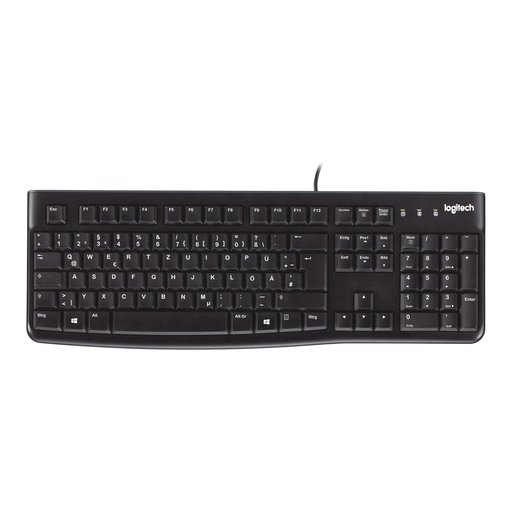
Why this product suits this profile: This wired, full-size keyboard is ideal if you want a straightforward solution for a PC or laptop with a number pad.
The German layout, USB plug-and-play connection and full key arrangement help prevent mis-purchases caused by unclear compatibility details.
104 keys, USB connection, splash-resistant design according to the product details, and adjustable feet.
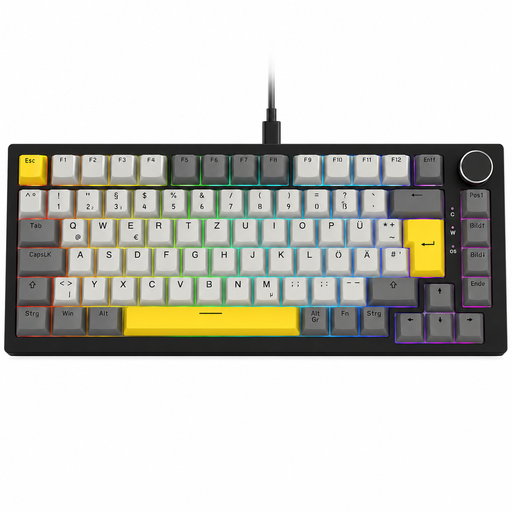
Why this product suits this profile: This model combines a German 82-key layout with mechanical switches, USB-C and customisable components.
The QWERTZ layout is clearly stated. Function keys, arrow keys and a volume control are retained despite the compact design.
Hot-swap sockets for compatible 3-pin switches, gasket construction, RGB lighting and detachable USB-C cable according to the product description.
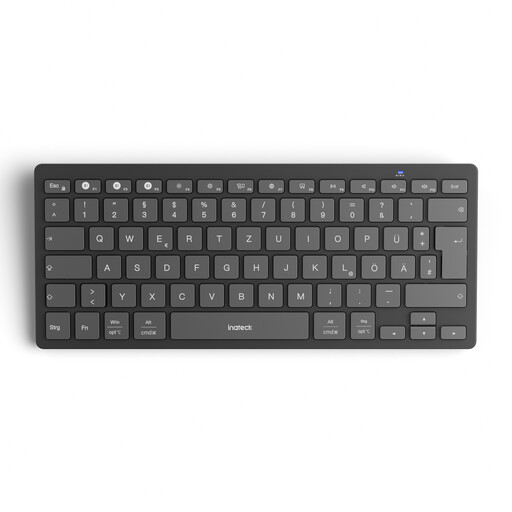
Why this product suits this profile: If you switch between a Windows PC, tablet and smartphone, this lightweight multi-device keyboard lets you save three connections.
Bluetooth 5.3, dedicated switching keys and compatibility details for Windows, iPadOS, Android and iOS make its intended use clear.
Weighs 217 g, 15 × 15 mm keycaps, connects to three devices and runs on two AAA batteries, according to the manufacturer.
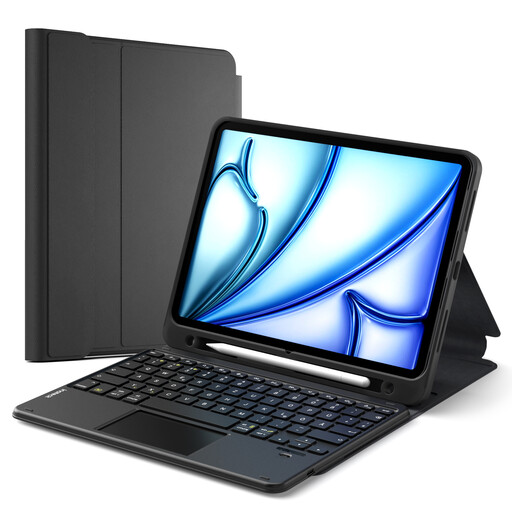
Why this product suits this profile: For mobile work and study, this accessory combines a keyboard, trackpad, stylus holder and protective case.
Before buying, check the list of compatible iPad series against the model number on the back of your device.
Detachable magnetic keyboard, three viewing angles and integrated trackpad according to the product details.
We’ve put together a complete, regularly updated list of products that meet these strict selection criteria and fully comply with the safety regulations in force in the EU.
In Windows, you can choose the keyboard layout in the language and region settings. On iPadOS, go to “General”, “Keyboard” and “Hardware Keyboard”. For the layout to work correctly, both your device and keyboard must be set to German or QWERTZ.
A keyboard’s lifespan depends on its switch type, how often it’s used, how it’s cleaned and the amount of mechanical wear. Some manufacturers state the expected lifespan of a model’s keys, but this figure doesn’t guarantee a particular lifespan in every use case. Dust, liquids and damaged cables can shorten its useful life.
Power consumption is usually low, but it depends on the connection, lighting and how long you use the keyboard. Models with RGB lighting generally need more power than an unlit keyboard. If you want to avoid frequent charging, you could choose a USB-C keyboard or a model with replaceable batteries.