
Lieferung heute & morgen

Qualitätsgarantie

Willkommens-Angebote freischalten: KOSTENLOSE Lieferung | Bis zu 80 % RABATT | Kostenlose 30-Tage-JoyPlus-Testphase
App herunterladen
As a Joybuy Product Recommendation Officer, I see users every day struggling to navigate a jungle of marketing promises. The confusion is especially high when it comes to mechanical gaming keyboards. Many people pay for superfluous features or aggressive designs, while the truly important quality characteristics fall by the wayside. This guide is designed to help you separate the wheat from the chaff and find a keyboard that is precisely tailored to your requirements.
Before we dive into the crucial features, let's shed some light on the typical traps that often lead to disappointment.
To make an informed decision, focus on the following three objective criteria.
The size of your keyboard directly impacts ergonomics and the available space on your desk.
The mechanical switches are the heart of any keyboard and define the typing experience.
Hot-swap capability is crucial for longevity and customisation. It allows you to replace individual switches without soldering. Pay attention to whether the circuit board (PCB) supports both 3-pin and 5-pin switches to ensure maximum compatibility.
Some features offer real value, while others are more cosmetic.
Here are some recommendations tailored to specific user profiles that avoid the pitfalls mentioned above.
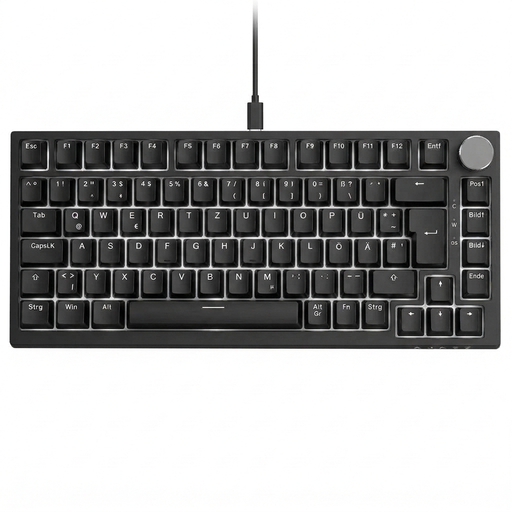
Why it's a great fit: This model combines a space-saving 75% layout with all the keys essential for gamers. The volume knob and hot-swap capability offer practical advantages and future-proofing for demanding players who value efficiency and customisation.
The keyboard provides clear specifications, such as linear red switches and a gasket-mount structure, instead of hiding behind vague "gaming" terms. The hot-swap sockets are designed for common 3-pin switches.
Combination of a German QWERTZ layout, 75% form factor, and a volume knob. The gasket-mount construction provides a softer, more cushioned typing experience.

Why it's a great fit: Designed for professional users who want a precise mechanical feel without the noise of a typical gaming keyboard. The low-profile design and quiet tactile switches are ideal for long workdays, yet still provide the precision required for gaming.
This model bypasses the "gaming" tax by focusing on productivity. The switches are clearly specified as "Tactile Quiet," so the buyer knows exactly what typing experience to expect.
Professional, low-profile design with a high-quality aluminium frame. Smart backlighting and multi-device connectivity (up to 3 devices) for seamless workflows.
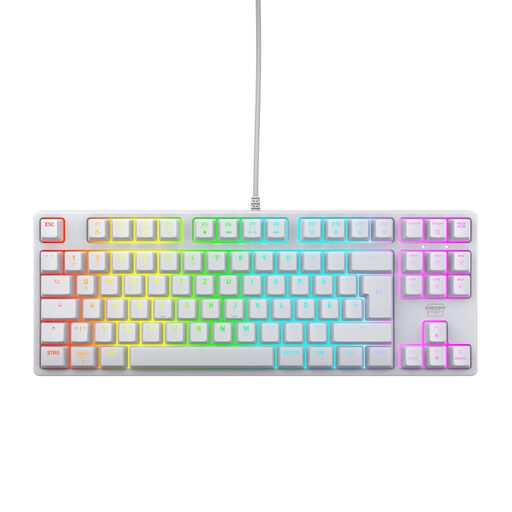
Why it's a great fit: For users seeking a solid, high-quality foundation for future modifications. The keyboard is equipped with the proven CHERRY MX2A RED switches and features a robust construction with a metal plate, providing an excellent base for swapping keycaps or other customisations.
This model relies on proven brand quality instead of gimmicks. While it is not hot-swappable, its CHERRY MX2A switches provide an extremely durable foundation (rated for over 100 million actuations), minimising the need for replacement.
High-quality CHERRY MX2A RED switches for a smooth, linear typing feel. The robust build with a metal plate ensures stability and longevity. The TKL layout offers a great compromise between space and function.
We have compiled a complete, up-to-date list of products that fully meet these strict selection criteria and German regulations.
1. What is the difference between a 75% and a TKL keyboard? A TKL (Tenkeyless) keyboard is essentially a full-size keyboard without the number pad. The key layout otherwise remains largely standard. A 75% keyboard is even more compact, as the keys (including arrow and navigation keys like Home, End) are moved closer together to save space while retaining functionality.
2. Are hot-swap keyboards suitable for beginners? Yes, absolutely. They are an ideal entry point into the world of mechanical keyboards because they allow you to try out different switch types and customise the typing feel without needing technical skills like soldering. This makes maintenance and personalisation very accessible.
3. How long does a mechanical keyboard last? The lifespan is primarily determined by the switches. Most mechanical switches are rated for 50 to 100 million keystrokes, which translates to many years of normal use. The overall build quality, the case material, and the quality of the keycaps also play a role in longevity. A well-built mechanical keyboard can be an investment for a decade or more.