
Lieferung heute & morgen

Qualitätsgarantie

Willkommens-Angebote freischalten: KOSTENLOSE Lieferung | Bis zu 80 % RABATT | Kostenlose 30-Tage-JoyPlus-Testphase
App herunterladen
A mechanical keyboard can feel very different from a traditional membrane or chiclet keyboard when typing, programming or gaming. However, not every model automatically offers greater comfort or better control. Features that have little relevance in everyday use are often heavily promoted, while important details such as the layout and compatibility receive little attention.
Before buying, you should therefore avoid these three common pitfalls:
For users in Germany, a mechanical QWERTZ keyboard with an ISO-DE layout is usually the simplest choice. It offers German key labelling and the familiar arrangement of umlauts and special characters. With a US layout, you can select German in your operating system settings, but the symbols printed on the keys will not fully match the characters entered.
The form factor determines how many keys the keyboard has and how much space it requires:
A 75% keyboard is a practical compromise for many workspaces. However, if you regularly enter numbers, you should take the missing number pad into account.
Mechanical switches mainly differ in actuation point, resistance and feedback. They are generally divided into three groups:
Noise is not determined by the switch alone. Keycaps, the case, stabilisers and the fitted sound-dampening materials also affect typing noise. Claims such as ‘quiet’ should therefore not be assessed in isolation.
A wireless mechanical keyboard can connect via Bluetooth, 2.4 GHz wireless or USB-C. A tri-mode keyboard typically combines all three options:
For wireless models, check the battery capacity, charging port and whether the receiver is included. With a USB-C keyboard, you should also check whether the cable is detachable. This makes transport and replacement easier.
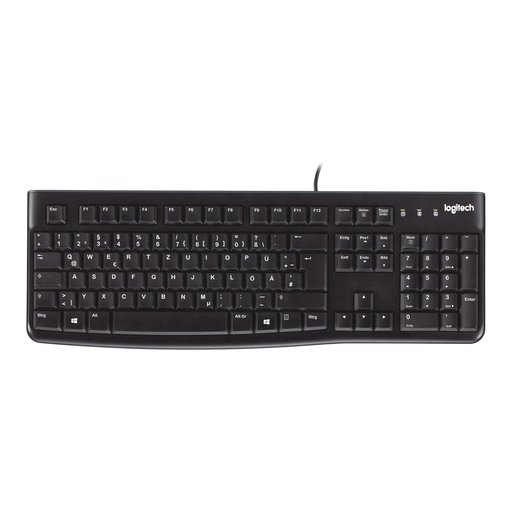
Why this product suits this profile: If you are looking for a reliable keyboard for the office, school or home working, this model offers a German QWERTZ layout, 104 keys and a direct USB connection.
The clearly specified German layout prevents the common confusion with a US keyboard. Wired use eliminates the need for batteries and wireless pairing.
Full-size format, USB plug-and-play, splash-resistant construction according to the product details, and height-adjustable feet.
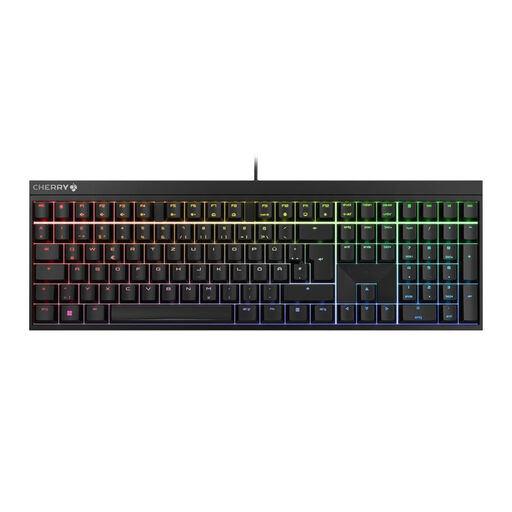
Why this product suits this profile: This full-size gaming keyboard combines a German ISO-QWERTZ layout with CHERRY-MX2A-Red switches, a USB connection and customisable RGB lighting.
The German layout is explicitly specified. The wired connection reduces potential pairing and battery issues during longer gaming or work sessions.
Full N-Key Rollover, anti-ghosting, Windows-key lock and, according to the product details, over 100 million keystrokes.
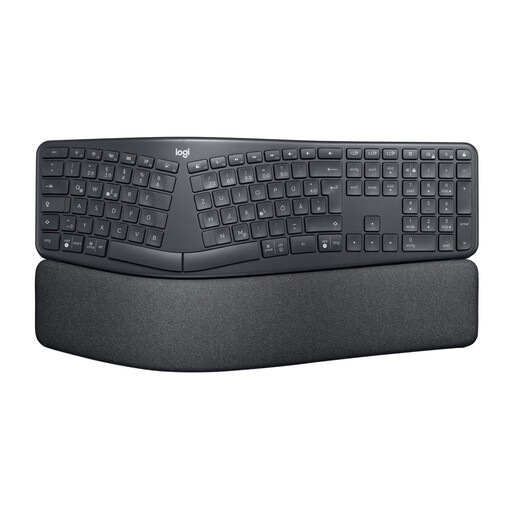
Why this product suits this profile: Frequent typists and office users looking for an ergonomic keyboard with a split key layout and wrist rest will find a different approach here from that of compact gaming models.
The design is clearly geared towards extended typing sessions rather than being defined purely by decorative lighting. Bluetooth and the USB receiver provide two connection options.
Split, curved layout, padded wrist rest, three tilt settings and QWERTZ layout according to the product details.

Why this product suits this profile: The 82-key layout, USB-C, RGB lighting, volume control and full-key hot-swap functionality appeal to users who want to customise their compact keyboard.
The description explicitly specifies German QWERTZ, USB-C and compatible 3-pin switches. This means you can check the key features before buying.
75% form factor with arrow and function keys, hot-swap functionality, detachable USB-C cable and rotary volume control.
We have put together a complete, regularly updated list of products that fully meet these strict selection criteria and the safety regulations applicable in the EU.
Yes, provided the switch type and noise level suit the environment. Linear or tactile switches can be suitable for office work. Clicky switches, on the other hand, produce a clearly audible sound. An ergonomic keyboard with membrane switches may also be a sensible choice for users who want to type as quietly as possible.
Its lifespan depends on the switches, keycaps, electronics, usage and care. Manufacturer claims about the number of keystrokes are guidelines, not a guarantee of the lifespan of the entire device. Dust, liquids and mechanical stress can reduce durability. A hot-swap keyboard makes it easier to replace individual compatible switches.
Power consumption mainly depends on the wireless standard, lighting and battery capacity. RGB lighting generally requires more energy than lighting that is switched off or set to a single colour. For a fixed workspace, a USB keyboard without a battery requires little maintenance; Bluetooth or 2.4 GHz wireless, however, offer greater flexibility when using multiple devices.