
Lieferung heute & morgen

Qualitätsgarantie

Willkommens-Angebote freischalten: KOSTENLOSE Lieferung | Bis zu 80 % RABATT | Kostenlose 30-Tage-JoyPlus-Testphase
App herunterladen
A QWERTZ mechanical keyboard combines the German keyboard layout with individual mechanical switches beneath each key. This can be useful for gaming, programming and long typing sessions. However, the term “mechanical” alone is not enough to help you choose the right model. The layout, form factor, switches, connection and software compatibility determine whether the keyboard is genuinely suited to your everyday workspace.
Some keyboards are advertised as German keyboards but merely use relabelled keycaps or a software-adjusted key layout. Therefore, check that the keyboard actually has a German ISO QWERTZ layout with a large Enter key, German legends and the usual special characters.
The operating system settings are also important. Windows, macOS, Linux, iPadOS and Android may recognise a physical keyboard differently. If pressing “Y” produces a “Z”, select German (QWERTZ) in the system settings.
An RGB keyboard can illuminate individual keys or zones. However, this says nothing about the quality of the switches, input latency or programmability. Look for the specific term “Per-Key RGB”, check the number of lighting zones and find out whether the lighting is controlled using key combinations or software.
A wireless mechanical keyboard requires a battery or batteries and needs to be charged or replaced regularly. A 2.4 GHz connection can be useful for gaming, while Bluetooth is suitable for tablets and office devices. If you want to avoid charging breaks and wireless pairing, a wired mechanical gaming keyboard is the simpler option.
The form factor affects the amount of space required and ease of use:
A number pad is often important for finance and office work. For FPS games or small desks, a compact mechanical keyboard can provide more room for mouse movement.
Mechanical switches are generally divided into three categories:
The stated lifespan, such as over 100 million keystrokes, reflects the manufacturer’s rating for the switch. It is not a guarantee of the lifespan of the entire product, as keycaps, cable, battery and electronics also play a part.
A hot-swap keyboard allows compatible switches to be replaced without soldering. Before buying, check whether 3-pin or 5-pin switches are supported and whether the existing keycaps are compatible with the layout.
The following differences apply to the available connections:
Additional features such as N-key rollover, anti-ghosting, macros, media controls and a Windows key lock are particularly relevant for gaming and complex workflows.

Why this product suits the profile: The 75% form factor with 82 keys retains the function keys, arrow keys and navigation keys, while taking up less space than a full-size keyboard.
The wired USB-C connection requires neither a battery nor wireless pairing. The German QWERTZ layout is explicitly specified.
Hot-swap support for compatible 3-pin switches, a volume control, RGB lighting and five layers for noise reduction.
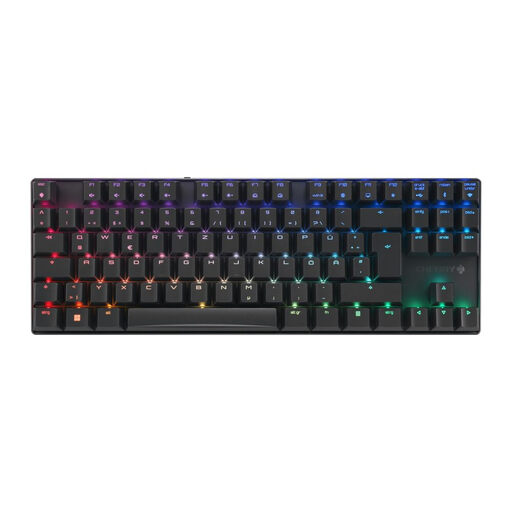
Why this product suits the profile: The TKL format, aluminium frame and three connection options are ideal for users who switch between gaming, office work and multiple devices.
The connection is not limited to Bluetooth: USB-C, 2.4 GHz and Bluetooth are all available. CHERRY MX2A Brown switches are tactile and are not specified as clicky switches.
German layout, full N-key rollover, anti-ghosting, RGB lighting and a stated gaming mode with latency below 1 ms.

Why this product suits the profile: The low-profile, tactile Quiet switches and ability to switch between up to three devices are designed for programming, office work and long typing sessions.
The product specifications name Bluetooth and Logi Bolt rather than referring to an unclear wireless solution. The low-profile design and tactile Quiet switches are clearly specified.
Smart backlighting, USB-C charging, German QWERTZ layout and compatibility with Windows, macOS, Linux, iPadOS and Android.

Why this product suits the profile: The 65% form factor reduces the footprint and leaves more room for mouse movements, while retaining the arrow keys and important functions.
The secondary functions are marked on the sides of the keys. Hot-swap sockets allow compatible switches to be replaced without soldering.
CHERRY MX2A Red, full N-key rollover, anti-ghosting, Per-Key RGB and a stated scan rate of 0.5 milliseconds.
We have put together a complete, regularly updated list of products that fully meet these strict selection criteria and the safety regulations applicable in the EU.
On a QWERTZ keyboard, the “Z” and “Y” are in different positions compared with the US QWERTY arrangement. The German layout also includes typical characters and key arrangements for the German language. For the correct characters to appear, the layout must match both on the keyboard and in the operating system.
Tactile or quiet linear switches are suitable for office use. Models with low-profile switches, a dampened construction or a Quiet configuration can help reduce noise. A full-size keyboard is practical if you frequently enter numbers, while a TKL or 75% keyboard takes up less space.
The lifespan depends on the switches, keycaps, electronics, cable and daily use. Manufacturer ratings of 50 or over 100 million keystrokes usually refer to the switches. Regular dry cleaning, a stable position and protection from liquids can help maintain the keyboard’s usability.