A 21:9 ultrawide is a good fit for learning a street racing circuit if your game supports the wider view and your viewing distance, desk space and graphics card are up to the task. A 16:9 monitor is a space-saving choice if you prefer a versatile format. Three monitors are mainly worth considering for a suitably equipped sim rig: iRacing Support provides specific setup instructions, which don’t automatically apply to other games. Then check the refresh rate and connection together, and plan your screen position and regular breaks for longer sessions.
Which monitor is right for you?
Learning circuits from the cockpit
If you want to get a better feel for corner exits and your surroundings on the track, consider the screen format, viewing distance and field-of-view settings together. iRacing Support explains how to set up a view across three displays for iRacing.
Drivers dealing with changing frame rates
If you repeatedly approach braking points, consider the refresh rate, connection used and Adaptive Sync together when choosing a monitor. Dell Germany lists different maximum refresh rates for DisplayPort and HDMI on the AW3423DWF at 3440 × 1440.
Long-distance drivers at a desk
For longer sessions, screen position, reflections and regular breaks all matter. With OLED, you should also check the care guidance and terms of any voluntary warranty for the exact model variant; the American Optometric Association recommends taking regular screen breaks.
What should you look for when buying?
Single 16:9 monitor
A good fit if: you have limited desk space or your game doesn’t display correctly in wider formats.
The trade-off: Compared with a suitable ultrawide, you get less horizontal screen space; check how the game actually looks.
Single 21:9 monitor
A good fit if: you want a wider, uninterrupted cockpit view and your game, available space and graphics card can handle it.
The trade-off: The screen width, curvature and resolution need to suit your seating position and system performance. OLED models also come with care and warranty terms to consider.
Three monitors
A good fit if: you’re setting up a permanent rig with room for side displays and want to configure a game specifically for them.
The trade-off: Setup, connections, desk space and graphics card workload are more demanding than with a single monitor. The iRacing Support guide applies to iRacing and doesn’t automatically cover other games.
| Priority |
What to check |
Who is it important to? |
| Field of view and reading the track |
Check format support, the HUD and field-of-view settings in your game, along with screen width and viewing distance. |
If I want to get a better feel for corner exits and track edges from the cockpit, I look at the format and viewing distance. Around 37% of consumers put field of view and reading the track first. |
| Motion handling |
Compare the resolution and refresh rate supported by the input you plan to use, your system’s frame rate and support for variable refresh rates. |
What matters to me is being able to follow sections of the track clearly when I approach them repeatedly. Around 27% of consumers prioritise motion handling. |
| Comfort and care during long sessions |
Check mounting options and reflections. For OLED, also read the care guidance and written warranty terms for the exact variant. |
When I’m driving at my desk for longer periods, I want to position my screen and set the room lighting appropriately, as well as plan breaks. Around 18% of consumers prioritise seating comfort and care. |
| Space and system compatibility |
Measure the available space and viewing distance, then check that the connections, mount and display configuration work with your game and system. |
I want to know in advance whether the monitor and connections will suit my driving setup and system. A further 18% of consumers put space and system compatibility first. |
Avoid common misconceptions
-
The highest refresh rate is available on every connection
For the Dell AW3423DWF at 3440 × 1440, Dell Germany lists up to 165 Hz via DisplayPort and 100 Hz via HDMI. So the input you use can affect the refresh rate available to you.
Check the resolution and refresh rate supported by the exact connection you plan to use.
-
A wider screen automatically gives you a better view of the track
The format, viewing distance and in-game settings all work together. With three monitors, you also need to configure the game.
Check how the screen looks in your racing game and measure the space available at your driving station before choosing a format.
-
Care and warranty don’t matter with OLED
Care features and voluntary warranties vary by model and are not the same as your statutory rights.
Read the care instructions and warranty terms for the exact model variant before making your decision.
Key brands at a glance
Xiaomi
The Xiaomi Curved Gaming Monitor G34WQi is a 34-inch 21:9 LCD option for a wide single-screen view.
- Xiaomi Germany lists a resolution of 3440 × 1440 and a maximum refresh rate of 180 Hz for the G34WQi.
- The G34WQi 2026 is listed as a separate variant. Check the model name carefully rather than assuming specifications apply across variants.
Dell Alienware
The AW3423DWF is a 34-inch QD-OLED option for a wide single-monitor view.
- Dell Germany lists up to 165 Hz via DisplayPort at 3440 × 1440.
- Dell lists 100 Hz via HDMI at the same resolution, so check which connection you’ll actually use.
BenQ
The MOBIUZ EX3410R combines a 34-inch ultrawide format with 1000R curvature and built-in speakers.
- BenQ lists built-in speakers and 1000R curvature for this model.
- Check that the pronounced curvature suits your viewing distance and seating position. HDRi and sound mode claims are from the manufacturer, not independently measured benefits for learning a racing circuit.
LG
The UltraGear 34GS95QE-B is a 34-inch OLED option with pronounced curvature and a resolution of 3440 × 1440.
- LG lists a maximum refresh rate of 240 Hz and Adaptive Sync support for this model variant.
- The listed 800R curvature should suit your seating position. Check the exact model variant before applying its specifications to other UltraGear models.
MSI
The MPG 341CQPX QD-OLED is a 34-inch 21:9 OLED option; the MPG 341CQR QD-OLED X36 is a separate variant.
- MSI lists 240 Hz and OLED Care 2.0 for the MPG 341CQPX, and 360 Hz for the X36.
- Check the exact model and part number. The variants with and without “DE” should not be treated as interchangeable.
Joybuy monitors for a wide single-screen view
The products below are 34-inch ultrawide monitors for a wide single-screen view. Before buying, check that the format and resolution suit your game, viewing distance, available space and graphics card.
 No image available
Gawfolk GF340C-H, 34-inch
A wide single-monitor view is worth considering if your game supports ultrawide and your system can handle the resolution.
Listed specifications include 3440 × 1440, 165 Hz, 1500R curvature, a VA panel and DisplayPort. VESA 75 × 75 mm is also specified.
View at Joybuy
 No image available
CRUA CR340QA-H, 34-inch
Consider this ultrawide single-monitor option if your game supports 21:9 and you have enough space for it.
Listed specifications include 3440 × 1440, 165 Hz, 1500R curvature and 1 ms MPRT. The VESA mount measures 75 × 75 mm.
View at Joybuy
 No image available
INNOCN E34A1R, 34-inch
If you’re looking for a wide single-screen view, compare the 21:9 format with how your game displays and how well your system performs.
Listed specifications include 3440 × 1440, 200 Hz, 1500R curvature and FreeSync. The stand is height-adjustable.
View at Joybuy
 No image available
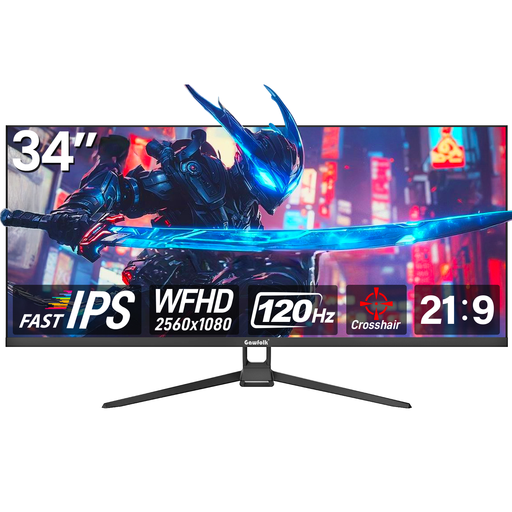
Gawfolk GF340H, 34-inch
Consider this wide single-monitor option if 21:9 suits your game and you prefer a resolution of 2560 × 1080.
Listed specifications include 2560 × 1080, 120 Hz, Fast IPS and FreeSync. HDMI, DisplayPort and VESA wall mounting are also listed.
View at Joybuy
 No image available
Xiaomi G34WQi, 34-inch
This 21:9 single-monitor option is worth considering if your game supports the wider format and your system can handle the resolution.
Xiaomi Germany lists a resolution of 3440 × 1440 and a maximum refresh rate of 180 Hz for the G34WQi. This listing also specifies 1500R curvature, a VA panel and FreeSync. According to the product description, a VESA mount may be needed for further ergonomic adjustments.
View at Joybuy
Frequently asked questions
How do I set up three monitors for iRacing?
iRacing describes a windowed mode stretched across three displays, as well as an alternative mode using a single virtual display. The field-of-view calculation takes factors such as eye distance and the distance to the centre screen into account. The guide is specifically for iRacing.
Is a low blue light mode enough for a long driving session?
A blue light mode isn’t a reason to skip regular breaks or a suitable screen setup. The American Optometric Association recommends taking regular breaks to look away when using a screen for long periods. Seek professional advice if you experience discomfort.
How can I compare potential differences in electricity costs?
Compare the EU energy label and product data sheet for similar displays. According to the European Commission, computer monitors are among the electronic displays covered; the label includes information on efficiency and HDR operation. Your usage and electricity tariff would also affect the amount you pay.
What rights apply when buying a monitor online in Germany?
According to the Verbraucherzentrale, online contracts generally come with a 14-day right to cancel, starting from the day you receive the goods. The seller is generally responsible for faults under statutory consumer rights; a voluntary manufacturer’s warranty has its own terms.


