Practising corner exits
You want to apply the throttle consistently and control your input in-game while wearing headphones. MOZA Racing describes adjustable throttle output curves, while iRacing offers a pedal display and calibration.


For practising virtual corner exits, look for pedals that let you control your throttle input in-game and stay put when you press them. A load-cell brake is an optional extra for practising braking, but it isn’t essential for throttle training. Before buying, check how the pedals connect to your PC or console. And if you practise with headphones, don’t rely on unsubstantiated claims about quiet pedals.
You want to apply the throttle consistently and control your input in-game while wearing headphones. MOZA Racing describes adjustable throttle output curves, while iRacing offers a pedal display and calibration.
At a desk, check whether your pedals and seat stay in place when you use them. Logitech G lists rubber feet and carpet grips for the RS Pedals SE, but you’ll still need to check that your whole seating setup is stable.
If you want to add or upgrade your pedals, check how they connect to your platform and game. Thrustmaster specifies that the T-LCM Pedals connect to a PC via USB, while console use requires a compatible wheel base.
| Priority | What to check before buying | Who it matters most to |
|---|---|---|
| Modulating the throttle out of corners | Check the sensor, pedal position and, where available, the throttle axis settings. MOZA Racing describes configurable throttle output curves in Pit House. | If I want to practise corner exits repeatedly, I need to be able to modulate the throttle smoothly and control it in-game. Around 28 % of consumers put throttle modulation first. |
| Keeping the pedals and seat in place | Consider the floor surface, chair movement and how the pedals are secured. Check whether the entire setup stays stable when you use the pedals. | At my desk, I want my pedals and seat to stay in the same place every time I use them. Around 22 % of consumers prioritise stability. |
| Connection to your platform and game | Check the pedal model, PC or console, and wheel base. Thrustmaster specifies that the T-LCM Pedals connect to consoles through a compatible base. | With an existing wheel base, I want to know before buying whether the pedals, platform and game will work together. Around 22 % of consumers prioritise compatibility. |
| Braking and future upgrades | Check the number of pedals and the brake sensor. Logitech G lists a separate load-cell brake module for the RS Pedals SE; the T-LCM Pedals are an adjustable three-pedal set with a load-cell brake. | If I also want to practise braking or use a clutch, I need the right sensors and number of pedals. Around 17 % of consumers prioritise braking and upgrade options. |
| Checking inputs while wearing headphones | Check whether your game can display and calibrate pedal axes. iRacing documents these features, but that doesn’t tell you how noisy the pedals are. | When practising with headphones, I want to check that the game registers my inputs without assuming anything about pedal noise based on my headphones. Around 11 % of consumers say controllable inputs are their main priority. |
On the sets described here, the load cell is for the brake. For corner exits, the priority is being able to control your throttle input.
Start by checking the accelerator pedal, connection and stability. Add a pressure-based brake only if you also want to practise braking.
Securing the pedals and seat firmly takes extra care when setting up.
For the T-LCM Pedals, Thrustmaster specifies USB for PC and connection to consoles through a compatible wheel base. The manufacturer also notes a limitation when the pedals are connected separately via USB for certain F1 games on PC.
Before buying, check the complete connection chain: pedal model, platform, exact wheel base and game.
Logitech G describes the RS Pedals SE as having a Hall-effect brake; the differently named RS Pedals are available with a load-cell brake.
Check the full model name and brake sensor for the specific version.
A separate upgrade module is available to add a load-cell brake to the RS Pedals SE later.
The SR-P Pedals are worth considering if you’re looking for a PC pedal set with an adjustable throttle output curve and a load-cell brake.
The RS Pedals SE are a two-pedal set with a Hall-effect brake; the separately named RS Pedals are a version with a load-cell brake.
The T-LCM Pedals are worth considering if you’re looking for three adjustable pedals and a load-cell brake.
The Sprint is suited to drivers with a fixed PC rig who want to adjust their pedals mechanically and through software.
This selection includes a MOZA Racing pedal set with extra braking and adjustment options, as well as a Logitech G923 SE racing wheel and pedal bundle. The pedals in the bundle connect to the wheel.
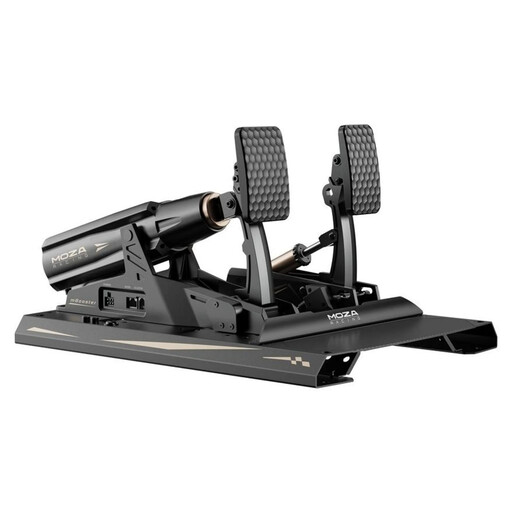 No image available
If you want to practise braking as well as throttle control, the product description lists three pedals and a load-cell brake.
According to the description, the accelerator pedal has two spring options. The pedals need to be secured firmly to a rig, and you should use the supplied 48-V power supply.
 No image available
If you’re looking for a wheel and pedal set, this is listed as a bundle, with the pedals connected to the wheel.
The product description lists an accelerator, brake and clutch. The product title mentions PlayStation, Xbox, PC and Mac; check the specific platform version before buying.
No, it isn’t essential for throttle training. On the sets described here, the load cell is for the brake. Start by checking the accelerator pedal, stability and throttle axis in your game. If you also want to practise braking, a compatible load-cell brake may be worth considering.
Check the pedal axes in your game and calibrate them after connecting the pedals. iRacing recommends calibrating after connecting new controllers and provides a pedal display; these instructions don’t necessarily apply to other games.
Thrustmaster specifies an RJ12 connection to a compatible Thrustmaster wheel base for consoles. USB is listed as the PC connection. Also check that your specific wheel base and game are supported.