When choosing pedals for virtual oval practice, first make sure they’re compatible with your platform and existing wheelbase. Also check that the pedals and seat will stay firmly in place when braking. A position-sensing set may be enough to get started; a load-cell brake is worth considering if you want to practise repeated braking inputs and can secure the set properly. Headphones don’t call for any specific pedal features; iRacing handles audio output and controller settings separately.
Which pedals are right for you?
Practising corner exits
If you want to control the throttle carefully as you exit a corner, check that the position and reach of the accelerator suit your seat and setup. The manufacturers’ specifications for the Fanatec CSL Pedals and Logitech G RS Pedals SE list Hall-effect sensors for the accelerator; this doesn’t establish any proven lap-time advantage.
Practising with a fixed setup
If you’re practising repeated braking inputs and can secure both the pedals and seat firmly, braking mechanism, adjustable resistance and calibration are important things to consider. Thrustmaster says the T-LCM has interchangeable springs and adjustable pedals; in iRacing, new controllers need to be calibrated.
Driving without a fixed rig
If you practise at a desk or with a temporary setup, pay particular attention to whether the pedals and seat will stay in place under the braking force you intend to use. Logitech lists rubber feet and carpet grips for the RS Pedals SE; the stability of the whole setup also depends on your floor and seat.
What should you look for when buying?
First check the connection and stability; then decide whether a position-sensing brake or a load-cell brake better suits your practice goals.
| What matters |
What to check |
Who it matters most to |
| Throttle control |
Check the accelerator sensor and position, as well as exactly what’s included in the box. |
If I want to ease on the throttle in a controlled way as I exit a corner, I’ll check the pedal position and reach. Around 33% of consumers prioritise throttle control. |
| Brake control |
Distinguish a load cell from a position-sensing brake; check the adjustment options and calibration in the game you use. |
If I want to practise repeated braking inputs, the brake feel and game settings need to suit my setup. Around 25% of consumers prioritise brake control. |
| Stability |
Check the floor and mounting, and make sure the seat stays put when you brake. |
If you practise without a fixed rig, you won’t want the pedals or seat to slide when you press down. Around 25% of consumers prioritise a stable setup. |
| Connection and compatibility |
Check the exact pedal variant, wheelbase, platform, connection type and included cables. |
If I want to keep using my existing wheelbase or a particular platform, I need to make sure there’s a compatible way to connect the pedals. Around 17% of consumers prioritise device compatibility. |
Common buying mistakes
-
Confusing a basic set with a load-cell brake
The Fanatec CSL Pedals and Logitech G RS Pedals SE are basic sets with position-sensing brakes. A load-cell upgrade for these variants is listed separately.
Compare the full model name and the brake technology explicitly included, rather than relying on the product range name alone.
A separate brake module or upgrade kit may be needed later.
-
Choosing a powerful brake without a stable overall setup
Manufacturers list different mounting and adjustment options. Whether the pedals and seat stay stable at a braking force that suits you depends on your particular setup.
Consider braking force, mounting and seat position together, and check your setup before settling on a particular brake feel.
Suitable support or a stable pedal plate may take up extra space and require additional assembly.
-
Assuming PC USB means a direct console connection
The documented connection options vary depending on the pedal set, platform and wheelbase you already have. For consoles, Thrustmaster specifies connecting the T-LCM to a compatible Thrustmaster wheelbase via RJ12.
Before buying, check the full connection chain against the exact models and platform you intend to use.
You may need additional compatible hardware for your chosen connection method.
Key brands at a glance
Fanatec
The CSL Pedals are a basic position-sensing set; the CSL Elite Pedals V2 have a load-cell brake. The features below apply to those specific models.
- Fanatec says the accelerator and brake pedals on the CSL Pedals use Hall-effect sensors.
- Additional compatible hardware is needed to use the CSL Pedals independently via PC USB. Fanatec lists a PC USB cable as included with the CSL Elite Pedals V2.
Logitech G
The RS Pedals SE are a two-pedal position-sensing set; the RS Pedals are a different variant with a load-cell brake included.
- Logitech lists PC USB operation, rubber feet and carpet grips for the RS Pedals SE.
- A load-cell brake module is listed as a separate upgrade for the RS Pedals SE; details for the RS Pedals don’t automatically apply to this variant.
Thrustmaster
According to the manufacturer, the T-LCM have a load-cell brake; the T3PM are a position-sensing alternative for compatible Thrustmaster setups.
- Thrustmaster lists interchangeable springs and adjustable pedal positions for the T-LCM.
- For consoles, the documented way to connect the T-LCM is via RJ12 to a compatible Thrustmaster wheelbase; direct USB connection is specified for PC.
- The mechanical resistance described by Thrustmaster for the T3PM doesn’t establish that it has a load-cell brake.
MOZA Racing
The CRP2 basic set is described as a combination of accelerator and brake pedals with a load-cell brake.
- MOZA lists a 200 kg load-cell sensor and various adjustment options for the CRP2.
- The 200 kg figure refers to the sensor, not the foot pressure every driver needs to apply. A clutch isn’t specified for the basic set mentioned here.
Joybuy products for a secure setup and load-cell braking
This product is suited to a permanently mounted sim-racing setup and focused practice with a load-cell brake.
 No image available
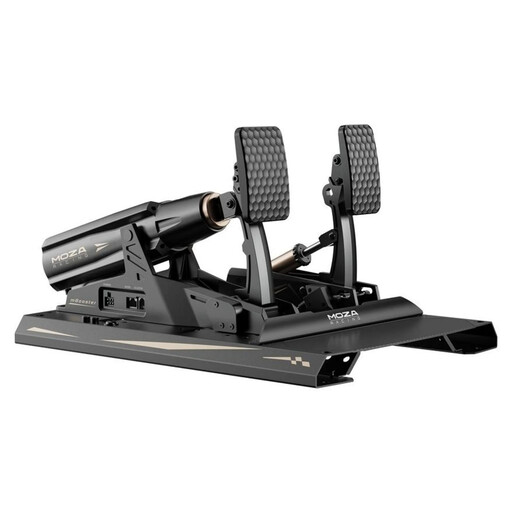
MOZA Racing RS082
Worth considering if you’re looking for a load-cell brake for a permanently mounted setup and can secure the pedals firmly to your racing rig.
The product description lists a load-cell brake, adjustable braking characteristics, and adjustable pedal angles and pedal plates. It also specifies a 200 kg load-cell sensor, a 15-bit angle sensor, USB Type-A to Type-B and USB Type-C.
The stated weight is 15.5 kg; the pedals need to be mounted securely before use. The 200 kg figure refers to the sensor, not the foot pressure required.
View at Joybuy
Frequently asked questions
Do I need special pedals to use my headphones?
No, headphones don’t call for any specific pedal features. If you use iRacing, you can select your preferred audio output and, if needed, voice chat in the audio settings. Check pedal compatibility separately.
How do I set up new pedals for practice?
First check the mounting and connection, then calibrate your new controllers in iRacing. iRacing Support specifies different Brake Force Factor settings for position-sensing and load-cell pedals; don’t assume these game settings apply to other simulations.
Can I connect the Thrustmaster T-LCM directly to a console via USB?
Not using the connection method described by Thrustmaster: for consoles, the manufacturer specifies an RJ12 connection to a Thrustmaster wheelbase. Direct USB connection is specified for PC; also check that your particular wheelbase is compatible.
What are the rules on online returns and faulty goods in Germany?
For a standard distance purchase from a business seller in the EU, you generally have 14 days from delivery to change your mind; exceptions may apply. New goods are also covered by a statutory minimum two-year legal guarantee against the seller, which is separate from any voluntary manufacturer’s warranty.


