Oval drivers focused on consistency
If you’re practising repeated laps, predictable throttle and brake inputs help you focus on your racing line and how the car behaves. iRacing recommends aiming for smooth, consistent laps during oval training.


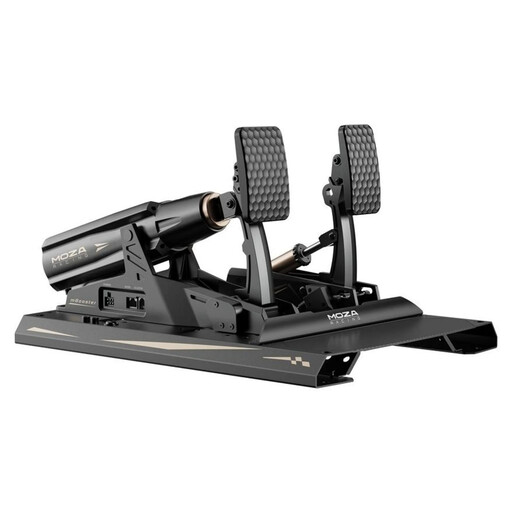
For oval training, it makes sense to choose pedals with an adjustable throttle travel and brake resistance. An adjustable load-cell brake is particularly useful if you’re practising consistent braking inputs, but it isn’t essential for every setup. Also check how the pedals are mounted, whether they connect to your specific platform and what’s included: in iRacing, pedals and multi-monitor displays are set up separately (iRacing Support).
If you’re practising repeated laps, predictable throttle and brake inputs help you focus on your racing line and how the car behaves. iRacing recommends aiming for smooth, consistent laps during oval training.
Even with multiple screens, it’s important that your pedals and seat stay stable when you brake, and that the pedals are within easy reach. This is especially important if they aren’t mounted on a solid plate.
If you want to keep your wheelbase, check that the pedals, connection and platform are compatible. A USB connection to a PC doesn’t automatically mean compatibility with every wheelbase or console.
First, check how easily you can adjust the throttle and brake to suit your inputs. Then consider whether they connect to your existing system and whether the setup is stable and easy to reach.
| What you need | What to check before buying | Who should consider it? |
|---|---|---|
| Modulating the throttle on corner exit | Pedal travel, resistance, position and calibration in the simulation you use. | This is key if you want to apply the throttle smoothly on corner exit and adjust the pedal position to suit your seating position. Around 31% of consumers are likely to put throttle control first. |
| Braking consistently | Included sensor type, adjustable resistance and calibration; don’t confuse the sensor’s rated load with the foot pressure required. | If you’re practising braking points and releasing the brake, you should be able to adjust it to suit the pressure you can apply. Around 25% of consumers are likely to prioritise consistent braking. |
| Connecting to your existing system | Pedal variant, PC or specific console, wheelbase model, cables and any additional hardware required. | If you want to keep using your working wheelbase, check how the pedals connect to your exact setup. Around 25% of consumers are likely to prioritise compatibility with their existing system. |
| Stability and seating position | Mounting, pedal spacing, seat stability and reach; consider the monitor mount separately. | If the pedals or seat might move when you brake, the mounting and ergonomics need to suit your setup. Around 19% of consumers are likely to consider stability their top priority. |
For the Fanatec CSL Elite Pedals V2, the manufacturer distinguishes between a sensor rated load of over 200 kg and a foot pressure of up to 90 kg on the pedal plate. These figures describe different things.
Only compare figures measured on the same basis, and check which force and settings are right for your setup.
The load-cell upgrade isn’t included with the Fanatec CSL Pedals basic set or the Thrustmaster Raceline Pedals III.
Check which brake is actually included and which upgrades you’ll need to buy separately.
How the pedals connect depends on the pedal set, wheelbase and platform. Thrustmaster’s Raceline LC upgrade also has cable and firmware requirements, depending on the connection.
Check the complete setup against the instructions for the specific model.
Monitors affect the display, but your pedals and seat still need to suit the floor setup and the amount of braking force you use.
Before practising, check that the pedals and seat stay in place when you brake and that the pedals are easy to reach.
The CSL Pedals are an upgradeable basic set, while the CSL Elite Pedals V2 are a standalone three-pedal set with a load-cell brake.
The RS Pedals are a load-cell option that can also be supported against the floor as part of your setup.
The CRP2 are an adjustable throttle-and-brake set for a PC setup, with a separate USB connection.
The P1000-F is a compact two-pedal set from a modular range, designed for a permanently installed PC setup.
The Raceline Pedals III are a three-pedal basic set, with a load-cell upgrade available separately.
This selection is for consumers looking to fine-tune their throttle and braking inputs for oval training and find an adjustable pedal set.
 No image available
An option for consumers looking to fine-tune their throttle and braking inputs for oval training; make sure the pedals are securely mounted to your rig.
The product description specifies 15 Bit and USB Type-A to USB Type-B and USB Type-C.
No, the number of monitors doesn’t determine which pedals you need. In iRacing, you calibrate controllers, including pedals, and configure three monitors in the display settings. For other simulations, check their individual requirements.
First, let Windows detect the pedals, then calibrate them in iRacing. iRacing recommends recalibrating after changing the USB port. For supported load-cell pedals, its instructions specify a Brake Force Factor of 0,00. This setting is for iRacing and isn’t a general recommendation for other games.
Before calibrating, make sure the pedals and seat can’t slip, and regularly check the mounting and cables. Follow the instructions for your specific model when cleaning or adjusting it mechanically. Logitech G describes wall mounts for the RS Pedals when setting them up on the floor.
Check what’s included before you buy: the load-cell upgrade is sold separately for the Fanatec CSL Pedals basic set and the Thrustmaster Raceline Pedals III. Your statutory rights against the seller are separate from any voluntary guarantee. The Verbraucherzentrale describes repair or replacement as forms of subsequent performance.
According to information from the European Union, CE marking is only required when the harmonised EU rules that apply to the specific product say it is. CE marking is a declaration by the manufacturer, not a general independent quality mark. For market surveillance, the Bundesnetzagentur lists product identification, manufacturer details and required notices among the points to check. Whether a specific product meets the applicable requirements depends on its documentation.