Who are the different pedal sets for?

Practising your braking point before the pit lane

If you’re practising slowing down before entering the pit lane, look for a brake you can apply in a controlled way. iRacing Support makes it clear that the limiter doesn’t brake for you before the pit lane.

Drivers with an existing PC wheel base

If you want to keep your current wheel, check whether the pedal connection and game support separate controllers. Fanatec Support explains that USB is required to use pedals from another brand on PC, while iRacing Support explains how to use multiple controllers.

Drivers with a moveable multi-monitor setup

If your driving setup isn’t permanently installed, make sure your pedals and seat are properly supported in your braking position. The multi-monitor setup described by iRacing Support relates to the display, not your choice of pedals.

What should you look for when buying?

Criteria What to check before buying Who is this important to?
Brake modulation Check the braking mechanism of the complete set, the settings available and how to calibrate the brake axis in the game. If I want to slow down in a controlled way before the pit lane line, being able to modulate the brake is my priority. Around 31% of consumers put brake modulation first.
Connection and compatibility Check the platform, exact pedal variant, wheel base, any adapters required and whether the game supports separate controllers. If I want to keep using my existing platform and wheel base, the pedal connection needs to work with my setup. Around 25% of consumers prioritise connection compatibility.
Stability and seating position Check the space available, pedal position and suitable support or mounting; your seat also needs to stay stable when braking. If I brake repeatedly and don’t leave my setup permanently assembled, a stable position is essential. Around 19% of consumers put stability first.
Adjustability Check which springs, elastomers or position adjustments are included, and which adjustments require extra accessories. If I want to adjust the pedal resistance or foot position, I look at the adjustment options actually included. Around 13% of consumers prioritise adjustability.
Clutch and upgrades Check how many pedals are included and the exact compatibility of any planned clutch or brake upgrade. If I want to use a clutch straight away or add one later, the set needs to suit my driving style and accessories. Around 12% of consumers put a clutch or upgrade options first.

Which buying mistakes should you avoid?

  • Confusing the pit limiter with automatic braking

    In iRacing, the limiter restricts your speed but doesn’t slow the car down before the pit lane, as iRacing Support explains.

    Practise your braking point and releasing the brake separately from using the limiter button. Don’t choose pedals expecting them to automate your pit entry.

  • Assuming USB details for an upgraded CSL set also apply to the base set

    Fanatec Support points out that CSL Pedals don’t have their own USB connection for PC use without an additional component.

    Check the full model name and what’s included before planning to use the pedals as a separate controller on a PC.

  • Treating SR-P and SR-P Lite as the same accessory system

    MOZA explicitly states that certain SR-P Lite components aren’t compatible with the SR-P set.

    Check the exact product range for both the set and its accessories, rather than relying on similar-sounding names.

Which brands are worth considering?

Fanatec

The CSL Pedals LC are a three-pedal load cell set for pressure-based braking.

  • According to Fanatec, the load cell kit replaces the original brake pedal, which can then be used as a clutch.
  • The CSL base set alone doesn’t have its own USB connection. This information applies to the CSL variants mentioned.

Thrustmaster

The T-LCM Pedals feature an adjustable load cell brake, while the Raceline Pedals III are a position-based three-pedal set.

  • Thrustmaster lists interchangeable springs and adjustable pedal positions for the T-LCM.
  • For the T-LCM, Thrustmaster specifies USB on PC and RJ12 via a compatible Thrustmaster base on consoles. The load cell is an upgrade for the Raceline Pedals III, not part of the base set.

MOZA Racing

The two-pedal SR-P set is aimed at PC drivers looking for a load cell brake and direct USB connection, without a standard clutch.

  • The EU product page lists adjustable pedal spacing.
  • According to MOZA, SR-P Lite accessories aren’t compatible with the SR-P set. Don’t compare disputed sensor or encoder figures as if they were measured under the same conditions.

Logitech G

The PRO Racing Pedals are a three-pedal load cell set with interchangeable resistance elements and repositionable modules.

  • Logitech describes adjustment options for the throttle, brake and clutch.
  • For older Logitech wheels used with a console, Logitech Support specifies an additional Racing Adapter. On PC, using them together depends on whether the game supports separate controllers.

SIMAGIC

The P1000-F are a modular two-pedal set with options to adjust pedal position and brake feel.

  • SIMAGIC lists a PC USB connection and optional upgrades.
  • Don’t assume hydraulic or haptic upgrades are included with the two-pedal set.

Related products from Joybuy

This is a load cell pedal set for practising repeated braking points and pressure-based braking.
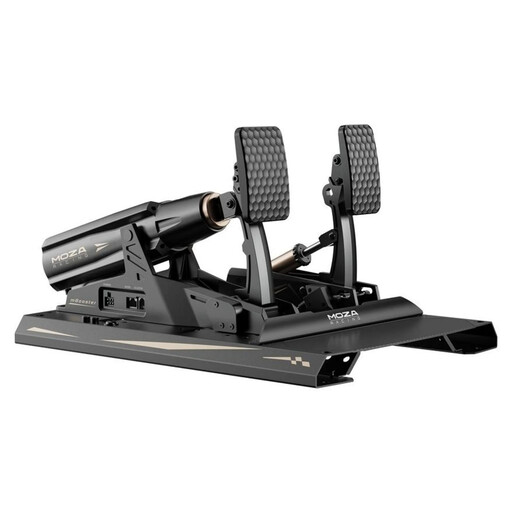
MOZA Racing RS082 Terrace, black aluminium finish

MOZA Racing RS082 Terrace, Black, Aluminium

This three-pedal set with a load cell brake is ideal for pressure-based practice. The description lists adjustable pedal angles and pedal plate height, as well as damping blocks.

The pedals need to be securely mounted to your rig before use.

Joybuy

Frequently asked questions about racing pedals

Does a pit limiter slow the car down before pit entry?

No, in iRacing the limiter won’t slow you down beforehand. According to iRacing Support, it restricts the speed of cars equipped with one; without a limiter, you’ll need to control your speed yourself. Also check the rules of the simulation you’re using.

Do I need special pedals for a three-monitor setup?

No, your monitors don’t determine which pedals you need. The multi-monitor setup described by iRacing Support relates to the display and graphics; instead, check that your pedals are compatible with your platform and game, and that they’re stable in your driving setup.

What should I do after connecting or moving my pedals?

Check that the controllers are recognised, then calibrate the pedal axes in your simulation. iRacing Support recommends calibrating when connecting new controllers for the first time.

Can I use USB pedals designed for PC on a console without changing anything?

Not necessarily; it depends on the specific combination of pedals, wheel base and console. For the T-LCM on consoles, Thrustmaster describes an RJ12 connection to a compatible Thrustmaster base. For PRO Racing Pedals used with older Logitech wheels on consoles, Logitech specifies an additional Racing Adapter.

Do I need a clutch to practise before entering the pit lane?

Not necessarily: you don’t need a third pedal to practise slowing down before the pit lane. Check whether you want a clutch for the car you drive or as a future upgrade, and whether it’s included in the set.