For virtual race starts at a small desk, first check the space available, how the pedals can be secured and whether they’ll connect to your existing hardware. If you want to practise using a clutch manually, you’ll need three pedals or a suitable clutch add-on. Thrustmaster describes the T3PM as suitable for desk setups, while Fanatec lists the CSL Pedals as a two-pedal set. Neither the dimensions nor an anti-slip mat alone prove that the pedals will stay put on your floor. A load-cell brake may be useful for extra braking practice, but it won’t replace a clutch and may need a particularly rigid mounting setup.
Who are the different pedal sets suitable for?
Practising starts without a cockpit
If you practise under a small desk, check that the pedals and your seat stay stable when you press them. Thrustmaster describes the T3PM as suitable for desk setups, while Heusinkveld requires a very rigid mounting base for its Sprint pedals.
Drivers practising clutch starts
To practise using a clutch manually, the set must include one or allow you to add a compatible clutch. Thrustmaster describes the T-LCM as a set with three adjustable pedals; Fanatec lists the CSL Pedals initially as a two-pedal set that can be expanded.
Upgrading an existing wheelbase
Check whether your pedal set connects directly via USB or through a compatible wheelbase. MOZA specifies a direct USB connection to a PC for the SR-P; Fanatec points out that the CSL Pedals don’t have a USB connection for a PC on their own.
What should you look for when buying?
Start by checking the space available and how the pedals can be secured, then look at the number of pedals and the connection. Choose a brake to suit any extra practice you have in mind and the stability of your setup.
| What matters |
What to check before buying |
Who it matters most to |
| Stability and space |
Compare the footwell and the dimensions with the space available: Thrustmaster gives the T3PM dimensions as 300 × 210 mm (width × depth). Check your floor and how the pedals can be secured, taking into account the force you expect to apply. |
If I’m practising under a small desk, the pedals and seat need to stay stable when I press them, and the pedals must fit in the footwell. Around 34% of consumers put space and stability first. |
| A clutch for race starts |
Check the number of pedals and what’s included with the exact model. The Fanatec CSL Pedals start as a two-pedal set; you’ll need a compatible add-on to get a clutch. |
If I want to practise using a clutch manually, I need a clutch included in the set or a suitable add-on. Otherwise, I can’t practise that start procedure. Around 33% of consumers prioritise a clutch. |
| Connection to existing hardware |
Check the platform and wheelbase model. According to Fanatec Support, the CSL Pedals don’t have a standalone USB connection to a PC, so you’ll need a suitable accessory or a compatible wheelbase. |
If I want to keep using my existing wheelbase or PC, the connection needs to work with that specific combination. Around 20% of consumers prioritise connection to existing hardware. |
| Brake adjustability |
Check the brake type and settings for the specific model. Heusinkveld requires a very rigid mounting base for the Sprint pedals because of the potential braking forces. |
If I want to do extra braking practice, I need to be able to adjust the resistance to suit me without the pedals or seat giving way. Around 13% of consumers prioritise brake modulation. |
Which buying mistakes should you avoid?
-
Buying a load-cell brake just to get better at race starts
A brake sensor won’t replace a clutch. Heusinkveld also requires a very rigid base for the Sprint pedals.
First consider whether you want to practise clutch starts and how you’ll secure the pedals. Then choose a brake to suit any extra braking practice.
You may need suitable mounting hardware to keep the pedals securely in place.
-
Confusing two-pedal sets or similarly named product ranges
The Fanatec CSL Pedals start with two pedals. MOZA has separate SR-P and SR-P Lite ranges, and accessories from these ranges aren’t freely interchangeable.
Before deciding, compare the full model name, what’s included and which add-ons are specifically compatible.
You may need an additional clutch module that’s compatible with the set.
-
Assuming PC compatibility means a direct USB connection
According to Fanatec Support, the Fanatec CSL Pedals can’t connect to a PC via USB on their own.
Check how the pedals, wheelbase and platform connect in the exact combination you’re considering.
You may need a suitable accessory to use the pedals with a PC.
Which brands are worth considering?
Thrustmaster
The T3PM and T-LCM ranges offer different ways to get three pedals and a choice of brake options.
- Thrustmaster describes the T3PM as suitable for a range of setups, including desks. The T-LCM has adjustable pedal positions and interchangeable brake springs.
- Check compatibility with your wheelbase and whether the pedals will stay in place on your floor. According to Thrustmaster, connecting to a console requires a compatible wheelbase.
Fanatec
The CSL Pedals are a two-pedal base set that you can expand with compatible add-ons.
- Fanatec describes add-ons for a clutch and a load-cell brake, which can also provide a clutch function.
- According to Fanatec Support, the standard pedals don’t have a standalone USB connection for a PC. Check whether you need a wheelbase or a suitable accessory.
MOZA Racing
The SR-P range includes pedals with a USB connection to a PC; SR-P and SR-P Lite are different product ranges.
- MOZA specifies adjustable pedal spacing and an anti-slip mat for the SR-P.
- An anti-slip mat doesn’t guarantee the pedals will stay in place on every floor. According to MOZA Support, accessories for the SR-P and SR-P Lite aren’t freely interchangeable.
Heusinkveld
The Sprint range is designed for rigs and offers a choice of two or three pedals with a load-cell brake.
- Heusinkveld describes the Sprint pedals as available in a two- or three-pedal configuration.
- Heusinkveld explicitly requires a very rigid mounting base because of the potential braking forces. Without suitable mounting, these aren’t an obvious choice for a loose floor setup at a small desk.
Racing pedal deals at Joybuy
The following Joybuy offers are suited to race starts with a clutch: a steering wheel and pedal bundle, plus a separate MOZA pedal set. The MOZA set needs to be securely mounted to a racing rig, so bear that in mind if you only have a small desk.
 No image available
Logitech G923 SE racing wheel and pedal set
This bundle is worth considering if you want to practise race starts with a manual clutch and secure the steering wheel to your desk.
According to the product description, the set includes accelerator, brake and clutch pedals. The steering wheel has built-in desk clamps, and the pedals connect to the wheel. The description specifies a USB connection from the steering wheel to a PC or PlayStation. The clamps on the wheel don’t prove that the pedals will stay securely in place on every floor.
View at Joybuy
 No image available
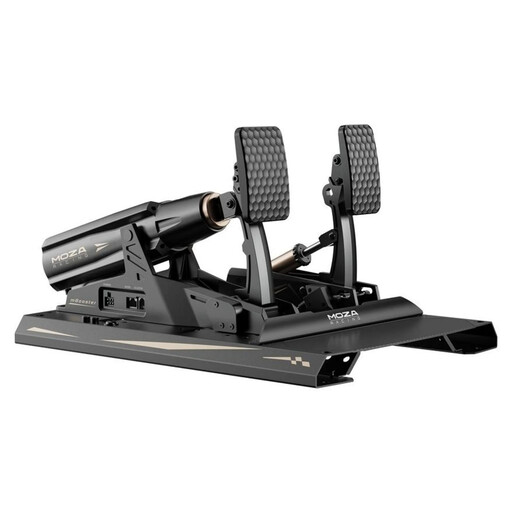
MOZA Racing RS082 pedal set, Terrace, Black, Aluminium
This set may suit you if you want to train on a PC with three pedals and a load-cell brake, and have a suitable fixed mounting setup.
The product description lists three pedals, a load-cell brake with an angle sensor, adjustable pedal angles and pedal plate height, and USB for a PC. It requires secure mounting to a racing rig, so you’ll need suitable mounting hardware if you’re setting it up at a small desk without a rig.
View at Joybuy
Frequently asked questions about racing pedals
Do I need a clutch for virtual start practice?
Only if you want to practise starts using a manual clutch. If so, check whether the specific offer includes three pedals or allows you to add a compatible clutch: the T-LCM has three adjustable pedals, while the Fanatec CSL Pedals start as a two-pedal set and need a compatible add-on.
Can I simply connect racing pedals to my PC via USB?
It depends on the model. MOZA specifies a direct USB connection to a PC for the SR-P; Thrustmaster describes a USB connection for the T-LCM. According to Fanatec Support, the CSL Pedals don’t have a PC USB connection on their own, so they need a suitable accessory or a compatible wheelbase.
What should I bear in mind when adjusting the T-LCM brake?
According to the Thrustmaster manual, you need to calibrate the T-LCM after changing the brake resistance. Connect the pedal set to your PC via USB to do this; the RJ12 cable must not be connected to the pedal set during the process.


