Choose your pedals based on your simulation’s start procedure. For manual starts where you control the clutch, you’ll need a compatible clutch input. If your start procedure doesn’t require you to operate the clutch yourself, a throttle-and-brake set may be enough. Then check the connection, mounting and calibration for your specific game – the number of monitors doesn’t automatically make one pedal set more suitable than another.
Who are the different pedal sets suited to?
Drivers who make manual starts
If you want to control the clutch and throttle yourself, check that the set has a compatible clutch input and is supported by your game. Fanatec and MOZA Racing describe pedal options with a clutch; what matters is whether the specific set is compatible.
Upgraders with a multi-monitor PC
If you already use a PC rig, your pedals need to connect, mount securely and calibrate in your simulation. iRacing Support treats multi-monitor setup and controller calibration as separate steps.
Drivers with limited space
If you don’t yet have a permanent rig, compare how the pedals mount, how stable they are and how much space they need before choosing a set. Thrustmaster lists adjustable pedal positions for the T-LCM; you’ll still need to make sure it suits your space and setup.
What should you look for when choosing?
Three-pedal set with clutch
A good fit if: you want to practise manual clutch starts and control the throttle and clutch yourself.
The trade-off: An extra input needs space and setup; check that your specific game supports it.
Two-pedal set with upgrade option
A good fit if: you want to start with a throttle and brake, then add a clutch later.
The trade-off: The add-on module may be sold separately; check what’s included, the connections and the total cost of both components.
Two-pedal set with no plans to add a clutch
A good fit if: you’re mainly practising throttle control and braking, and your start procedure doesn’t require you to operate a clutch input yourself.
The trade-off: Without a clutch pedal, you can’t practise operating a clutch manually; the driving aids available depend on the simulation and session.
The key is deciding which aspect matters most to you when practising starts. The percentages show how consumers are divided according to their single most important selection criterion.
| What matters |
What to check before buying |
Who it matters to |
| Clutch for your start procedure |
Check whether a clutch is included, how inputs are assigned and whether your specific game supports it. |
If I want to practise manual starts, I need a compatible clutch input; around 28% of consumers put a clutch for their start procedure first. |
| Throttle control when setting off |
Check pedal travel, resistance and the calibration options available on the specific model. |
If having controllable throttle response during practice matters to me, I look for suitable adjustment options; around 22% of consumers prioritise throttle control. |
| Secure pedal mounting |
Check the mounting surface and fixing points, and whether a base plate is sold separately. |
If my base or available space is limited, the mounting needs to suit my existing setup; around 22% of consumers put mounting first. |
| Connection and recognition in-game |
Check the platform, wheel base, cables and calibration requirements for your specific game. |
If I want to keep using my existing PC and wheel, I check which connection method is compatible; around 17% of consumers prioritise connection and in-game recognition. |
| Brake for further practice |
Distinguish between pressure measurement, the foot force required and the sensor’s rated load; also consider mounting. |
If I’m practising braking as well as starts, the right feel from the brake matters; around 11% of consumers put the brake first. |
Which assumptions should you avoid?
-
A clutch module that’s mentioned is automatically included in the set
MOZA describes the CRP2 base as having a throttle and brake, with a compatible clutch pedal available as an add-on. Mentioning both parts doesn’t mean they’re supplied together.
Check what’s included in the specific offer, and allow for the clutch module if you want to practise manual starts.
You may need to buy a clutch module separately to upgrade the set.
-
A USB connection means universal compatibility with games and consoles
For T-LCM pedals, Thrustmaster lists different connection methods for PC and console. Whether a separate controller is recognised also depends on the simulation.
Check that the pedals, platform, wheel base and specific game all work together before buying.
For console use, you may need a compatible Thrustmaster wheel base.
-
The sensor’s rated load is the same as the foot force required
For the Sprint set, Heusinkveld specifies a maximum actual braking force of 65 kg, as well as a load-cell sensor rated at 120 kg. These figures don’t describe the same thing.
Only compare force figures that are defined in the same way, and consider whether the resistance and mounting suit your seating position.
-
A base plate and permanent rig are automatically included
Heusinkveld describes the Sprint pedals as being mounted to a very rigid base; the Sprint base plate is optional.
Check what’s actually included against your mounting surface, and see what fixings you already have.
Depending on your existing setup, you may need an additional base plate or rig mount.
Which brands are worth considering?
Fanatec
Options include the ClubSport Pedals V3, a three-pedal set, and the CSL Elite Pedals V2, another three-pedal option.
- Fanatec describes the ClubSport Pedals V3 as having contactless sensors for the throttle and clutch, plus an adjustable brake.
- For the CSL Elite Pedals V2, Fanatec lists standalone USB use on PC. Check the connection and platform compatibility of the specific set.
Thrustmaster
The T-LCM is a three-pedal set for buyers who want to adjust pedal position and brake springs.
- Thrustmaster lists adjustable pedal height, angle and spacing, as well as a load-cell brake.
- According to the connection guide, consoles connect via RJ12 to a Thrustmaster wheel base; PC USB support alone doesn’t confirm console compatibility.
MOZA Racing
The CRP2 throttle-and-brake base can be upgraded with a separately listed CRP2 clutch pedal.
- MOZA describes the add-on pedal as having a three-stage, adjustable clutch feel.
- Check whether both the base and clutch module are included and compatible with your platform. No independent evidence confirms that this gives you an advantage at the start.
Heusinkveld
The Sprint three-pedal set is aimed at PC users with a permanent rig who are interested in software adjustments.
- Heusinkveld documents settings in SmartControl and mounting to a very rigid base.
- The optional Sprint base plate isn’t automatically included; the quick-start guide says a very rigid base is required.
Simagic
The P1000 series is worth considering if you’re looking at a modular setup and want to check the variants and clutch options individually.
- The Simagic manual describes the available expansion options.
- The manual distinguishes a Formula version with two pedals; not every P1000 configuration includes a clutch or the same expansion options.
Joybuy products for virtual race starts
This selection includes pedals with a clutch for manual virtual starts.
 No image available
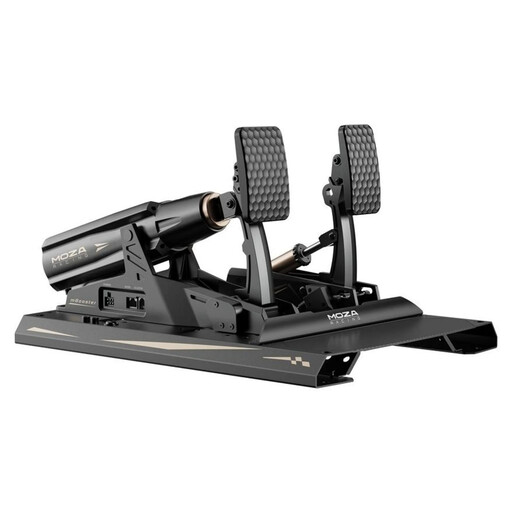
MOZA Racing RS082 Terrace Black Aluminum
This product is listed as a three-pedal set with a clutch for manual starts; before buying, check that your simulation supports it and that the mounting is suitable.
The product description lists 200 kg, 15 Bit, and USB Type-A to USB Type-B and USB Type-C.
Joybuy
Frequently asked questions about racing pedals
Do I need special pedals because I have three monitors?
No, the number of monitors doesn’t determine which pedals you need. iRacing Support treats multi-monitor setup and controller calibration separately, so check your simulation’s platform, connection and input settings instead.
Do I need a clutch for every virtual race start?
No, a clutch isn’t required for every start procedure. If you want to operate one yourself, you’ll need a compatible input. For example, iRacing Support describes an anti-stall clutch, which may not be available in every series.
How do I set up new pedals for practice?
Mount the pedals according to the model’s instructions, connect them using the specified method and calibrate the inputs in your simulation. iRacing Support says calibration is required during initial setup or after connecting new controllers.
Can I use T-LCM pedals via USB on a console?
No, for consoles Thrustmaster specifies an RJ12 connection to a Thrustmaster wheel base. On a supported Windows PC, the manufacturer describes either a direct USB connection to the PC or an RJ12 connection to the base.
What rights do I have when buying online in Germany?
For most online purchases of goods from a trader, you generally have a 14-day right to cancel from the date of delivery; exceptions and return costs should be taken into account. The European Union’s Your Europe website distinguishes this cancellation right from statutory rights for faulty goods and from a voluntary guarantee; the EU states that goods must be covered by a legal guarantee for at least two years from receipt.


