Choose racing pedals based on whether you want to use a foot clutch for starts in your chosen game and car. For this, you’ll need a suitable three-pedal set or a compatible clutch upgrade; a two-pedal set may be enough for other starting methods. Then check the connections to your PC, console and wheelbase, as well as the mounting options. Headphones alone don’t determine which type of pedals you need, and calibration also depends on the simulation and car.
Which pedals are right for you?
Practising with a foot clutch
If you want to practise virtual starts using a foot clutch, check whether one is included or can be added with a compatible upgrade. Fanatec says that the existing brake pedal can be used as a clutch with the CSL Load Cell Kit. In iRacing, inputs must be calibrated during the initial setup or after connecting new controllers.
Upgrading an existing wheelbase
If you want to add to a set or connect it to your existing hardware, check that the pedal model, wheelbase, platform and cables are compatible. For the T-LCM, Thrustmaster specifies different connection options: USB on PC or RJ12 to the wheelbase. It recommends using only one of these options at a time.
Driving with a permanent rig
If you want to adjust your pedal positions regularly, check the adjustment options and how the pedals attach to your seat setup. Thrustmaster documents adjustable height, spacing and angle for the T-LCM; Heusinkveld requires a fixed rig for the Sprint.
What should you look for when buying?
For practising virtual starts, the key things to consider are the pedal setup you need, compatible connections and a stable rig. Headphones alone don’t point to any particular pedal setup.
| What you need |
What to check before buying |
Who this matters most to |
| Clutch and start control |
Check the starting method in your chosen car, what’s included and whether a clutch upgrade is compatible. Then check the axis assignment in the game. |
If I want to practise starts using a foot clutch, I need a suitable clutch axis that can be assigned in the game. Around 33% of consumers say a clutch is their main priority. |
| Connection and platform |
Check the pedal model, wheelbase, PC or console and intended connection method against the manufacturer’s documentation. |
If I want to use the pedals with my existing wheelbase or console, the connection must work with the entire setup. Around 27% of consumers say connection compatibility is their main priority. |
| Stable setup and positioning |
Check the mounting points, seat and pedal fixings, as well as the adjustable spacing and angles for the specific model. |
If I want to use the pedals repeatedly while keeping my seating position, the setup must suit my space and mounting points. Around 20% of consumers say a stable setup is their top priority. |
| Throttle and brake control |
Check the axes and calibrate them in the game. A load-cell brake doesn’t replace a clutch; compare brake specifications only for the specific model you’re considering. |
If I want to fine-tune the throttle and brake for the start and the drive that follows, I should check the inputs in my chosen car. Around 20% of consumers say throttle and brake control is their main priority. |
Common misconceptions
-
A clutch pedal shown in a picture is automatically included in the basic set
The documented basic MOZA CRP2 set includes a throttle and brake. Fanatec CSL Pedals are also available as a two-pedal set.
Before buying, check the pedal count and what’s included with the exact model.
A compatible clutch pedal may be sold separately.
-
USB on PC automatically means console compatibility
Connection options vary by pedal set, wheelbase and platform. A USB connection that works on PC doesn’t prove that the same setup will work on a console.
Check the complete connection chain, from pedals and wheelbase to your chosen platform.
You may need a compatible wheelbase or an adapter that’s explicitly supported for a different connection method.
-
A baseplate is a substitute for a fixed rig
Heusinkveld requires a fixed rig for the Sprint; the optional baseplate doesn’t replace the need to connect the setup to the seat.
Before choosing a model, make sure you have the space and mounting points it requires.
-
A load-cell brake determines the clutch bite point
A brake and a clutch have different functions. How the clutch input behaves also depends on the game and car.
Check the clutch axis and its calibration in the car you’ll actually be driving.
Key brands at a glance
Fanatec
Fanatec offers the CSL Pedals as an expandable two-pedal set, as well as the CSL Elite Pedals V2, a documented three-pedal model.
- According to Fanatec, the existing brake pedal can be used as a clutch with the CSL Load Cell Kit.
- The kit isn’t a standalone complete set and is only compatible with CSL Pedals. Connections vary between the basic set and upgraded models.
Thrustmaster
The T-LCM comes with three pedals and adjustable positions.
- Thrustmaster documents adjustments for height, spacing and angle.
- USB to PC and RJ12 to the wheelbase are different connection options. Check compatibility with your specific console and wheelbase; Thrustmaster recommends not using both cables at the same time.
MOZA Racing
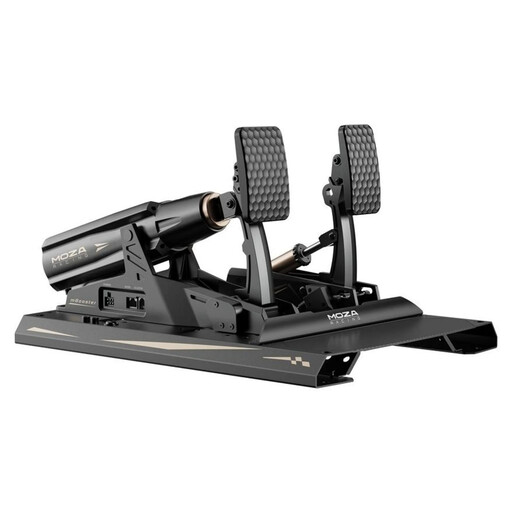
The basic CRP2 set includes a throttle and brake; a compatible clutch pedal is sold separately.
- The CRP2 clutch pedal is designed to create a three-pedal set when paired with the CRP2 throttle and brake set.
- The basic set doesn’t include a clutch. Claims about clutch feel come from the manufacturer and don’t prove that it will improve virtual starts.
Heusinkveld
The Sprint is designed for PC setups with a fixed rig and is available with either two or three pedals, depending on the model.
- According to the manufacturer, pedal positions and response curves can be adjusted.
- A clutch is only included with the relevant model. Heusinkveld requires a fixed rig; an optional baseplate doesn’t replace this requirement.
Joybuy product selection
This selection includes racing pedals for virtual starts using a foot clutch, with adjustable pedal positions.
 No image available
MOZA Racing RS082 Terrace, Black, Aluminium
The product description lists a throttle, brake and clutch pedal for racing simulations that use a foot clutch.
The product name specifies USB Type-A to USB Type-B and USB Type-C.
Secure the pedals to your rig before use and, according to the product information, use only the included 48-V power supply.
View at Joybuy
Frequently asked questions
Do I need a foot clutch for every virtual race start?
No. It depends on the starting method supported by the game and car you’re using, and what you want to practise. For starts using a foot clutch, you’ll need a suitable clutch axis; a load-cell brake isn’t a substitute.
How do I set up the pedals for repeated start practice?
Connect and calibrate the axes according to the instructions from the pedal manufacturer and the game. iRacing requires calibration during initial setup or after connecting new controllers. Then check the clutch assignment and throttle input in your chosen car; headphones don’t change this process.
What should I consider when mounting and maintaining the pedals?
Make sure the pedals and seat are secured appropriately for how you plan to use them. According to the manufacturer, the Heusinkveld Sprint requires a fixed rig, even when used with the optional baseplate. Follow the instructions for your specific model when it comes to maintenance and spare parts.
What extra costs and consumer rights should I consider when buying online in Germany?
A clutch sold separately or an adapter required for the connection isn’t automatically included in the basic set. When buying online from a trader, you generally have a 14-day right to cancel, subject to exceptions; according to Your Europe, the period starts when the goods are delivered. Under EU consumer rules, goods are generally covered by a minimum two-year legal guarantee against faults. This is separate from any voluntary manufacturer’s guarantee.


