Practising on a console you already own
You want to drive the same virtual course repeatedly and need a wheel that works with your console and the specific game. Logitech G and Thrustmaster list platform-specific versions.


First, choose a wheel that works with your platform and the specific racing game you want to play. Then check the pedals and mounting options for your setup. Force feedback and Direct Drive use different drive systems; a higher torque rating alone is no proof of faster progress or better lap times. Set up your headphone audio through your PC or console, independently of the wheel.
You want to drive the same virtual course repeatedly and need a wheel that works with your console and the specific game. Logitech G and Thrustmaster list platform-specific versions.
You want to set up a wheel and pedals without a dedicated cockpit. A suitable desk clamp and enough room for the pedals are important considerations. Thrustmaster, MOZA Racing and Fanatec document mounting solutions for certain sets.
You want to take steering feedback into account and are happy to weigh up the drive system, settings and setup effort. MOZA Racing and Fanatec describe Direct Drive sets with different manufacturer specifications and bundle contents.
Start by checking platform and game compatibility. Then compare steering feedback, pedals and mounting options with your setup.
| What matters to you | What to check before buying | Who should pay particular attention |
|---|---|---|
| Platform and game | Check the full model variant, platform compatibility and support for the specific racing game. | If I want to drive the same course on the console I already own, the wheel needs to work with both my platform and the game. Around 31% of consumers put this compatibility first. |
| Steering feedback | Check the drive system and adjustment options for the exact model; treat torque figures as manufacturer specifications. | If you want to compare the feel of the steering responses while practising repeatedly, pay particular attention to feedback and tuning. Around 25% of consumers prioritise steering feedback. |
| Pedals and what's included | Check the number of pedals, which components are included and how much space the specific set needs. | If I want to practise using the accelerator and brake repeatedly, and may want to use a clutch, I need to know exactly which pedals come with the set. Around 25% of consumers consider pedal operation their main concern. |
| Mounting and space | Measure your desk edge and available space; check whether the required clamp is included in the bundle. | If your driving space is limited or shared, you need to be able to mount the set securely and put it away after playing. Just under 19% of consumers focus mainly on setup and space requirements. |
Logitech G lists the G29 and G920 for different platforms. The model name alone is therefore not enough to identify the right console version.
Before buying, check the full model name and confirm it is compatible with your console.
Audio settings and headset connections relate to the gaming system or controller; they don't tell you whether the wheel works with the game.
Check your headset's audio connection to the gaming system separately from the wheel's compatibility.
What's included varies by model. For example, the MOZA R3 is described as coming with pedals without a clutch, while the components included with other bundles are listed separately.
Check the contents of the specific set against your pedal and mounting requirements.
If the bundle doesn't include a part you need, you may have to buy it separately.
The T128 sets are designed for desk setups, with Force Feedback and two pedals. The PlayStation/PC and Xbox/PC versions are separate variants.
The G29 and G920 are wheel-and-pedal sets for different PlayStation/PC and Xbox/PC configurations.
The R3 is described as a Direct Drive bundle for PC, with a separate Xbox/PC version also available.
The documented CSL-DD-Ready2Race bundle combines a PC base with a wheel, pedals and desk clamp.
The sets below are listed for PC and, depending on the specific model variant, for PlayStation or Xbox too. Models in the same range can have different platform compatibility, so check the full variant and make sure your game is supported.
 No image available
For you if you want to include a clutch pedal and desk mounting in your setup: the product description lists three pedals, including a clutch, as well as built-in clamps.
The description lists TRUEFORCE and a 900° steering angle. Logitech notes that Force Feedback and RPM LEDs on PC require G HUB, and that TRUEFORCE requires support in the game.
Check that the exact console version works with your platform and racing game.
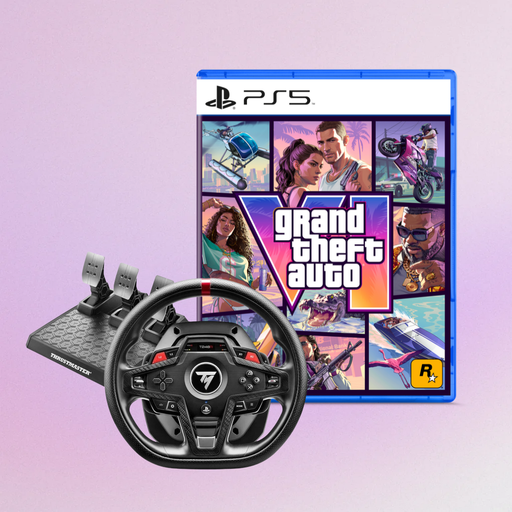 No image available
If you play on PS5, PS4 or PC, these platforms are listed in the product title. Before buying, check that your specific racing game is supported.
The product title also lists Grand Theft Auto VI PS5 German Edition as a code-in-a-box bundle.
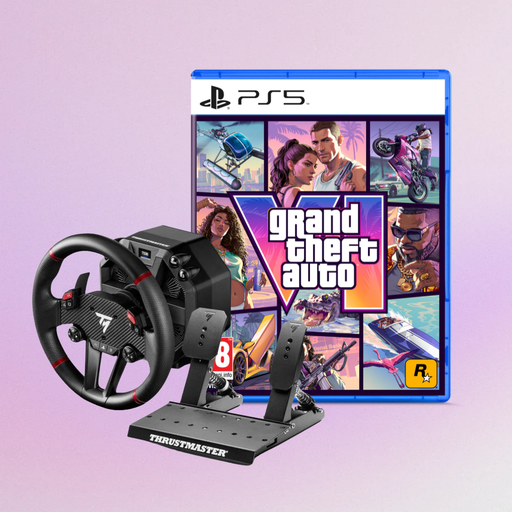 No image available
For you if you're looking for a Force Feedback set for PS5, PS4 or PC: these platforms and a pedal set are listed in the product details.
The description lists Direct Axial Drive and mounting with clamps or screws. Before use, secure the unit firmly to a stable rig or desk.
The bundle also includes Grand Theft Auto VI PS5 German Edition as a code-in-a-box product. Check separately that your racing game is supported.
 No image available
If you're looking for a desk setup with two pedals, the product description lists a magnetic T2PM two-pedal set and a desk clamp.
The listed steering angle ranges from 270° to 900°; the clamp fits desk tops up to 5,5 cm thick. Check that your game is supported on your platform.
 No image available
For you if you're looking for a Force Feedback wheel with pedals for PS5, PS4 or PC: these platforms and a Raceline pedal set are listed in the product details.
The description lists Direct Axial Drive and mounting with clamps or screws. Before use, secure the unit firmly to a stable rig or desk and check that your racing game is supported.
No. Set up your audio output through your gaming system and a compatible headset. On PS5, you can choose your output device under “Settings > Sound > Audio Output”; Xbox also explains how to connect a compatible 3.5 mm headset to a suitable controller. Check your headphones' connection separately from the wheel.
Secure the wheel and pedals according to the instructions for your specific set, then configure the wheel in the game. For the Logitech G923, Logitech notes that Force Feedback and RPM LEDs on PC require G HUB, and that TRUEFORCE only works when supported by the game. These requirements don't apply to every model.
When you buy from a trader, EU consumer law provides a legal guarantee of at least two years from the date you receive the goods. This is separate from any additional manufacturer's warranty; if there's a fault, the seller is generally your first point of contact.
For eligible distance contracts, you generally have a 14-day right to cancel from the date the goods are delivered. This is different from your rights if goods are faulty; check the specific purchase terms for possible return costs and exceptions.