Beginners setting up at a desk
If you’re getting started with virtual hill-climb racing, look for a complete set, a suitable mounting option, and support for your game and platform.


Start by choosing a racing wheel and pedal set that works with the specific game and platform you use, and can be secured to your desk. Then consider the type of force feedback, the pedals included and any upgrade options for later. More force from the wheel won’t replace controlled pedal inputs or a well-adjusted single-monitor view.
If you’re getting started with virtual hill-climb racing, look for a complete set, a suitable mounting option, and support for your game and platform.
If you practise the same routes repeatedly, controllable steering and pedal inputs are important factors to consider.
If you’d like to change parts of your wheel later, consider your seating position and field of view on your single monitor too.
First, check support for your game and platform, as well as how the wheel attaches to your desk. Then compare the drive system, pedals and upgrade options in light of your practice setup.
| What matters when buying | What to look for | Who it matters most to |
|---|---|---|
| Steering feedback | Check that your specific game and platform support the wheel; don’t compare drive specifications unless they were measured under the same conditions. | If I drive the same routes repeatedly, I want to be able to control my steering well; around 31% of consumers put steering feedback first. |
| Pedal inputs | Compare which pedals are included and whether the accelerator and brake meet your needs. Logitech lists three pedals for the G29; Fanatec lists CSL Pedals for the bundle reviewed. | If I want to modulate the accelerator and brake precisely on repeated runs, the pedals actually included are essential; around 31% of consumers prioritise pedal inputs. |
| Mounting | Check what’s included and whether the mounting option suits your desk surface, seating position and available floor space. MOZA Racing EU and Fanatec list a desk clamp for their respective bundles. | If I want to use the wheel on my existing desk, the mounting option needs to suit my setup; around 23% of consumers put mounting first. |
| Game and single monitor | Check that your game supports the wheel. For iRacing, iRacing Support explains how to enter screen dimensions and viewing distance when configuring a single-monitor setup. | If I use just one monitor, I want to set the field of view and platform support to suit my game; around 15% of consumers prioritise this. |
A wheel base on its own isn’t the same as a bundle that includes a steering wheel rim and pedals. Fanatec explicitly lists these components for the CSL DD bundle reviewed.
Only compare offers when the version and what’s included are clear.
If your chosen offer is missing parts, you may need to buy a steering wheel rim, pedals or a mounting option separately.
Wheel feedback and field of view are separate settings. A new wheel won’t expand what you can see on screen.
Check your game’s field-of-view options. If it offers a suitable setting, measure your screen width and viewing distance. iRacing Support describes this process for iRacing.
MOZA Racing EU lists a peak torque of 5,5 Nm for the R5 Racing Bundle, while Fanatec lists 5 Nm for the CSL DD bundle. These manufacturer specifications aren’t measurements taken under the same conditions and, on their own, don’t establish which model performs better.
Start by comparing platform support, bundle contents and mounting; assess performance specifications in the context of each manufacturer’s own claims.
Logitech describes the G29 Driving Force as a set with gear-driven force feedback and three pedals for supported PC and PlayStation games.
Thrustmaster lists the T300RS GT Edition as a PC and PlayStation option with a dual-belt drive system, T3PA-GT pedals and a detachable steering wheel rim.
MOZA Racing describes the R5 Racing Bundle as a direct-drive PC set with a desk clamp.
Fanatec describes the CSL DD QR2 Ready2Race Bundle with 5 Nm as a PC bundle that includes a steering wheel rim, CSL Pedals and a desk clamp.
This selection includes force feedback racing wheels for a range of PC and console platforms; pedals, mounting options and platform support vary by model. Equipment within the scope of the EU Electromagnetic Compatibility Directive must carry CE marking (EUR-Lex); check the evidence provided for the specific offer.
 No image available
A set with force feedback and three pedals is listed for repeated steering and braking inputs.
Joybuy’s product details list 900° rotation, built-in clamps and support for PlayStation, Xbox, PC and Mac. Check that your specific game is supported and that the offer carries CE marking.
 No image available
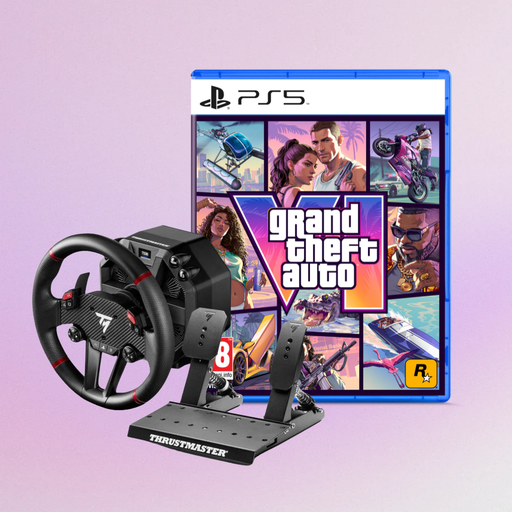
This offer pairs a force feedback racing wheel with a game; check that both the game and platform suit your needs.
The product title lists PS5, PS4 and PC, as well as Grand Theft Auto VI as a code in box in the German edition. Check that your specific game is supported and that the offer carries CE marking.
 No image available
This set could suit a desk setup if the supplied clamp fits your desk surface.
Joybuy’s product details list an automatically adjusted steering angle from 270° to 900°, a T2PM pedal set with two pedals and a clamp for desk surfaces up to 5,5 cm thick. Check that your specific game is supported and that the offer carries CE marking.
 No image available
This model is worth considering if you’re looking for a Direct Axial Drive system and the upgrade options listed.
Joybuy’s product details list a detachable wheel, a Race Dash display, Raceline pedals with HEART sensors, and mounting to a rig or desk using clamps or screws. Check that your specific game is supported and that the offer carries CE marking.
If your simulation offers a field-of-view setting, such as iRacing, measure your screen width and viewing distance, then enter those figures. iRacing Support explains how to do this for iRacing; it isn’t automatically a feature in every game.
No. The platform specification alone isn’t enough: Logitech notes that the specific game must support wheels when using the G29. So check the game and the platform you’ll be using before you buy.
First, check what’s included and whether the mounting option suits your desk and seating position. Then set up the wheel and pedals in a supported game. A clamp included in the box isn’t guaranteed to fit every desk surface.
Equipment within the scope of the EU Electromagnetic Compatibility Directive must carry CE marking when placed on the market; EUR-Lex explains this requirement. This doesn’t mean that any specific offer mentioned here has been shown to carry the marking.
In the EU, faulty goods or goods that aren’t as described are generally covered by a minimum two-year legal guarantee from the seller. For most online purchases of goods from traders, you also generally have a 14-day right to cancel from the date of delivery; Your Europe explains that exceptions may apply and return costs may be payable.