What should you look for when buying?
For three monitors, iRacing Support describes a dedicated display setup. This includes connecting the monitors to your graphics card, as well as setting your seating distance and screen dimensions. Choosing a wheel doesn’t replace this configuration.
| What to consider |
What to check before buying |
Who should pay particular attention? |
| Platform and multi-monitor setup |
Check the exact version of the set and its compatibility with your game. For iRacing, connect the monitors to the dedicated graphics card, then set up the screen dimensions and seating position. |
If I practise across multiple monitors, my game, platform and wheel all need to work together. Around 31% of consumers focus on platform and multi-monitor compatibility. |
| Consistent braking input |
Compare the number and type of pedals included, along with any explicitly supported upgrades. Metal pedals alone don’t confirm that the brake uses a load cell. |
If I’m practising the same braking points repeatedly, the brake pedal included in the set matters to me. Around 25% of consumers focus on braking. |
| Steering feel and force feedback |
Compare the drive type, the stated peak torque and the adjustment options. Additional features may require support from the game in question. |
If you prioritise the drive type, force feedback settings or a replaceable wheel, pay attention to these differences. Around 25% of consumers focus on steering feel. |
| Mounting and what’s included |
Check that your desk and clamp, or rig and mounting points, are compatible. Confirm whether the base, wheel, pedals and clamp are all included. |
If space or my desk surface limits how I can mount the wheel, the right mounting system is essential. Around 19% of consumers focus on mounting. |
Racing wheels at Joybuy
The Joybuy products below are racing wheel sets for repeated steering and braking input. Platform compatibility, the pedals included and desk mounting options vary by model.
 No image available
Logitech G923 SE Racing Wheel + Pedals Bundle
With three pedals and a progressive brake pedal, this set is a good option for repeated steering and braking practice, provided the specific version works with your platform and simulation.
The product name lists PlayStation, Xbox, PC and Mac, while the description gives a 900° steering angle. Check the exact platform version before buying.
View at Joybuy
 No image available
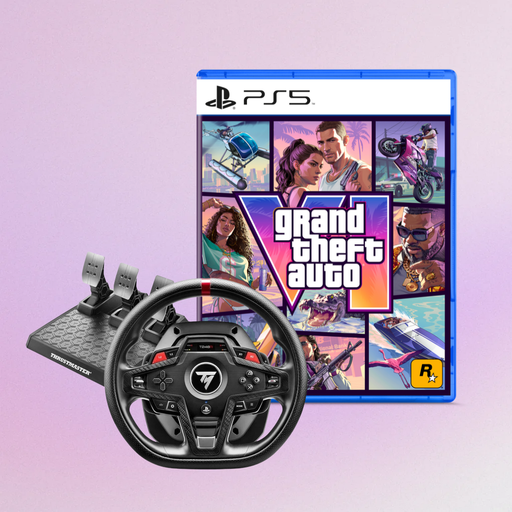
Thrustmaster T248R (PS5/PS4/PC) with GTA 6 PS5 German Edition
This wheel is worth considering if you race on PS5, PS4 or PC and the game version included meets your needs.
The product name lists GTA 6 PS5 German Edition as a code in a box. Before buying, check that the platform and bundle contents suit your setup.
View at Joybuy
 No image available
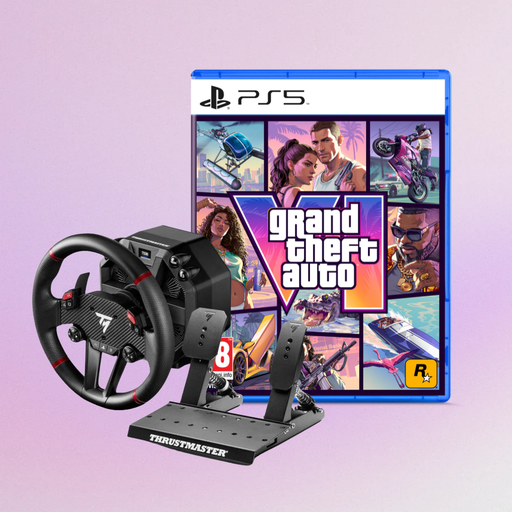
Thrustmaster T598-P (PS5/PS4/PC) with GTA 6 PS5 German Edition
For steering and braking on PS5, PS4 or PC, the product details say this set includes a Direct Axial Drive wheel and a pedal set.
The description lists 5 Nm of constant torque and Hall sensors in the pedal set. It also warns that the magnets are strong: keep the wheel away from pacemakers, credit cards and other objects sensitive to magnets. The bundle title lists GTA 6 PS5 German Edition as a code in a box.
View at Joybuy
 No image available
Thrustmaster T128-P (PC/PS4/PS5)
If you’re looking for a set for PC, PS4 or PS5, this wheel offers force feedback and comes with a T2PM pedal set.
The description lists two pedals, an automatically adjusted steering angle from 270° to 900° and a desk clamp for surfaces up to 5,5 cm thick.
View at Joybuy
 No image available
Thrustmaster T598-P (PS5/PS4/PC)
This set is suitable for steering and braking on PS5, PS4 or PC if you’re looking for a Direct Axial Drive wheel with a pedal set.
The description lists 5 Nm of constant torque and Hall sensors in the pedal set. It also warns that the magnets are strong: keep the wheel away from pacemakers, credit cards and other objects sensitive to magnets.
View at Joybuy
Frequently asked questions
Does the wheel need to support three monitors?
No. Set up the monitors separately from the wheel in your simulation. iRacing Support says this includes connecting them to the dedicated graphics card and entering your screen dimensions and seating position. Check the guide for the simulation you use.
How do I set up three monitors for iRacing?
From your usual seating position, measure the distance to the centre monitor, the screen width and the angle of the side monitors, then enter these values in iRacing’s display settings. iRacing Support also explains how to set up a window across three screens.
Does the MOZA R5 Racing Bundle work with a console too?
No. MOZA describes the R5 Racing Bundle as a PC version for Windows 10/11, not an Xbox or PlayStation set. Other combinations of bases and wheels are different.
What should I check on the mounting before racing?
Check that the base, clamp and pedals are secure, and inspect the cables for damage. MOZA states that the R5 bundle’s desk clamp fits desks up to 50 mm thick. Check separately that it suits your desk.
What rights do I have if a racing wheel bought online is faulty?
If you buy from a trader, you have statutory rights against the seller. For new goods, the period is generally two years from the date you receive them. The Verbraucherzentrale distinguishes these statutory rights from a voluntary guarantee. Online purchases also generally come with a 14-day right to cancel, subject to relevant exceptions. Your Europe and the Council of the European Union explain when this right applies.


