Oval beginners with a dedicated space
You want to practise regularly on the same virtual track and reliably calibrate your wheel and pedals. iRacing recommends calibrating when you first start the game and after connecting new controllers.


For oval-track practice, choose a set that works with your game and platform, and can be securely mounted with its wheel and pedals. An all-in-one set keeps getting started simple; the Direct Drive sets described here are designed for PC and require a suitable setup. A higher torque rating alone doesn’t prove you’ll learn faster: calibration and consistent laps are part of the practice too.
You want to practise regularly on the same virtual track and reliably calibrate your wheel and pedals. iRacing recommends calibrating when you first start the game and after connecting new controllers.
You want to adjust the force feedback and perhaps set up a PC simulator permanently. MOZA Racing and Fanatec offer Direct Drive PC bundles; make sure the mounting options and bundle contents suit your planned setup.
The key thing for you is whether the exact wheel variant works with your PlayStation or Xbox console and chosen game. Logitech G distinguishes between PlayStation/PC and Xbox/PC versions in its G29/G920 series; Thrustmaster lists the T248 for PlayStation and PC.
A good fit if: You want to get started with a wheel and pedals and keep your setup simple. Logitech G describes the G29 as a PlayStation/PC set; according to the manufacturer, the Thrustmaster T248 is designed for PlayStation and PC.
What to consider: Manufacturers describe different drive systems, but their specifications don’t prove you’ll complete oval laps faster. Check the exact variant and whether your game supports it.
A good fit if: You’re planning a permanent PC setup and want to adjust the steering feel. MOZA Racing lists a wheel, pedals and desk clamp in the R5 Bundle; Fanatec offers a PC package with a wheel and pedals.
What to consider: Torque figures are manufacturer specifications, not a measure of how quickly you’ll learn. With Fanatec, check whether the specific offer includes a suitable desk clamp.
For oval-track practice in a dedicated gaming room, first check that your platform and game are compatible. Then consider the steering feel and pedals, and finally plan the mounting and bundle contents around your available space.
| What matters | What to check before buying | Who should pay particular attention |
|---|---|---|
| Game and platform compatibility | Check the exact model and console or PC version, and make sure your chosen game supports it. | If you play on a particular console, the exact variant must work with your gaming system. Around 31% of consumers focus mainly on game and platform compatibility. |
| Steering feedback you can control | Compare the drive system and adjustment options, then calibrate the wheel in your game. iRacing requires calibration when you first start the game and after connecting new controllers. | When practising repeatedly, you’ll want to adjust the steering feel to suit you and calibrate the controls accurately. Around 31% of consumers prioritise controllable steering feedback. |
| Pedals that are stable and easy to modulate | Check the pedal set and mounting included with the specific bundle, then calibrate the pedal inputs in your game. iRacing notes that the appropriate Brake Force Factor setting depends on the type of pedals. | If you’re braking and accelerating repeatedly, the pedals should stay firmly in place and register your inputs reliably. Around 23% of consumers prioritise stable pedals that are easy to modulate. |
| Mounting and expansion | Check the bundle contents against your desk, stand or rig. MOZA Racing lists a desk clamp with the R5 Bundle; Fanatec sells a compatible CSL DD desk clamp separately. | If you’re setting up a permanent space, it’s worth planning the mounting and accessories from the outset. Around 15% of consumers put mounting and expansion first. |
Manufacturers’ torque figures alone don’t prove that a wheel will help you learn an oval track. A figure by itself also doesn’t tell you whether a wheel is compatible with your game and platform.
Compare complete sets that work with your system, and remember to allow time for in-game calibration.
Bundle contents vary: MOZA Racing lists a desk clamp as included with the R5 Bundle, while Fanatec sells a compatible CSL DD desk clamp as a separate product.
Check the contents of the specific offer and make sure the wheel and pedals can be mounted to your desk or rig.
Logitech G lists the G29 for PlayStation and PC, and the G920 for Xbox and PC. Models with similar names aren’t necessarily designed for the same console.
Check the full model name and platform information against your chosen game.
The G29/G920 series includes wheel and pedal sets for different platform versions.
According to Thrustmaster, the T248 is a PlayStation/PC set with hybrid force feedback and T3PM pedals.
The R5 Bundle is described as a PC-focused Direct Drive set for a dedicated sim racing setup.
The CSL DD Ready2Race BMW Bundle is described as a PC Direct Drive package with a wheel and pedals.
This selection includes racing wheels for a dedicated gaming space, with different platform specifications and bundle contents. Before buying, check that the exact variant works with your game and suits your available space.
 No image available
The product name lists PlayStation, Xbox, PC and Mac; before buying, check that the exact console variant works with your chosen game.
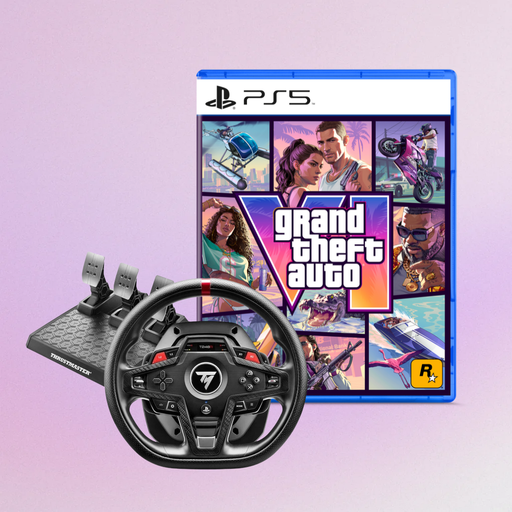
Described as a racing wheel and pedals bundle.
 No image available
The product name lists PS5, PS4 and PC; check that the included GTA 6 edition works with your platform.
The offer describes the racing wheel as a bundle with a PS5 edition of GTA 6.
 No image available
The product name lists force feedback, PC, PS4 and PS5; check that your specific game supports it.
The model is described as a force feedback racing wheel.
 No image available
The product name lists Direct Axial Drive, force feedback, PS5, PS4 and PC; check that the platform works with your game.
The model name identifies it as a Direct Axial Drive racing wheel.
 No image available
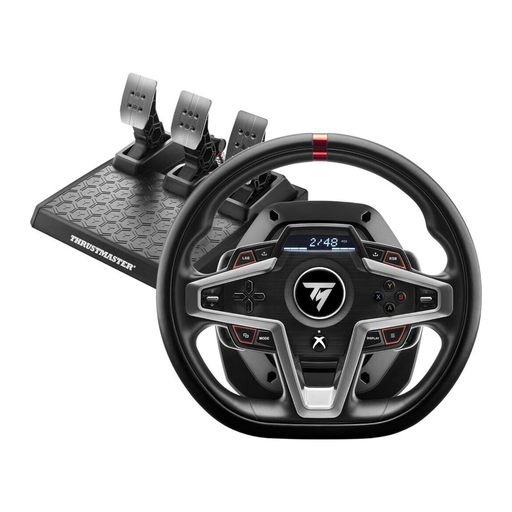
The product name lists Xbox Series X/S, Xbox One and PC; check that your chosen game supports it.
Described as a racing wheel with force feedback.
Secure the wheel and pedals, then calibrate the controllers in your chosen game. iRacing requires calibration when you first start the game and after connecting new controllers; afterwards, check the brake settings to make sure they suit your pedal type.
Manufacturer specifications don’t tell you how much torque you need to learn an oval track. Choose based on your platform, adjustable steering feel, pedals and suitable mounting. iRacing describes clean, consistent driving as a goal for beginners.
Check the full model name and stated platform version against your console and chosen game. Logitech G distinguishes between PlayStation/PC and Xbox/PC versions of the G29 and G920, so similar model names alone don’t confirm compatibility.
If you choose iRacing, you’ll first need a membership, according to iRacing. It includes the cars and tracks for the ranked Rookie series. Other cars or tracks you want may cost extra. This doesn’t automatically apply to other racing games.