Choose a racing wheel bundle that suits your gaming platform and can be mounted securely. For repeated pit entries, a brake pedal you can modulate and controls that are easy to reach and calibrate matter more than the highest possible torque rating. Displays and button mappings must be supported by the game and car you’re using. In iRacing, a pit limiter won’t brake for you: according to iRacing Support, you must slow down yourself before reaching the speed limit.
Who practises virtual pit entries?
Pit-entry practice
If you want to brake repeatedly before the speed limit and hit your turn-in point, pay particular attention to pedal feel, calibration and a stable setup. iRacing is a useful example of specific in-game rules; the iRacing Support guides cover pit limiters and controller calibration.
Single-monitor sim racers
If you want to check information and operate functions as you enter the pits without having to search for keyboard commands, check the displays and control mappings in your game and car. iRacing Support explains the Black Box displays and mappable controls available in iRacing.
Platform-specific buyers
If you play on a particular PC or console, you’ll need the right version of the wheel. Logitech distinguishes the G29 for PlayStation and PC from the G920 for Xbox and PC; MOZA Support describes the R5 Racing Bundle as PC-only.
What should you look for when buying?
| What to consider |
What to check |
Who is this especially important to? |
| Controllable braking |
Check the pedal set, brake feel and how securely the pedals can be positioned. Then calibrate the steering and brake in the game you use. iRacing Support explains calibration and car-specific settings. |
If I want to brake repeatedly before reaching the pits and adjust my speed under control, pedal feel is my priority; for around 33% of consumers, braking precision is the most important buying priority. |
| Platform and game |
Check the full model name and make sure your game supports it. Logitech assigns the G29 and G920 to different console families; MOZA Support says the R5 Racing Bundle is PC-only. |
If I race on a particular PC or console, I need a bundle that’s compatible with my exact platform; for around 27% of consumers, this is their top priority. |
| Controls for a single-monitor setup |
Check whether you can map the key functions and access the displays in your chosen car and game. iRacing Support explains the pit information and Black Box displays available in iRacing. |
If I want to keep an eye on my speed and key functions as I enter the pits, I need controls that are easy to reach; for around 20% of consumers, ease of use with a single monitor comes first. |
| Mounting and what’s included |
Check your desk thickness, the clamp supplied and the space available for the pedals against the details for the exact bundle. Thrustmaster says the T248R clamp fits desks up to 45 mm thick. |
If I want to set up the wheel and pedals securely in my existing space, the clamp and bundle contents are key; for around 20% of consumers, mounting and a complete bundle are the main priorities. |
Common misconceptions when buying a racing wheel
-
Assuming the pit limiter brakes for you
In iRacing, the limiter doesn’t slow the car down for you, according to iRacing Support. Not every car has a pit limiter either.
Practise your braking point and check which functions are available in your chosen car.
-
Assuming similar-looking wheels are interchangeable across consoles
Logitech assigns the G29 and G920 to different console families. With Fanatec, console compatibility depends on the specific licensed wheel base or compatible steering wheel.
Before you buy, check the full model name and the bundle’s platform compatibility.
-
Confusing a compatibility listing with a complete racing wheel bundle
A cockpit may list certain wheel models as compatible without including a wheel or pedals.
Check the product category and exactly what’s included, rather than relying on model names alone.
If the wheel and pedals aren’t included, you’ll need to buy these components separately.
-
Confusing peak torque with sustained torque
MOZA describes the R5 Racing Bundle’s 5.5 Nm as peak torque. This figure doesn’t show that the wheel can sustain the same torque, or that it offers a learning advantage.
Compare how manufacturers measure and report their figures, and assess the pedals, controls and mounting too.
Relevant brands and product ranges
Logitech G
The G29 and G920 are three-pedal bundles with dual-motor force feedback, designed for different console families and PC.
- Logitech lists the G29 for PlayStation and PC, and the G920 for Xbox and PC.
- The two versions aren’t interchangeable console options, so check the platform compatibility of the full model.
Thrustmaster
The T248R is a hybrid-drive option with controls for PlayStation and Windows PC.
- Thrustmaster lists 25 action buttons, a T3PM three-pedal set and a desk clamp that fits desks up to 45 mm thick.
- Check whether your game supports the displays and button functions you want to use.
MOZA Racing
The R5 Racing Bundle is a PC-focused direct-drive set with an ES steering wheel, SR-P Lite pedals and a desk clamp.
- MOZA lists peak torque for the R5 as 5.5 Nm.
- MOZA Support describes the R5 Bundle as PC-only; the peak torque figure isn’t a sustained torque rating.
Fanatec
The CSL DD QR2 Ready2Race Bundle with 5 Nm combines a direct-drive base, steering wheel, pedals and desk clamp for Windows PC.
- Fanatec lists the components of the PC bundle individually.
- The brand alone doesn’t guarantee PlayStation compatibility: according to Fanatec, this depends on having the right licensed base.
Racing wheels at Joybuy
The racing wheels listed here are for PC, PlayStation and Xbox platforms. Check that the full model is compatible with your game and platform.
 No image available
Logitech G923 SE Racing Wheel + Pedals Bundle
An option to consider if you’re looking for a racing wheel bundle for one of the platforms listed in the product name.
Platforms listed in the product name: PlayStation, Xbox, PC and Mac.
View at Joybuy
 No image available
Thrustmaster T598-P Direct Axial Drive Force Feedback Racing Wheel
An option to consider if you’re looking for a direct axial drive force feedback racing wheel for one of the platforms listed in the product name.
Platforms listed in the product name: PS5, PS4 and PC.
View at Joybuy
 No image available
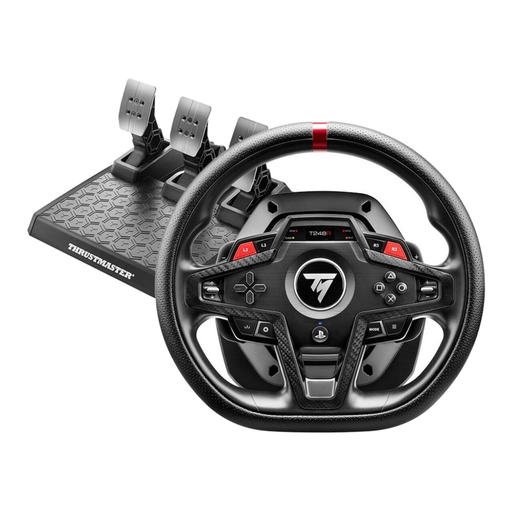
Thrustmaster T248R Racing Wheel – Black
If you race on PS5, PS4 or Windows PC and want to use controls on the wheel, the T248R is an option worth considering.
Thrustmaster lists 25 action buttons and a T3PM three-pedal set. The desk clamp is designed for desks up to 45 mm thick.
Whether the displays and button mappings you want will work depends on the game and car.
View at Joybuy
Frequently asked questions
Does a pit limiter automatically slow you down to the speed limit as you enter the pits?
Not in iRacing: according to iRacing Support, whether you use the manual limiter or the automatic one available there, you must brake sufficiently before entering the pits yourself. Whether a car has a mappable limiter and whether an assist is permitted in the session depends on the car and session.
How should I set up my wheel and pedals for repeated practice sessions?
In iRacing, calibrate your connected controllers using “Configure Controls”. You may need to recalibrate after switching USB ports. You can then map the functions available in your car, as described by iRacing Support.
What should I know about returning or making a claim for a racing wheel bought online?
If you buy from a trader, goods purchased in the EU are generally covered by a statutory guarantee of at least two years from the date you receive them. Online purchases generally come with a 14-day right to cancel, subject to legal exceptions. Your Europe and the Council of the European Union distinguish these rights from a voluntary manufacturer’s warranty.


