For repeatable virtual pit entries, your wheel and pedals need to fit securely on your desk, work with your platform and offer easy-to-reach buttons that you can assign in-game. An all-in-one set that’s quick to mount can make setup easier. With direct-drive bundles, take extra care to check desk stability, pedal grip and exactly what’s included. In iRacing, you need to brake before reaching the speed limit – the pit limiter won’t do it for you.
Who is a racing wheel on a small desk suitable for?
Drivers using a desk for more than one purpose
If you want to use your desk for work after driving, you’ll need a suitable mounting option and somewhere to store the wheel and pedals. Thrustmaster describes the T128 as having a quick-release clamp, but the fit will still depend on your desk.
Drivers practising virtual pit entries
When practising, controlled braking and an easy-to-reach button for in-game commands are important. iRacing says the pit limiter won’t slow you down before you reach the pit lane.
Sim racers tied to a particular platform
If you race on a specific console or PC, check the full model name against your system. Logitech lists the G29 and G920 for different console platforms, and the Thrustmaster T128 also comes in separate versions.
What should you look for when buying?
| Buying priority |
What to check before buying |
Who is it especially important to? |
| Mounting and space |
Check your desk thickness and available edge against the clamp range of the specific mount. Allow space for the pedals and cables. |
If I also use my desk for work, I want to be able to remove the wheel and put the pedals away. Around 36% of consumers put mounting and space first. |
| Braking and pit controls |
Make sure the pedals won’t slip and check whether the game you’re playing lets you assign a pit limiter for the vehicle. In iRacing, the limiter doesn’t replace braking to slow down. |
When practising a pit entry, I want to be able to brake and reach the button I need without relying on automatic deceleration. Around 29% of consumers prioritise braking and pit controls. |
| Platform and game |
Check the full model version against the specific console, PC and racing simulation you’ll use. |
If I already play on a particular console or PC, I don’t want to choose based only on a similar-sounding model name. Around 21% of consumers put platform and game first. |
| Upgrades and what’s included |
Check the parts list for the specific bundle, including pedals and a desk clamp. Don’t assume the mounts you need are included. |
If I want to expand my setup later, I first want to know which parts are included in the bundle I’m buying now. Around 14% of consumers put future upgrades first. |
Common buying mistakes
-
Putting torque ahead of your desk and pedals
A torque rating describes a particular model, but it doesn’t prove that the wheel will help you practise pit entries. In iRacing, you still need to brake before reaching the speed limit.
First, check that the desk mount fits and the pedals stay in place. Then compare force feedback and any plans you have for future upgrades.
Depending on your setup, you may need extra mounting hardware and space.
-
Assuming similar model names mean the same console version
Manufacturers assign models such as the Logitech G29 and G920, as well as the two T128 versions, to different platforms. Even if the wheel is compatible, that doesn’t guarantee a particular button will perform the function you want in-game.
Before buying, check the full model name, platform and control options in your game.
-
Assuming the product name tells you everything that’s included
The specific Fanatec CSL DD Ready2Race BMW Bundle with 8 Nm that we researched lists a desk clamp. That doesn’t mean other bundles include one.
Check the parts list for the specific offer to see whether it includes a wheelbase, wheel, pedals and clamp.
If a mount or pedals you need aren’t included, getting the right setup may cost extra.
Key brands to consider
Thrustmaster
The T128 is sold as an all-in-one set with a quick desk mount. Separate versions are available for PlayStation/PC and Xbox/PC.
- For the PlayStation/PC T128 we researched, Thrustmaster lists 13 buttons and a magnetic two-pedal set.
- Check you have the right platform version, that it fits your desk edge and that two pedals are enough for you.
Logitech G
The G29 and G920 are all-in-one sets with three pedals, designed for different console platforms.
- Logitech lists two force feedback motors and three pedals for these models.
- The G29 and G920 aren’t interchangeable when it comes to console choice. The Joybuy page we researched for the G29 showed it as unavailable.
MOZA Racing
According to the manufacturer, the R3 PC Bundle combines a direct-drive wheel with SR-P Lite pedals.
- MOZA lists 3.9 Nm for the PC bundle and adjustable pedal spacing.
- These manufacturer specifications don’t prove an advantage when practising pit entries. Check whether a clamp is included in the specific bundle.
Fanatec
CSL DD bundles are aimed at setups that can be expanded. The Fanatec CSL DD Ready2Race BMW Bundle with 8 Nm that we researched lists a desk clamp.
- Fanatec specifies a desk thickness of 5 to 60 mm for the CSL DD desk clamp.
- According to Fanatec, the clamp is designed for the CSL DD and Gran Turismo DD Pro. The stated thickness range doesn’t prove your desk will be stable.
Racing wheels for your desk
These Joybuy offers include racing wheels with pedal sets for virtual racing simulations. Before choosing, check the exact platform version, mounting options and what’s included.
 No product image available
Logitech G923 SE Racing Wheel + Pedals Bundle, PlayStation/Xbox/PC/Mac, Black
Described as a racing wheel with a pedal set; check the exact compatibility of this offer version with your console.
View offer
 No product image available
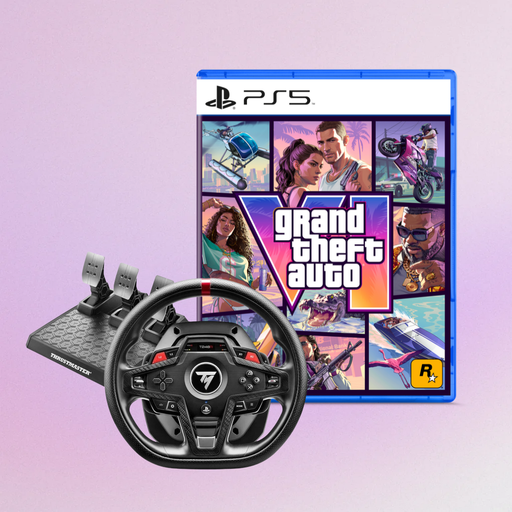
Thrustmaster T248R Racing Wheel, Black (PS5/PS4/PC) + Grand Theft Auto VI PS5 German Edition Bundle
The offer describes the wheel as compatible with PS5, PS4 and PC, and includes a GTA VI bundle for PS5. Check that both suit your system and the game you want to play.
View offer
 No product image available
Thrustmaster T128-P Force Feedback Racing Wheel, Black (PC/PS4/PS5)
The offer lists PC, PS4 and PS5. Check whether your specific simulation supports the button mapping you need for pit procedures.
View offer
 No product image available
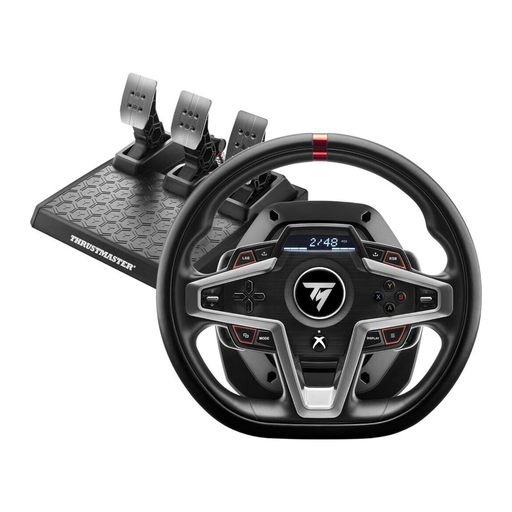
Thrustmaster T248X Racing Wheel with Force Feedback for Xbox Series X/S/One/PC
The offer lists Xbox Series X/S, Xbox One and PC. Check that it suits your system, and confirm your game settings support the pit functions you want.
View offer
Frequently asked questions
Will the pit limiter brake for me automatically when I make a virtual pit entry?
No. In iRacing, you need to brake and get below the speed limit before reaching the pit lane. According to iRacing, this still applies when the limiter is activated; also, not every vehicle has a pit limiter that you can assign to a button. Other simulations may have their own settings.
How do I set up buttons for pit procedures?
First, check your simulation’s control options. In iRacing, you can assign the pit limiter for vehicles with that feature, as well as pit macros, to buttons in-game. Choose a button you can reach while braking and test your settings before the race.
Will a desk clamp fit any small desk?
No. The suitable desk thickness and available edge depend on the clamp. Fanatec specifies 5 to 60 mm for its CSL DD desk clamp and limits compatibility to the CSL DD and Gran Turismo DD Pro. Also check the space underneath your desk; the thickness range alone doesn’t tell you whether your desk will be stable.
How do I check whether a racing wheel is compatible with my console?
Check the full model name against your console rather than choosing based only on the product family. Logitech lists the G29 and G920 for different console platforms, and the T128 also comes in separate PlayStation/PC and Xbox/PC versions. Also check that your simulation supports the features you need.


