What should you look for when buying?
First, check that the pedals can be mounted securely and that the pit-lane controls you need are within reach. Then check game compatibility, monitor setup and what’s included in the box separately.
| Buying priority |
What to check |
Who is it most important for? |
| Controlled braking |
Check the pedal mounting and pedal type; calibrate the brake in the game after connecting it. |
If you want to slow down repeatedly and under control before entering the pit lane, a stable pedal setup matters more than an isolated torque figure. Around 33% of consumers put braking control first. |
| Access to pit-lane controls |
Check that the buttons or encoders are within reach and can be mapped in the game you use. |
If you want to operate the limiter and other available pit-lane controls without taking your hands far from the wheel, the right inputs and the features of your chosen car matter. Around 27% of consumers prioritise these controls. |
| Setting up multiple monitors |
Check the wheel’s PC and game support separately from your graphics card connections and display settings. |
If you want to set up a multi-monitor display, don’t confuse racing wheel features with your graphics card and game settings. For around 20% of consumers, setting up the screens separately is the main priority. |
| Mounting and expandability |
Check the parts list, clamp, available mounting surface and compatibility with any accessories you plan to add. |
If you’re mounting your setup on a desk or in a cockpit, or want to add components later, the exact contents of the box are essential. Around 20% of consumers focus mainly on mounting and expandability. |
Racing wheels for PC and pit-lane practice
This Joybuy selection features PC-compatible racing wheels with brake pedals and controls you can map in-game. Multiple monitors need to be set up separately on your PC and in the game.
 No image available
Thrustmaster T598-P (PS5/PS4/PC)
A good option if you want to assign additional in-game actions using an encoder on your PC; the available functions depend on the game being supported.
Thrustmaster lists a multi-function encoder with 12 assignable actions for the T598. The set includes a Raceline Pedals LTE pedal set.
Securely mount the wheelbase and pedals to a stable structure before use.
View at Joybuy
 No image available
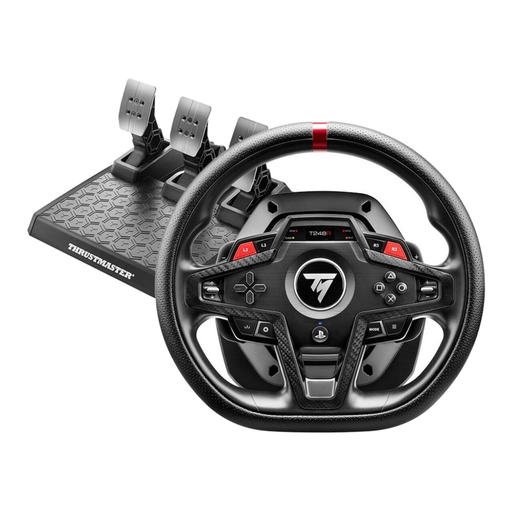
Thrustmaster T248R (PS5/PS4/PC)
An option if you’re looking for a PC-compatible set with a brake pedal and several mappable controls.
The product description lists a three-pedal set with a brake pedal and 25 action buttons.
According to the product description, the desk clamp is designed for desks up to 45 mm thick.
View at Joybuy
 No image available
Logitech G923 SE with pedals
An option for PC simulations if you’re looking for a set with a brake pedal and mappable controls.
The product description lists three pedals, including a brake, customisable button mapping and 900° of wheel rotation.
Before buying, check that the platform and power plug variant in the specific offer are right for you.
View at Joybuy
Frequently asked questions
Does the pit limiter automatically brake before you enter the pit lane in iRacing?
No. According to iRacing Support, neither the manual nor the automatic limiter brakes for you; you need to slow down below the speed limit yourself before entering the pit lane. Check separately whether the car you’re using has a manual limiter and whether the session allows automatic assistance.
Does a racing wheel need to support three monitors?
No. Setting up multiple monitors isn’t a racing wheel feature. For iRacing, Support explains that display setup depends on your PC, graphics card and game settings; check these separately from racing wheel compatibility.
What should I set up after connecting the racing wheel and pedals?
Calibrate the connected controllers in iRacing, then check the steering, accelerator, brake and button mapping. iRacing Support recommends recalibrating on first launch and after connecting new controllers; the Brake Force Factor depends on the pedal type.
Are a manufacturer’s warranty and your statutory rights for faulty goods the same thing?
No. A warranty is in addition to your statutory rights for faulty goods. The limitation period for the usual claims for defects specified by law is generally two years from delivery; the relevant legal requirements still apply. The Federal Ministry of Justice and the Federal Office of Justice set out these rules in the German Civil Code.
What should you know about CE marking on a racing wheel offered for sale in Germany?
Products covered by relevant EU harmonisation legislation must carry the required CE marking. Germany’s Federal Network Agency explains this requirement for products within its scope; check the marking and accompanying information for the specific model and the items included in the offer.


