Drivers practising pit-lane entries
If you want to practise braking and, where applicable, using the limiter, you’ll need controls that are easy to reach. As iRacing Support explains, the limiter doesn’t replace braking in iRacing.


For practising virtual pit-lane entries, choose a racing wheel set that’s compatible with your game and platform, has a brake pedal that stays firmly in place and puts the limiter button within easy reach. iRacing Support points out that the pit limiter doesn’t brake for you; you’ll need to set up your headphone and voice chat output separately in the audio settings. All-in-one sets include key components, while modular sets may offer other upgrade options. Before you buy, check the exact variant, what’s included and how it can be mounted.
If you want to practise braking and, where applicable, using the limiter, you’ll need controls that are easy to reach. As iRacing Support explains, the limiter doesn’t replace braking in iRacing.
First, choose a wheel version that’s compatible with your device and game. Platform compatibility details from Logitech G, Thrustmaster and Fanatec vary by model and combination.
If you’re practising in the space you already have, your wheel and pedals need to stay securely in place or be mountable. You should also set the game’s audio output to suit your headphones and voice chat; iRacing Support describes separate device options for this.
Start by checking the braking controls and compatibility with your game, then look at mounting and audio set-up. In iRacing, whether a limiter is available also depends on the car you’re driving and the session.
| What to consider | What to check before buying | Who is this important to? |
|---|---|---|
| Braking and limiter | Controls that are easy to reach, a stable pedal position, and limiter functionality in the specific car and game. | If I want to practise braking repeatedly before the pit lane, I need a brake I can control and a button that’s easy to reach. Around 36% of consumers put braking and limiter controls first. |
| Platform and game | Check the full model variant and whether the game you actually play supports it. | For consumers who want to keep using their current device, choosing the right platform version is essential. Around 29% prioritise compatibility with their platform and game. |
| Mounting and what’s included | Check whether pedals and a desk clamp are included and whether they’ll suit your practice space. | If I practise at my desk, the set-up needs to stay secure during repeated braking and include all the essential components. Around 21% of consumers prioritise mounting and a complete package. |
| Headphones and voice chat | Check the game’s audio output and microphone settings, as well as the cable routing around your wheel set-up. | For consumers who want to hear announcements through headphones, getting the audio and chat settings right matters more than an assumed audio feature on the wheel. Around 14% give this factor priority. |
In iRacing, the pit limiter restricts your speed but doesn’t brake the car for you. You’ll need to slow down in good time before entering the pit lane.
First, check the braking controls and pedal position. Then assign a button to the limiter, if the car you’re driving has this feature.
Platform compatibility and what’s included depend on the exact model variant and combination. Just because products belong to the same range doesn’t mean they have the same compatibility.
Compare the full variant name and the component list, including pedals and clamp. If a clamp is missing or doesn’t suit your space, you may need a different set-up or an additional component.
In iRacing, you choose the voice chat output device in the audio settings. An audio device that’s in exclusive use can also interfere with game audio.
Test the game audio and voice chat with the headphones you plan to use before deciding what you need from your wheel.
The G29 and G920 sets include a wheel and three pedals; the platform compatibility listed varies between them.
The T300RS GT Edition is a PC and PlayStation set with T3PA-GT pedals and an interchangeable wheel rim.
The R5 Bundle is a PC-focused direct-drive set with an ES steering wheel, SR-P Lite pedals and a desk clamp.
The CSL DD QR2 Ready2Race Bundle with 5 Nm is a modular PC package with a base, steering wheel, pedals and desk clamp.
Racing wheels and pedal sets for a range of PC and console set-ups; check that each variant suits your game and set-up.
 No image available
This bundle is an option if you’re looking for a wheel and brake pedal together to practise pit-lane entries.
According to the product description, it includes three pedals and built-in desk clamps. The product title lists PlayStation, Xbox, PC and Mac; check the exact version and whether your game supports it.
 No image available
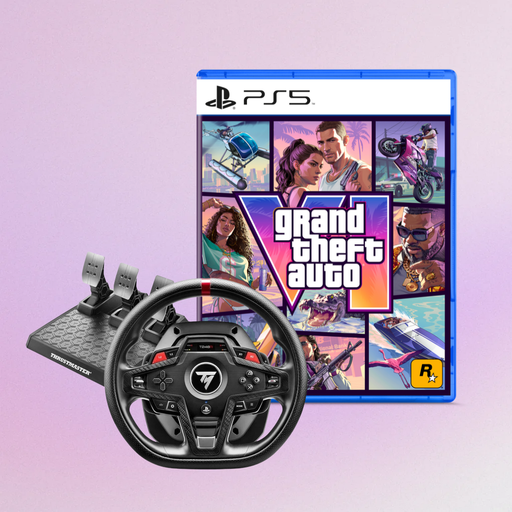
This wheel is worth considering if you’re looking for a model listed as compatible with PS5, PS4 or PC; check that it works with the specific game you play.
The product title also lists Grand Theft Auto VI for PS5 as a German Edition, Code in Box. This game offer is separate from the wheel’s platform compatibility.
 No image available
This set is an option if you’re looking for a force feedback wheel with pedals for PS5, PS4 or PC; check that the platform is compatible with your game.
The product description lists a detachable steering wheel and a Raceline Pedals LTE set.
In iRacing, the pit limiter doesn’t brake for you: you need to slow down to the applicable speed limit yourself before entering the pit lane. Whether a manual limiter is available or an automatic limiter is permitted depends, among other things, on the car and session; don’t assume the same rules apply in other games.
In iRacing, calibrate controllers the first time you connect them, or after reconnecting them. If needed, assign the pit limiter in the controls and select the right voice chat output device and microphone in the audio settings.
As the Verbraucherzentrale explains, the statutory warranty is generally a claim against the seller and is not the same as a voluntary guarantee. Consumers generally have a 14-day right to cancel an online purchase; check the terms of your specific contract.
As the Federal Environment Ministry explains, electrical waste must be collected separately and taken to an authorised collection point, such as a local authority facility, manufacturer or retailer. Retailers’ take-back obligations depend on certain conditions; don’t put a racing wheel in your household rubbish.