What should you consider when choosing?
Complete set with Logitech G923
A good fit if: you want to choose a wheel and pedals together, and the platform version is right for your system.
Bear in mind: TRUEFORCE extra effects require a compatible game, so check the exact version.
Belt drive with T300RS GT Edition
A good fit if: you want a set with a replaceable wheel rim and T3PA-GT pedals for a PC or PlayStation platform listed by the manufacturer.
Bear in mind: the GT Edition isn’t necessarily the same as other T300RS packages.
Direct Drive with MOZA R5 or Fanatec CSL DD
A good fit if: you want a PC set with a desk clamp and the option to add components from a compatible system.
Bear in mind: the bases and bundle contents vary. A higher stated torque rating doesn’t prove better track knowledge or faster lap times.
As iRacing Support explains, controller calibration and multi-screen setup are separate steps in iRacing. For other simulators, check their own settings.
| Priority |
What to check before buying |
Who is this important to? |
| Controlled braking |
Check the included pedals, how they’re secured and the calibration options in your game. Don’t assume standard pedals are the same as a load-cell brake. |
If I want to practise braking points repeatedly, a secure pedal position and suitable settings matter. Consumers who prioritise brake control may account for around 36%. |
| Steering feel and Force Feedback |
Compare the drive type and adjustability, and check which effects the specific game supports. |
When driving the same track repeatedly, I want steering feel I can tailor to my preferences. Around 29% of consumers prioritise steering feedback. |
| Setup and field of view |
Check that the desk clamp fits, and confirm that your computer, graphics outputs and game support multiple monitors. |
When I’m combining multiple screens with limited space, I need a setup that fits and an adjustable field of view. Consumers with this priority may account for around 21%. |
| Platform and what’s included |
Check the full model version, game compatibility and included parts, such as pedals or a clamp. |
Before buying, I want to be sure the exact version on offer works with my system and game. Around 14% of consumers prioritise compatibility. |
Racing wheels at Joybuy
The products below include racing wheels and pedal sets for repeated steering and braking. For each version, check the specific platform, the game you play and the full list of what’s included.
 No image available
Logitech G923 SE Racing Wheel + Pedals Bundle
With three pedals included, this set is worth considering for repeated steering and braking. Make sure you confirm the exact platform version before buying.
The product description lists Force Feedback, a 900° steering angle and three pedals for the accelerator, brake and clutch. The platform details in the listing are contradictory.
Joybuy
 No image available
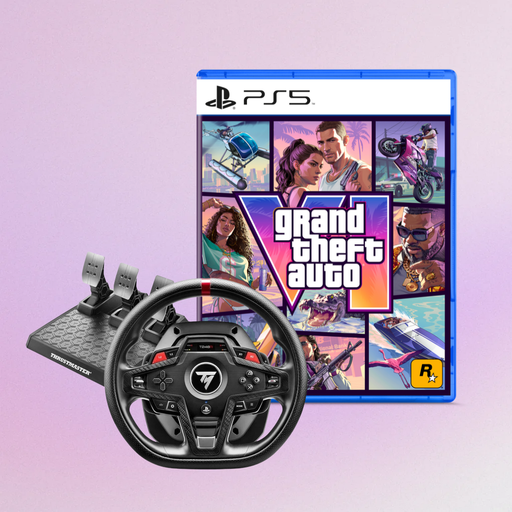
Thrustmaster T248R Racing Wheel, Black, PS5/PS4/PC, with GTA VI PS5 German Edition
The racing wheel named in the title is designed for repeated steering inputs in a racing simulator; check game compatibility first.
The product listing names PS5, PS4 and PC, as well as a GTA VI PS5 German Edition bundle.
Joybuy
 No image available
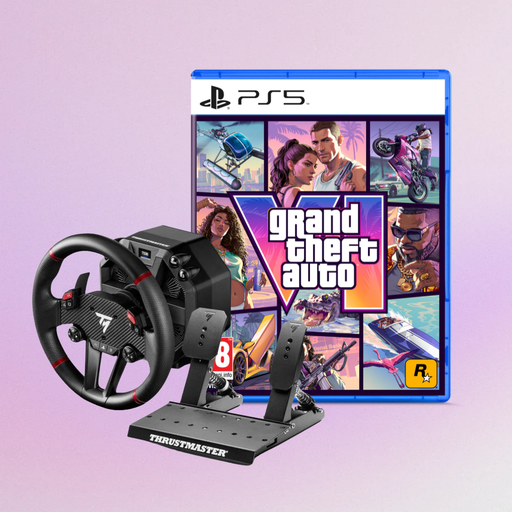
Thrustmaster T598-P Direct Axial Drive Force Feedback, PS5/PS4/PC, with GTA VI PS5 German Edition
This set is worth considering for repeated steering and braking, as long as your platform and game are supported.
The product description lists Hybrid Drive, an automatically adjusted steering angle of 270° to 900° and a two-pedal T2PM pedal set. The desk clamp is specified for desks up to 5.5 cm thick.
Joybuy
 No image available
Thrustmaster T128-P Force Feedback Racing Wheel, Black, PC/PS4/PS5
This racing wheel is designed for repeated steering and braking; check that your game supports the platform you use.
The product description lists Hybrid Drive, a steering angle of 270° to 900°, magnetic paddle shifters and a T2PM pedal set for the accelerator and brake. The desk clamp is specified for desks up to 5.5 cm thick.
Joybuy
Frequently asked questions
Do I need a special wheel because I have three monitors?
No, not just because of the number of monitors. In the documented iRacing setup, you configure the screens through your computer or graphics solution, then enter monitor values in the simulator. Check support for the specific game you play separately; the wheel is set up as a controller.
How do I set up my wheel and pedals for repeated practice?
As iRacing Support explains, you need to calibrate controllers the first time you start iRacing or after connecting new devices. Assign steering, accelerator and brake, then check the brake settings to suit your pedal type. These steps aren’t a general guide for every game.
Do all Direct Drive products include a clamp and pedals?
No, it depends on the specific package. The manufacturers list pedals and a desk clamp for the MOZA R5 and Fanatec CSL DD Ready2Race bundles described here, but you can’t assume that individual bases or other bundles include them. Check the parts list before buying.
What are my rights in Germany if I buy a faulty product from a trader?
For consumer purchases in the EU, the statutory guarantee lasts for at least two years from the date you receive the goods, as explained by the European Union’s Your Europe service. If a product is faulty, the seller may first be required to repair or replace it free of charge. A voluntary manufacturer’s warranty is separate; the requirements for each claim depend on the purchase and the fault.
Can I put an old electric racing wheel in household waste?
No. Germany’s Federal Ministry for the Environment explains that old electrical equipment must not go in household waste; local collection points accept it. Whether a retailer has to take it back depends on the applicable legal requirements.


