Start by choosing a wheel and pedal set that works with your game and platform, and can be mounted securely. For consistent practice, look for a brake pedal you can control and adjustable force feedback; a single torque figure on its own is no proof of a training advantage. With a single monitor, you’ll also need to get your seating position and field of view right, and your game must support wet-weather driving for the content you’ve chosen.
Which setup is right for you?
Practising wet-weather lines
You want to understand how steering response and grip change over repeated wet laps. Your game and its content need to support wet-weather driving; iRacing Support explains that the usual, heavily used racing line can be particularly slippery in the rain.
Practising braking points
You want to practise consistent inputs under braking, so you’re comparing the pedals and wheel as a set. Check which pedals are included with the specific set and how they can be secured in your chosen space.
Single-monitor desk racers
You’re setting up the set in the space you already have, so you’ll need to consider the desk mount, platform version and your seating distance together. For a single-monitor setup, iRacing Support recommends measuring the distance from your eyes to the screen while sitting in your usual position.
What should you look for when buying?
First, check that the game and platform are compatible with the complete set and that it can be mounted securely. Then consider the brake pedal and force feedback settings, rather than judging a wheel by a single torque figure.
| What matters to you |
What to check before buying |
Who it matters most to |
| Steering feedback as grip changes |
Check that the force feedback is adjustable, supported by the game you use and paired with a secure mounting solution. A higher stated torque figure alone is no proof of a training advantage. |
If I want to compare steering response and grip changes over wet laps, I pay particular attention to getting suitable, adjustable feedback. Around 33% of consumers have this as their main concern. |
| Consistent braking and acceleration inputs |
Compare the pedal type and what’s included with the specific version. Also check that the pedals will stay firmly in place where you plan to use them. |
If your main aim is to practise consistent braking, you need pedals that suit your setup and can be positioned securely. Around 27% of consumers prioritise brake control. |
| Platform and wet-weather content |
Check the full model name, platform compatibility and game. iRacing Support lists rain-enabled cars and track configurations, so check that the content you use is included. |
If I first want to make sure the set and game work on my platform, I check the exact version. Around 20% of consumers prioritise this compatibility. |
| Mounting and field of view on a single monitor |
Check how the wheel mounts to your desk or rig. For iRacing, measure the screen width and the distance between your eyes and the screen from your usual seated position. |
If you race at a desk with a single monitor, you’ll need to make sure the mounting and seating position work in your available space. Around 20% of consumers consider space and field of view essential. |
Common buying mistakes
-
Assuming similar model names mean the same platform compatibility
Logitech lists the G29 and G920 for different console platforms. With Fanatec, PlayStation use depends on having a wheelbase licensed for it.
Before buying, check the full model and bundle name against your platform and the game you use.
-
Taking a high torque figure as proof of better wet-weather training
Manufacturers’ figures may describe different products and measurement standards. On their own, they prove neither faster lap times nor training success.
Instead, compare the pedals, adjustment options and how securely the specific set can be mounted.
-
Expecting the wheel to sort out your single-monitor field of view
When setting the field of view in iRacing, screen width and the distance from your eyes to the screen both matter. Choosing the right wheel won’t take care of this setup for you.
Set up your seating position first, measure the required values, then configure the field of view in the game.
-
Assuming an accessory or cockpit is a complete wheel set
A cockpit described as compatible may be supplied without a wheel or pedals.
Check the product category and what’s actually included, rather than relying on the model names in the title alone.
Brands and suitable model ranges
Logitech G
The G29 and G920 are complete sets with a wheel and pedals. The right version depends on whether you use PlayStation or Xbox.
- Logitech G lists two-motor force feedback and three adjustable pedals for the G29 and G920.
- The G29 and G920 aren’t interchangeable console versions, and neither is proven to offer a particular advantage on wet tracks.
Thrustmaster
The T300RS GT and T248 are different models, with different drive systems, pedal sets and platform compatibility.
- Thrustmaster lists a dual-belt drive and T3PA-GT pedals for the T300RS GT. The T248 comes with magnetic pedals and several force feedback presets.
- You shouldn’t assume the T300RS GT’s features and platform compatibility also apply to the T248.
Fanatec
The documented CSL DD QR2 Ready2Race Bundle is a PC setup that includes a wheelbase, wheel, pedals and desk clamp.
- Fanatec lists the bundle with 5 Nm of torque and a desk clamp included.
- PlayStation use requires a wheelbase licensed for it; the PC setup described isn’t automatically compatible with PlayStation.
MOZA Racing
According to MOZA, the R5 Racing Bundle includes a direct-drive base, an ES steering wheel, SR-P Lite pedals and a desk clamp for PC.
- MOZA lists a peak torque of 5.5 Nm and software settings for the R5 bundle.
- MOZA Support describes the complete R5 bundle as PC-only. Xbox compatibility listed for a different base and wheel combination doesn’t automatically apply to this bundle.
Racing wheels at Joybuy
This selection includes racing wheel sets for force feedback practice and mounting in your existing gaming space. Check the platform compatibility, bundle contents and mounting options for the version you’re considering.
 No image available
Thrustmaster T598-P Direct Axial Drive Force Feedback Racing Wheel (PS5/PS4/PC)
An option for shoppers looking for a force feedback wheel with pedals for one of the platforms listed.
Platforms listed in the product name: PS5, PS4 and PC. The wheelbase and pedals need to be secured to a stable setup.
View at Joybuy
 No image available
Logitech G923 SE Racing Wheel with Pedals
A good option for shoppers who want to choose a wheel and pedals together.
Before buying, check that the specific version is compatible with your game and console or PC.
View at Joybuy
 No image available
Thrustmaster T128-P Force Feedback Racing Wheel (PC/PS4/PS5)
This version may suit shoppers looking for a force feedback wheel with pedals for one of the platforms listed.
The desk clamp is specified for desks up to 5.5 cm thick.
View at Joybuy
 No image available
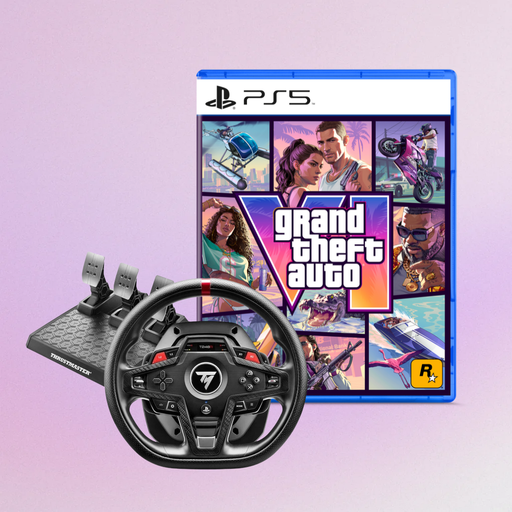
Thrustmaster T248R Racing Wheel, Black, bundled with Grand Theft Auto VI (PS5, German Edition, code in a box)
This bundle is an option for shoppers choosing a racing wheel for PS5, PS4 or PC who also want to consider the included game version.
The product name lists PS5, PS4 and PC as compatible platforms. The bundle also includes Grand Theft Auto VI for PS5 as a code in a box.
View at Joybuy
Frequently asked questions
Can I practise a wet racing line with the wheel alone?
Only if the game supports wet-weather driving for the content you’re using. iRacing Support lists rain-enabled cars and track configurations; according to iRacing, the usual, heavily used racing line can be particularly slippery in the rain.
How do I set up a single monitor for practice?
For iRacing, measure the shortest distance between your eyes and the screen, as well as the screen width, while sitting in your usual position. Enter both values in the single-monitor setup so the game can calculate your field of view.
Can I simply use a PC direct-drive bundle with a PlayStation later?
Not necessarily. Fanatec requires a wheelbase licensed for PlayStation use; the documented CSL DD bundle is a PC setup. MOZA Support describes the R5 bundle in question as PC-only.
What are my rights when shopping online in Germany?
For covered online purchases made by consumers, there is generally a 14-day cancellation period from delivery; exceptions and possible return costs should be taken into account. The European Union’s Your Europe website distinguishes this right to cancel from the statutory guarantee for faulty goods, which lasts for at least two years from receipt.


