First, choose a wheel and pedal set that’s compatible with your gaming platform and can be securely fixed in place. Consistent braking and steering inputs also depend on your pedals and seating position. Stronger force feedback won’t widen the view on a single monitor, so make sure you set the field of view to suit your setup in the game.
Which setup is right for you?
Beginners with a desk setup
If you want to practise on a single monitor and buy a wheel and pedals together, check the exact platform version and how it’s secured. Logitech lists the G29 for PlayStation and PC, and the G920 for Xbox and PC. According to MOZA, the R5 Bundle includes a desk clamp, wheel and pedals.
Drivers focused on braking points
If you’re practising tight corners and braking zones repeatedly, make sure your pedals are positioned correctly and your setup is secure. Thrustmaster and MOZA sets differ in the pedal sets they include and the adjustments they offer. The steering torque alone won’t tell you how consistent your inputs will feel.
PC sim racers looking to upgrade
If you’d like to adjust your wheel rim, pedals or force-feedback settings later, compare an expandable belt-driven system with a PC Direct Drive bundle. Thrustmaster lists additional wheel rims and the T-LCM pedal set as separate purchases, while MOZA says the R5 Bundle can be configured through Pit House.
What should you look for when buying?
When practising on a virtual urban circuit with a single monitor, the order of your priorities will depend on whether platform compatibility, using the wheel at a fixed spot, your cockpit view or future upgrades matters most to you.
| What matters when buying |
What to check |
Who it matters most to |
| Platform and complete set |
Check the exact wheel version, supported platform and included pedals against the game you play. |
If I want to buy a wheel and pedals together for my existing system, I need to make sure I don’t choose the wrong console version. This is a priority for around 30 % of consumers. |
| Braking and mounting |
Check the pedal set, desk clamp and space available for a consistent seating position. |
If I want to repeat braking and steering inputs at my usual spot, the pedals and wheel need to be easy to use there. Around 30 % of consumers put this first. |
| Field of view on a single monitor |
Before changing hardware, check your game’s monitor, field-of-view and seating-position settings. |
If I want a better view of tight corners on one screen, I should first adjust the view to suit my monitor width and viewing distance. This matters most to around 20 % of consumers. |
| Force feedback and upgrades |
Compare the drive type, platform, bundle contents and separately available upgrades. |
If I want to adjust settings or components on my PC later, I’ll compare the specific upgrade options rather than looking only at a torque figure. This is a priority for around 20 % of consumers. |
Common buying mistakes
-
Assuming the G29 and G920 are interchangeable console versions
Logitech lists the G29 for PlayStation and PC, and the G920 for Xbox and PC. Similar model names don’t mean that both versions support the same consoles.
Check the exact model name in the listing against your console and the stated platform compatibility.
-
Expecting more steering torque to fix a restricted field of view
On a single monitor, your cockpit view also depends on screen width, viewing distance and the game’s camera settings. Changing your wheel won’t affect these factors.
First check your simulation’s monitor and seating-position settings, then compare wheels for fit and ease of use.
-
Confusing a standalone base or accessory with a complete set
What’s included varies by model and version. According to Thrustmaster, the T300RS GT Edition includes T3PA-GT pedals; additional wheel rims and the T-LCM pedal set are sold separately. MOZA lists a wheel, pedals and desk clamp in the R5 Bundle.
Check what’s included with the exact version before relying on the product-line name.
If you want to use a different wheel rim or a separate pedal set, you may need to buy an additional accessory.
Key brands at a glance
Logitech G
The G29 and G920 are complete sets for different console versions and PC.
- Logitech lists three pedals and dual-motor force feedback as features.
- The G29 is listed for PlayStation and PC, while the G920 is listed for Xbox and PC. These specifications don’t demonstrate an advantage in lap times.
Thrustmaster
The T300RS GT Edition is a PC and PlayStation set with an interchangeable wheel rim.
- According to Thrustmaster, the set includes a brushless motor, a dual-belt system and T3PA-GT pedals.
- Additional wheel rims and the compatible T-LCM pedal set are sold separately. Claims that it offers a particularly smooth driving feel come from the manufacturer.
MOZA Racing
The R5 Racing Bundle pairs a compact Direct Drive base with a wheel, pedals and desk clamp for PC.
- MOZA lists 5,5 Nm of peak torque and adjustment options in Pit House.
- The stated peak figure isn’t an independent real-world test. The bundle page described doesn’t list console support.
Racing wheels at Joybuy
The following Joybuy products include racing wheel and pedal sets for PC, and—depending on the exact version—for PlayStation or Xbox systems. Before buying, check the platform compatibility and what’s included with each version.
 No image available
Logitech G923 SE racing wheel and pedal set
For a desk setup, provided you check the exact console version against your system before buying.
- Force feedback
- Steering angle: 900°
- Three pedals and pressure-sensitive brake
- Integrated desk clamps
View at Joybuy
 No image available
Thrustmaster T128-P force-feedback racing wheel
For desk-based throttle and braking inputs, if PC or PlayStation is listed as compatible with your system.
- Hybrid Drive
- Automatically adjustable steering angle: 270° to 900°
- T2PM pedal set with two pedals
- Desk clamp for desks up to 5,5 cm thick
View at Joybuy
 No image available
Thrustmaster T598-P Direct Axial Drive force-feedback racing wheel
For PC or PlayStation, if you’re looking for an included pedal set and the option to mount it on a rig or desk.
- Removable wheel with paddle shifters and display
- Raceline pedal set included
- Listed for PlayStation 5, PlayStation 4 and PC
View at Joybuy
 No image available
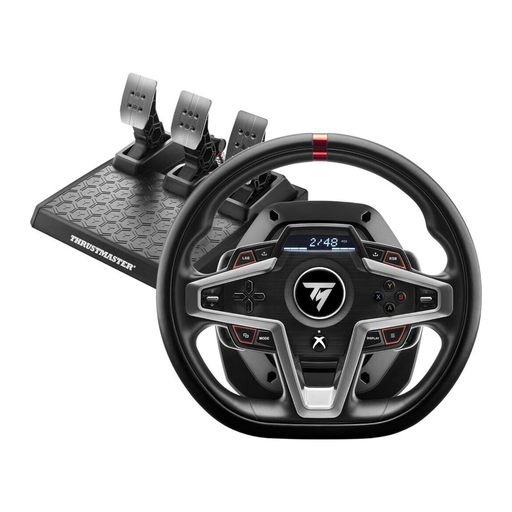
Thrustmaster T248X racing wheel
For an Xbox or PC setup, provided the stated compatibility matches your system.
- Force feedback
- Listed for Xbox Series X/S, Xbox One and PC
View at Joybuy
Frequently asked questions
How do I set up the view for a single monitor?
If you use iRacing, measure the screen width and the shortest distance between your eyes and the monitor surface in your usual driving position. Enter these measurements in the monitor settings and use the calculation tool. You can then adjust the horizon and driver height. Other games have their own settings menus.
Are the Logitech G29 and G920 compatible with the same consoles?
No. Logitech lists the G29 for PlayStation and PC, and the G920 for Xbox and PC. Check the exact model version against your console rather than relying on the similar model names.
Do I need different pedals straight away for the Thrustmaster T300RS GT Edition?
No. According to Thrustmaster, the set includes three T3PA-GT pedals. The compatible T-LCM pedal set is available separately and isn’t part of the stated package.
What is the right to cancel for online purchases in Germany?
Consumer contracts made at a distance generally come with a right to cancel under § 312g BGB; § 355 BGB sets out a 14-day period. Statutory exceptions and when the cancellation period starts depend on the applicable conditions, including those in § 356 BGB. This information relates to German law.


