If several people are speaking at the same time and you want to edit their dialogue separately later, you’ll need separate microphone inputs and suitable microphone positions. For a single voice, USB is often easier to connect to a computer; sharing one microphone saves on setup but gives you less control over individual voices and desk noise. Samson describes a multi-microphone setup using a mixer, while Audio-Technica points out that using several USB microphones together on the same computer isn’t always straightforward.
Which setup is right for you?
Radio play team recording dialogue
If you sometimes speak at the same time and want to adjust each voice separately during editing, having enough separate recording inputs is essential. Samson describes connecting several XLR microphones to a mixer, while Zoom gives multiple XLR/TRS inputs as an example of a recorder with several inputs.
Recording at a busy desk
If keyboard, movement or room noise is likely to be picked up alongside voices, check the microphone’s direction, speaking distance and mounting options with your actual setup. Shure describes the SM58’s cardioid pattern as being directed towards the main sound source; it won’t eliminate all background noise.
Single voice with a simple setup
If you’re recording roles one at a time on a computer and want to get started without a separate interface, a USB microphone can make connecting everything simpler. Audio-Technica describes USB as a direct connection option; check the specific model for a headphone socket and what’s included, too.
What should you consider when choosing?
If you’re recording a radio play at a shared desk, your choice will mainly depend on whether you want to edit voices separately, how the microphone connects and how you plan to record the scene.
| What you need |
What to look for when buying |
Who is it most relevant to? |
| Voice and desk noise |
Check the microphone’s polar pattern and speaking direction; allow room for close placement and a suitable mount. |
If you want to record your voice despite keyboard and movement noise, microphone positioning is particularly important. For around 33% of consumers, controlling this kind of background noise is the top priority. |
| Separate dialogue tracks |
Check how many microphone inputs and recording tracks can be used at the same time; using several USB microphones together isn’t automatically straightforward. |
If several people are speaking at the same time and you want to adjust each voice individually during editing, you’ll need a suitable multi-track recording setup. Separate dialogue tracks are the priority for around 27% of consumers. |
| Easy computer connection |
Check the USB connection, computer compatibility and included accessories; if you choose XLR, consider the complete signal chain. |
If you’re recording roles one at a time on a computer and want to start with as few devices as possible, an uncomplicated connection matters. Around 20% of consumers prioritise a direct connection to their computer. |
| Recording scenes together |
Check seating arrangements, speaker distances and room acoustics with a test recording; recording together means less individual control. |
If you’re happy to record a scene together and don’t need individually editable voices, pay particular attention to where everyone is positioned. This recording approach is the priority for around 20% of consumers. |
Common buying mistakes
-
Choosing one microphone for everyone when roles are spoken at the same time
A shared recording won’t give you the same individual level control as separate microphone inputs.
Before you buy, decide how many people will be speaking at once and which voices need their own tracks.
You may need additional microphones and suitable recording inputs later to create separate tracks.
-
Assuming XLR plugs straight into a laptop as a complete recording solution
An XLR connector on its own doesn’t provide a suitable microphone input for your computer. In a 2012 guide, Shure Germany describes level and noise problems when connecting an XLR microphone directly to a laptop’s microphone input.
Check the complete signal chain instead of comparing connector types alone.
Depending on your existing setup, you may need a suitable interface or recorder, as well as cables and a mount.
-
Assuming directional recording removes all background noise
A cardioid pattern reduces sound from certain directions, but you’ll still need to consider microphone position, the room and movement around the desk.
Test your planned speaking distance and typical desk movements in a trial recording.
-
Planning to use a hybrid microphone’s two connections as two simultaneous tracks
According to RØDE Support, the RØDE PodMic USB can’t use USB and XLR as audio outputs at the same time.
Check whether the specific model can use its outputs simultaneously. For separate speaker tracks, plan for separate microphone inputs.
Key microphone brands at a glance
Shure
Models for different connection options, from dynamic XLR microphones to USB-C/XLR hybrids.
- Shure says the SM58 has a cardioid polar pattern and an integrated pop filter.
- For computer recording over XLR, you’ll need a suitable signal chain. The manufacturer’s claims about noise processing on the MV7+ aren’t independent proof that it will deliver a noise-free radio play recording.
RØDE
The PodMic USB combines USB-C and XLR for different connection options.
- The manufacturer’s guide lists a cardioid polar pattern, an internal pop filter and shock mounting.
- According to RØDE Support, USB and XLR audio can’t be output at the same time. The two connections therefore don’t provide two parallel speaker tracks.
Audio-Technica
The ATR2100x-USB is a dynamic USB/XLR handheld microphone for recording individual roles or setting up an XLR system.
- The German product page lists a cardioid polar pattern, a headphone socket, a desktop stand, and USB and XLR cables.
- When several people are speaking at the same time, one microphone doesn’t replace additional microphones or separate inputs.
Sennheiser
The Profile USB is a USB-C condenser microphone for a thoughtfully arranged workspace and for recording together or one voice at a time.
- According to the product page, it has gain, mix and volume controls, a headphone output and a desktop stand.
- USB-C power and a shared recording path don’t replace separately connected microphones for each speaker.
Samson
The Q2U is a dynamic USB/XLR model supplied with accessories for a compact setup.
- Samson lists a microphone clip, desktop stand, windscreen, USB and XLR cables, and direct headphone monitoring as features or included accessories.
- At a shared desk, check whether the desktop stand can be positioned suitably and whether movement across the desk could affect your recording.
Joybuy products for voice recording
The products below cover a range of voice recording setups, from multi-microphone and wireless kits to individual USB/XLR microphones.
 No image available
Yinkaer G10-P17-P17 podcast kit with two microphones and mixer
An option if you want to use two microphones and a mixer for a multi-person setup.
The set includes two 3.5 mm condenser microphones with desktop stands and an audio mixer.
View at Joybuy
 No image available
Moman MC1(C) lavalier microphone system, 1TX & 1RX
This system may suit a two-person recording if a lavalier microphone works better for your setup than a stand on the desk.
2.4 GHz; USB-C receiver for a compatible device. The product details list one transmitter and one receiver.
View at Joybuy
 No image available
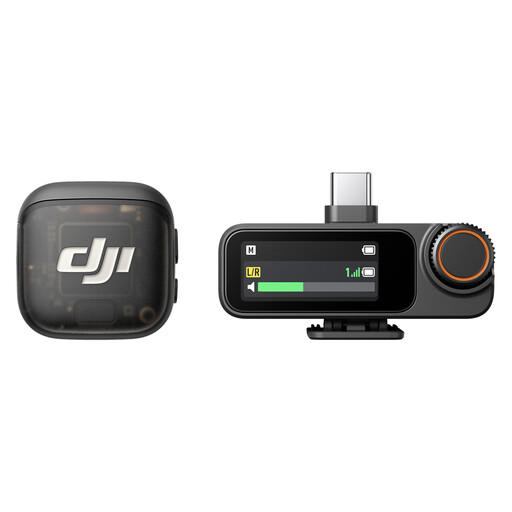
DJI Mic 3, 2 TX + 1 RX + Charging Case
The configuration with two transmitters and one receiver is designed for a recording setup with two speakers.
The product name lists two transmitters, one receiver and a charging case.
View at Joybuy
 No image available
FIFINE K688CTW dynamic USB/XLR microphone with boom arm, white
The boom arm may suit you if you want to position a dynamic microphone close to one person speaking.
USB and XLR connections; XLR cable not included. The microphone controls are inactive when connected via XLR.
View at Joybuy
 No image available
FIFINE AM8 dynamic USB/XLR microphone with desktop stand
If you want to record one voice on a computer, this model offers USB connectivity and a desktop stand. Check whether you can position the stand suitably on your shared desk.
USB and XLR connections. XLR cable and boom arm not included; the microphone controls are inactive when connected via XLR.
View at Joybuy
Frequently asked questions
Can I simply connect two USB microphones and record them separately?
Not without checking the entire recording setup. Audio-Technica points out that using two USB microphones at the same time isn’t straightforward. If you need separate speaker tracks, check your software and operating system, or plan a recording setup with enough suitable microphone inputs.
How should I position a close-talk microphone at a shared desk?
Point the microphone’s speaking side towards the person, allow room for the mount and cable, and listen back to a test recording featuring normal speech and typical desk movements. RØDE recommends a mouth-to-microphone distance of around 5–10 cm for the PodMic USB. This recommendation applies to that model, not all microphones.
What extra equipment might I need for an XLR microphone?
If you don’t already have a suitable recording setup, you’ll need an appropriate microphone input, such as one on an interface or recorder, and possibly cables, a mount and headphones. Check what’s included with the specific model; a simple XLR-to-jack adapter won’t reliably solve the level issue when connecting to a laptop.
Can I record any conversation I can hear at a shared desk?
Not without authorisation: under § 201 StGB, recording another person’s non-public spoken words without authorisation is a criminal offence. Before recording, check who might be heard and obtain the necessary permission. Permission to record doesn’t automatically mean you’re allowed to publish the recording, too.
What should I check before publishing a radio play that uses someone else’s music?
If you’re making the recording publicly available online, you’ll need to consider the rights to the music used. GEMA describes licensing for music in its repertoire used in podcasts; you’ll need to check separately whether that tariff applies to your specific radio play and how you plan to publish it. This doesn’t affect buying a microphone if you aren’t using this kind of music.


