For people who write a lot at a fixed desk
If you write and edit long sections of a script, look for a keyboard with a key action that suits you and that can be positioned comfortably at your desk.


For writing a radio script across two screens, a compact keyboard without a number pad is a good choice if having more room for your mouse matters more than entering numbers frequently. A split keyboard is worth considering if you’d like to try a different key layout and can allow time to get used to it. A keyboard with device switching is mainly useful if you actually work across several computers – not simply because you have two screens.
If you write and edit long sections of a script, look for a keyboard with a key action that suits you and that can be positioned comfortably at your desk.
If your script and research are open across two screens, having room for your mouse may matter more than a number pad – especially if you only enter numbers occasionally. The DGUV lists compact keyboards without a numeric section as a possible option if you enter few numbers or prioritise mouse use.
If you switch between computers while writing, you could consider a keyboard with device switching. Logitech lists the MX Keys S as a model compatible with Easy-Switch; CHERRY describes the STREAM KEYBOARD ULTIMATE as having four connection channels.
When writing a radio script across two screens, the most important things to consider depend on how you type, how much space you have and whether you use more than one computer.
| Buying consideration | What to look for | Who is it important for? |
|---|---|---|
| Key action and noise | Check the key layout, key action and noise level at your own workstation. CHERRY describes the STREAM KEYBOARD TKL’s key action as quiet. | When I’m writing and editing long sections of a script, I want a key action that feels comfortable to me, without the sound of typing becoming a distraction at my desk. Around 33% of consumers rank key action and noise as their top consideration. |
| Hand position and getting used to the keyboard | Check the split keyboard layout, dimensions, wrist rest and connection for the specific model; a different layout may take some getting used to. | During longer writing sessions, I want to find out whether a split keyboard suits the way I position my hands, and I can allow time to get used to it. Around 25% of consumers put hand position first. |
| Space for your mouse and documents | Check the space available, mouse position and how often you enter numbers. According to the DGUV, a compact keyboard may be an option if you enter few numbers or prioritise mouse use. | If I need my desk to have room for my mouse and documents as well as two screens, I want to know whether I can do without a separate number pad. Around 25% of consumers prioritise available space. |
| Switching between computers | First check whether you use more than one computer; then check which devices and connections the specific keyboard supports. | If I really do work on the script across different computers, I want to switch between them easily; having two screens connected to one computer alone doesn’t make this feature necessary. Around 17% of consumers put device switching first. |
Switching features such as Easy-Switch let you switch between devices, not between windows on two monitors connected to the same computer.
First, check how many computers you actually work on. Only then choose the number of connection channels you need.
A TKL keyboard doesn’t have a separate number pad. If you use one often, this could make your work more difficult.
Think about how often you enter numbers as part of your script-writing and production work.
If you regularly need to enter numbers, you may also need a separate number pad.
The key layout may differ from a conventional keyboard. Perixx specifically notes that the PERIBOARD-512 B takes time to get used to.
Check that the layout suits the way you type, and allow time to try it out. Manufacturers’ claims about comfort are not a guarantee of health benefits.
The STREAM KEYBOARD TKL is a compact, wired range without a number pad. According to CHERRY, the STREAM KEYBOARD ULTIMATE is designed for people who use several devices and connection types.
According to Logitech, the MX Keys S has customisable functions and backlit keys; the ERGO K860 is a split keyboard that offers an alternative for longer writing sessions.
The PERIBOARD-512 B is a wired split keyboard. According to Perixx, it has a USB-A connection and an integrated wrist rest; a German QWERTZ version is available to select.
The selection includes keyboards with different layouts, compact designs and features for switching between devices. Before buying, check in particular that the layout and connections suit your computer and workspace.
 No image available
Could suit you if you need a German layout and genuinely switch between several devices.
The product name lists three Bluetooth connections and compatibility with iPadOS, Windows, Android and iOS.
 No image available
Could be worth considering for a mobile workspace if you’d like a foldable design with an integrated touchpad.
The product name lists three Bluetooth channels and compatibility with iPadOS, Android and Windows.
 No image available
Could suit you if you need a QWERTZ layout and a separate number pad for your work.
The product name lists a 2.4 GHz USB connection, quiet keys and a detachable wrist rest. The set includes a mouse.
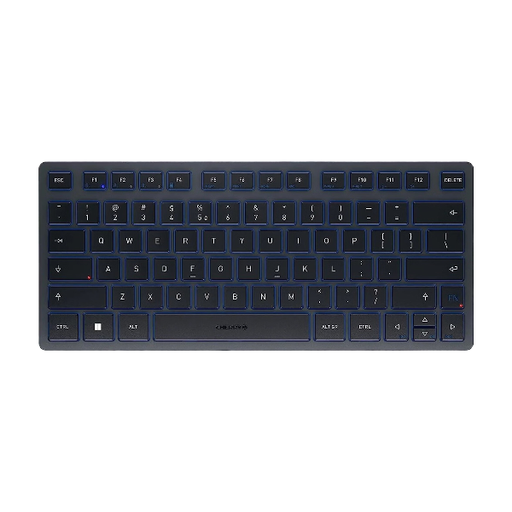 No image available
Could suit you if you’re looking for a compact keyboard for several devices and are happy to use a US International QWERTY layout.
The product name lists three Bluetooth channels and a portable design with a travel case. The layout is US International QWERTY, not German QWERTZ.
 No image available
Could suit you if you prefer a wired TKL design without a number pad and the layout works for the way you type.
The product name lists a USB connection, CHERRY SX scissor mechanism and six multimedia hotkeys. The layout is English (US) with a euro symbol.
No, not just because of the number of screens. Device switching is useful if you want to switch between several computers or other devices.
Allow enough space to arrange your keyboard, screens, documents and other input devices comfortably. The DGUV lists a compact keyboard without a number pad as a possible option if you enter few numbers or prioritise mouse use. The relevant workplace health and safety rules apply to professional screen-based workstations; having two screens alone doesn’t determine whether these rules apply to a home workspace.
Avoid harsh cleaning products and take care not to let any liquid get inside the device. Also follow the care instructions for your specific model.
The Verbraucherzentrale states that consumers generally have a 14-day cancellation period from the date the contract is concluded or the goods are received; conditions and exceptions depend on the specific purchase. Statutory rights relating to faulty goods are separate from a voluntary guarantee. Check the terms and conditions for your purchase.