First, measure the space you have for your keyboard, mouse and papers. A 75% layout can retain the arrow and function keys while taking up less room, whereas TKL does away with the number pad and uses a different key arrangement. If other people can hear you or you have an open microphone, the specific switch type and how it sounds at your desk matter: “mechanical” doesn’t automatically mean quiet. For German text, also check that you’ve selected the DE layout and that your correction keys are where you expect them to be.
Which keyboard is right for you?
Scriptwriter with a small desk
If you need room alongside your keyboard for a mouse, notes or a manuscript, check whether the specific layout retains the arrow and function keys you use most. Keychron and CORSAIR offer compact 75% models as examples of this layout.
Writer in a shared space
If other people are within earshot or you’re using an open microphone, the specific switch type matters more than a blanket “silent” label. For the MX Mechanical Mini, Logitech offers options including Tactile Quiet, Clicky and Linear.
Frequent typist with a proofreading routine
If you regularly work on German text, check that the selected DE layout and the position of the navigation keys suit the way you work. Keychron and CHERRY offer relevant layout or TKL variants.
What should you look for when buying?
Start with the desk space available and the key arrangement. Then compare the switch feel and sound, as well as the connection options and how easily you can switch between devices.
| What matters |
What to check before buying |
Who is it important to? |
| Desk space and keys |
Measure the space you have for your keyboard, mouse and papers. Check the arrow, function and navigation keys on the specific model. |
If I want to fit a manuscript and mouse on a small desk, I don’t want to lose important correction keys by mistake. Around 33% of consumers put desk space and retaining the keys they need first. |
| Sound and switch feel |
Check the exact switch type and, if possible, listen to it in the space where you plan to use it. |
If I’m writing within earshot of others or near an open microphone, I want to get a feel for the sound rather than rely on a “silent” label. Around 27% of consumers say sound and switch feel are their main concerns. |
| German text and corrections |
Check that you’ve selected the DE or ISO-DE version and review the key layout. Make sure the correction keys are where you need them in your writing software. |
If I often edit German text, I want a suitable layout and navigation keys that are easy to reach. German text and corrections are a priority for around 20% of consumers. |
| Connection and workflow |
Check the connection options on the specific version, as well as its ports and compatibility with your devices. |
If I switch between devices or work at a fixed desk, I want to choose a connection that suits my setup. Around 20% of consumers prioritise connectivity and switching between devices. |
Common buying mistakes
-
Assuming “compact” means a layout that suits your writing
75% and TKL keyboards save space in different ways and don’t have the same key arrangement. A compact model may therefore suit your proofreading routine differently than you expect.
Measure your whole workspace and compare the position of the correction keys you use most with the layout of the specific model.
-
Treating a switch description as a measure of noise
A dampened switch type or sound-dampening construction doesn’t guarantee a particular noise level at your desk.
Check the exact version and, if possible, listen to it in the environment where you plan to use it.
-
Assuming the model name tells you which version has a German layout
A range may include different ISO variants, so the model name alone doesn’t necessarily confirm which layout you’ve selected.
Before buying, check that you’ve selected the DE-ISO version and review the key layout.
Brands to consider
Keychron
Keychron’s K3 Max is a low-profile keyboard in a 75% layout, with different connection options and ISO versions listed.
- The manufacturer lists wired, Bluetooth and 2.4 GHz connections, along with QMK/VIA and a hot-swappable version.
- Check the selected layout carefully: the product page may show an ES-ISO option, and the model name alone doesn’t confirm a DE layout.
Logitech
The MX Mechanical Mini is a compact, low-profile mechanical keyboard for the office, available with different switch types.
- Logitech says you can use up to three devices.
- Tactile Quiet, Clicky and Linear switches differ in feel and sound. Check the specific version: “Mini” doesn’t automatically mean a quiet keystroke.
CHERRY
The KC 500 MX LP TKL is a low-profile, wired mechanical keyboard for the office, without a number pad.
- CHERRY lists a low profile and PBT keycaps for this model.
- TKL still needs enough desk space. Allow room for the cable, too; a separately described CHERRY switch model doesn’t prove that this keyboard has those switches.
CORSAIR
According to CORSAIR, the German K65 Plus Wireless combines a 75% layout with arrow keys and a programmable multi-function dial.
- CORSAIR describes two sound-dampening layers, but this doesn’t indicate a specific noise level at your desk.
- A PC-WELT review dated 5 August 2024 reports significantly shorter battery life with the lighting switched on, as well as a lack of dedicated macro keys.
Joybuy products
The models below include compact mechanical keyboards with different layouts and connection options. Pay particular attention to the layout listed: the CHERRY KW X ULP is shown with an English US layout.
 No image available
Akko 3084B Plus Tri-Mode, 75%, ISO-DE, black and gold
The 75% layout and ISO-DE key layout are suited to limited desk space and German text.
Bluetooth, 2.4 GHz and USB-C; V3 Pro Cream Blue switches; hot-swappable; RGB.
View at Joybuy
 No image available
Akko 5087S V1 TKL, wired, ISO-DE QWERTZ
A TKL version for writers who can do without a number pad and want a German layout.
V3 Pro Cream Yellow switches; hot-swappable; RGB.
View at Joybuy
 No image available
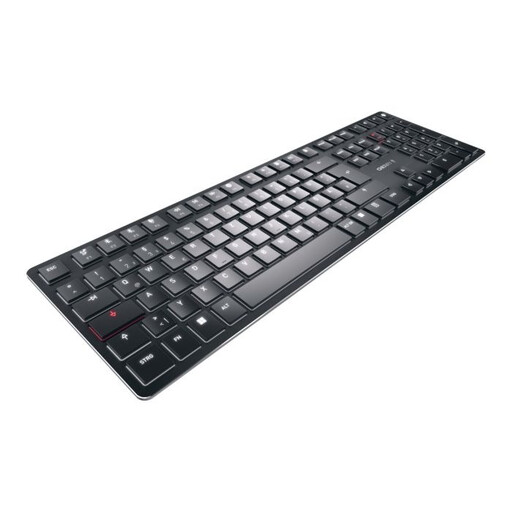
CHERRY KW X ULP, mechanical, English US layout
This low-profile mechanical keyboard is only an option if you specifically want to use an English US layout.
65% layout; tactile MX switches; multi-device; white backlighting.
View at Joybuy
 No image available
Ticktype EVO75 Custom Tri-Mode, ISO-DE
The 75% ISO-DE layout combines a compact design with a German key layout.
Bluetooth, 2.4 GHz and USB-C; hot-swappable; VIA-compatible; Creamy Rye switches.
View at Joybuy
 No image available
CHERRY XTRFY K5V2 Compact, wired, 65%, German QWERTZ layout
The compact design and German QWERTZ layout are useful for limited desk space and German text.
Hot-swappable; MX2A RED switches; RGB lighting; detachable USB-C connection.
View at Joybuy
Frequently asked questions
Is 75% or TKL better if I often move sections of text?
Choose based on the keys you need for your writing software and the width of your desk. The K65 Plus Wireless, as described by CORSAIR, has arrow keys; the CHERRY KC 500 MX LP TKL does away with the number pad. The percentage alone doesn’t tell you whether the key arrangement will suit your proofreading routine.
How can I check whether a keyboard really has a German layout?
Before buying, check the selected version and the key layout shown, not just the model name. The Keychron product page for the K3 Max lists different ISO versions, so make sure you explicitly select a DE-ISO option.
Are mechanical keyboards quiet enough for use with an open microphone?
You can’t tell from the word “mechanical” or a sound-dampening specification alone. Logitech offers different switch types for the MX Mechanical Mini. Check the specific version and, if possible, listen to it at the desk where you plan to use it.
Which connection should I choose if I switch between devices?
Choose based on your devices and how you plan to connect. Keychron lists Bluetooth, 2.4 GHz and wired connections for the K3 Max. Check which connection and port are right for your workflow on the version you’ve selected.


