Which keyboard is right for you?

Railway network builders who like a quieter setup

If you play with headphones on but don’t want to disturb others in the room with keyboard noise, check the switches on the specific version and consider the sound of the keyboard as a whole. Logitech, SteelSeries and be quiet! describe certain models as quiet or dampened, but that doesn’t mean they’ve all been measured using the same method.

Players with lots of building commands

If you often switch between tools, views and menus, first check which commands your game actually offers and whether you can customise them. Transport Fever 2’s official help shows the relevant keyboard shortcuts for tools; extra macro keys are only useful if you can assign them in a way that works for you.

Railway planners with a small desk

If you need more room for your mouse alongside the keyboard, a TKL layout could be a good fit. It does away with the separate number pad, so its key arrangement differs from a full-size model. SteelSeries offers the Apex 3 TKL - DE as a TKL option.

What should you look for when buying?

Full-size keyboard described as quiet

A good fit if: You want direct access to the number pad and media functions, and don’t need a specific mechanical feel. Logitech describes the G213 as a Mech-Dome keyboard with a whisper-quiet sound.

The trade-off: A full-size keyboard takes up more desk space. “Whisper-quiet” is the manufacturer’s description, not a guarantee that nobody in the room will hear it.

TKL layout described as quiet

A good fit if: You mainly use the mouse to operate your building tools and need more room beside your keyboard. SteelSeries describes the Apex 3 TKL - DE as having Whisper Quiet Switches.

The trade-off: There’s no number pad, so check whether you actually use it or need the keys arranged in that area.

Dampened mechanical keyboard with extra keys

A good fit if: You value a mechanical feel and want to assign extra macro or media keys to functions you can use in your game. be quiet! lists five such keys on the Light Mount Silent Linear (DE ISO).

The trade-off: “Silent” doesn’t mean silent as a mouse. Also check whether you can configure the game commands you want and how much desk space the layout you choose will take up.

Customisable full-size mechanical keyboard

A good fit if: You value having a number pad and customisable keys more than proven low noise levels. Keychron lists QMK/VIA and several layout and switch options for the K10 Pro.

The trade-off: Layout, keycaps and hot-swap features depend on the version you choose. There’s no comparable noise measurement available here for the K10 Pro.

What matters when buying What to check Who is this important to?
Keystroke noise Check the switch version and information about the keyboard as a whole. If low noise is a priority, assess the sound in your own surroundings. If I want to be considerate of others in the room even when I’m wearing headphones, I won’t rely on “Silent” alone. Around 33% of consumers put keystroke noise first.
Building and management commands Check which commands you use most often and whether you can remap them in your game before choosing macro keys. If I want quick access to tools and views, I need to know whether the extra keys can be assigned to the commands I actually use in the game. Around 27% of consumers prioritise shortcuts that are within easy reach.
Room for the mouse Compare the free space on your desk and how you use the number pad with TKL and full-size keyboards. If there’s little room beside my keyboard, I want to be able to move my mouse without giving up a number pad I need. Around 20% of consumers put desk space first.
Typing feel and features Decide which features you need and what kind of typing feel you prefer. With a range of versions, check the layout, switches and features of each one individually. If typing feel matters more to me than unused extras, I want to choose only the features I’ll actually use. Around 20% of consumers prioritise typing feel and useful features.

Avoid common buying mistakes

  • Assuming headphones make a quiet keyboard

    Headphones don’t change which keystrokes other people in the room can hear. The manufacturers’ claims about quiet switches here aren’t based on a shared measurement of complete keyboards.

    Check the precise switch and case version. Don’t take “Silent” as a promise of complete silence.

  • Giving up the number pad for a compact layout without checking first

    A TKL layout gives you more room beside your keyboard, but it doesn’t have a separate number pad.

    Compare the commands in your game and the way you usually enter numbers with the specific key arrangement.

  • Assuming every version has all the features of a product range

    Layout, keycaps, switches and the number of extra keys can vary across a product range. Full-size and TKL versions may also have different features.

    Before buying, check the exact model name, DE layout, switches, hot-swap information and what’s included with the version you’ve chosen.

Brands and ranges to help you choose

SteelSeries

The Apex 3 TKL - DE is aimed at buyers looking for a compact layout with keys specifically marketed as quiet.

  • SteelSeries lists Whisper Quiet Switches and media controls for the TKL version.
  • The TKL layout has no number pad. The noise description isn’t an independent comparative test.

Logitech G

The G213 Prodigy is a Mech-Dome alternative for buyers who don’t need individual mechanical switches.

  • Logitech lists media controls, five lighting zones and an integrated wrist rest.
  • The “whisper-quiet” description comes from the manufacturer; the sound hasn’t been independently compared with other models here.

be quiet!

According to the manufacturer, the Light Mount Silent Linear (DE ISO) combines dampened mechanical switches with extra programmable functions.

  • For the full-size version, be quiet! lists three layers of dampening, hot-swap support and five macro or media keys.
  • The TKL version has no number pad and, according to the manufacturer, has three extra keys rather than five. This doesn’t mean its noise level has been independently measured against other models.

Corsair

The K55 RGB PRO (DE) is worth considering if you’ll actually use its six dedicated macro keys.

  • Corsair lists six macro keys and media controls for the DE version.
  • Extra keys are only useful if you can assign the functions you want in a way that works for the game you’re playing.

Keychron

The K10 Pro ISO collection is aimed at buyers looking for a customisable mechanical full-size keyboard in a suitable ISO version.

  • Keychron lists QMK/VIA and several layout, keycap and switch options.
  • Check the specific DE ISO version you choose. Hot-swap support and quiet operation can’t be assumed across the whole range.

Joybuy products for virtual railway building

The Joybuy keyboards below include full-size and more compact layouts, as well as different switch descriptions. Before choosing, check that the layout and switch version suit your game and surroundings.

Ticktype DP104, full-size keyboard with 108 keys, US layout, Silent Tactile Switches, Powder White

Ticktype DP104, full-size, 108 keys, US layout, Silent Tactile Switches, Powder White

The product name describes a full-size keyboard with 108 keys and Silent Tactile switches, for buyers looking for a number pad and a version described as quiet.

US layout; the product name also lists hot-swap support, a customisable pixel screen and a tri-mode wireless connection.

View at Joybuy

Ticktype DP104, full-size keyboard with 108 keys, US layout, Thocky Linear Switches, Gecha Gray

Ticktype DP104, full-size, 108 keys, US layout, Thocky Linear Switches, Gecha Gray

The product name describes a full-size keyboard with 108 keys and linear switches. Check whether this layout and typing feel suit your needs.

US layout; the product name also lists hot-swap support and a tri-mode wireless connection.

View at Joybuy
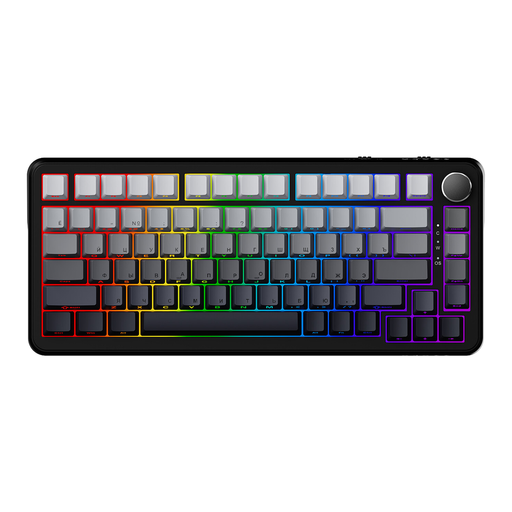
AJAZZ AK820 MAX, wired mechanical gaming keyboard with 82 keys

AJAZZ AK820 MAX, wired, 82 keys

The product name describes a more compact wired gaming keyboard with 82 keys. Check that the layout keeps the game commands you need within easy reach.

The product name lists magnetic switches and adjustable actuation points.

View at Joybuy

Logitech MX Mechanical, Tactile Quiet, German QWERTZ layout

Logitech MX Mechanical, Tactile Quiet, German QWERTZ layout

The product name lists Tactile Quiet switches and a German QWERTZ layout for buyers who prefer this version.

The product name lists Bluetooth and Logi Bolt as connection options.

View at Joybuy

Siukie CR108, wired mechanical keyboard with 108 keys, US layout

Siukie CR108, wired, 108 keys, US layout

The product name describes a wired full-size keyboard with 108 keys. Check whether you want to use the number pad and this layout.

The product description lists dedicated media keys and replaceable switches.

View at Joybuy

Frequently asked questions

Do I need macro keys for every railway-building game?

No, not necessarily. First check which commands you actually use and what remapping options your game offers. Transport Fever 2’s official help shows the relevant keyboard shortcut for some tools.

How do I set up my keyboard for virtual railway building?

First, check the layout you’ve actually received, then look at your game’s controls or contextual help. Transport Fever 2’s official help shows keyboard shortcuts for tools.

Can I use any switches in a hot-swap keyboard?

No. be quiet! specifies support for 5-pin MX-style switches in the Light Mount Silent Linear. Even so, check the specific model version and the manufacturer’s instructions before replacing switches.

What should I know about defects or cancellation when buying online in Germany?

Your statutory rights against the seller are separate from any voluntary guarantee. For online consumer contracts, goods generally come with a 14-day cancellation period; when it starts and whether any exceptions apply depend on the specific contract. Verbraucherzentrale explains these rights.

Is the CE mark an independent quality check?

No. Your Europe explains that CE marking is only required for products covered by relevant EU rules; it isn’t an independent endorsement of product quality. The Bundesnetzagentur checks, among other things, product marking and manufacturer information. For a specific device, check which requirements apply and whether the necessary markings and documents are in place.