Rally drivers who want a wider view
If you want more screen space to either side while driving, check that the format works with your game’s visuals and field-of-view settings.


A 21:9 monitor is an obvious middle ground if your rally game makes good use of the wider view and your PC and cockpit are up to the task. A 32:9 display needs more space and can put greater demands on your PC. A 16:9 screen is usually easier to fit, while three monitors are only worth considering if your particular game supports the setup. For long sessions, you’ll also want to think about the frame rate you can actually achieve, your seating position and, with OLED, how to manage HUD elements that stay on screen.
If you want more screen space to either side while driving, check that the format works with your game’s visuals and field-of-view settings.
For long stages with on-screen displays that stay in the same place, a suitable seating position matters. If you’re choosing OLED, check the care guidance for the specific model too.
If your cockpit has little room, check the monitor’s dimensions and stand before choosing an especially wide single display or multiple screens.
A good fit if: you have limited space or want a straightforward setup.
The trade-off: The display offers less horizontal screen space than the 21:9 and 32:9 formats considered here.
A good fit if: you want more horizontal screen space on one display, and the format suits your game, PC and seating position.
The trade-off: At 3440 × 1440 pixels, your PC has more pixels to render than it would on a 16:9 QHD monitor.
A good fit if: an especially wide display fits your rig and your simulation makes good use of the view.
The trade-off: A 49-inch model takes up more room, and its stated refresh rate doesn’t tell you what frame rate your game will achieve.
A good fit if: you want to make purposeful use of the side views and your particular game supports a suitable multi-monitor setup.
The trade-off: Extra displays, cables and setup take up more space and require more effort.
| Buying criterion | What to check | Who it matters to |
|---|---|---|
| Field of view and format | Check the aspect ratio, native resolution, dimensions, viewing distance and field-of-view options in your particular game. | If I want to make more use of the side view while driving, I’ll first check whether my rally game makes good use of the format. Around 33% of consumers would put field of view at the top of their buying priorities. |
| Motion handling | Consider the frame rate you can achieve, connection, VRR compatibility and native resolution together; don’t treat GtG and MPRT as equivalent. | If you want fast driving scenes to look as smooth as possible, check that your PC’s performance matches the game and monitor. Around 25% of consumers would make achievable frame rate their top buying priority. |
| Long sessions and HUD | Check the panel type, OLED care guidance, warranty terms for the specific model and how easily you can adjust the screen position. | If I drive long stages and on-screen displays stay in the same place for extended periods, I pay particular attention to panel care and seating position. Around 25% of consumers would prioritise suitability for long sessions above all else. |
| Space and setup | Check the dimensions of the screen and stand, mounting options, connections and the work involved in setting up multiple displays. | If you want to use an existing rig without setting aside much space or taking on extra setup, check the dimensions in advance. Around 17% of consumers would put space requirements and overall effort first. |
Manufacturers use different response-time methods and modes. The frame rate you actually get also depends on your PC, signal and game.
Don’t compare GtG and MPRT figures directly. Check the resolution, connection, mode and achievable in-game frame rate together.
The documented triple-screen setup is specifically for iRacing and doesn’t automatically prove that other games support it.
Check the features of your particular game and the space available in your rig before planning a multi-monitor setup.
Three displays mean extra cost and effort for monitors, mounting and setup.
LG notes that burn-in can’t be ruled out completely, even with proper use. A HUD that stays unchanged for a long time is therefore a factor to consider when choosing a panel.
Read the care guidance and warranty terms for the exact model you’re planning to buy.
Xiaomi lists the G34WQi and the monitor explicitly named “G34WQi 2026” as separate products.
Check the full model number and compare the connections, dimensions and technical specifications that matter to you.
The Odyssey G9 G95C is an example of a 49-inch 32:9 single display.
The UltraGear 34GX900A-B is a 34-inch example of a 21:9 OLED display.
The AW3426DWM is a 34-inch ultrawide example with a VA panel and height adjustment.
The G34WQi is a 34-inch example of a 21:9 display; “G34WQi 2026” is a separate model name.
The MAG 341CQP QD-OLED is a 34-inch 21:9 alternative.
The ROG Swift OLED PG34WCDN is a 34-inch OLED example with a high specified refresh rate.
The Joybuy models below are 21:9 and 32:9 single monitors. Check that the format suits your game, its native resolution and the space in your rig.
 No image available
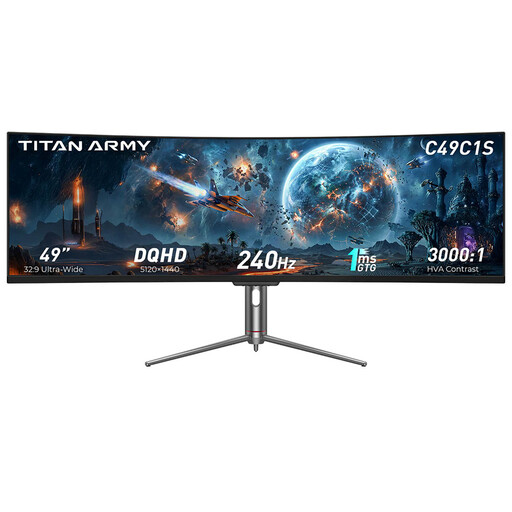
This 32:9 single monitor is worth considering if your game supports the wide format and your rig has enough room.
The product title lists a 49-inch screen, 32:9 aspect ratio, 5120 × 1440 pixels and 240 Hz; the product description mentions AMD FreeSync. According to the description, handle the 49-inch curved panel with care during installation.
 No image available
This 21:9 model is an option if your rally game supports a wide single-screen view and the monitor fits your rig.
The product title lists a VA panel, 1500R and 3440 × 1440 pixels; the product description mentions 165 Hz and Adaptive Sync.
 No image available
This 32:9 single monitor is only a good fit if your simulation supports the format and you have enough room for it.
The product title lists a 49-inch screen, 32:9 aspect ratio, 5120 × 1440 pixels, 1500R and 165 Hz. The product description mentions AMD FreeSync, HDMI 2.1 and DisplayPort 1.4, as well as a height-adjustable stand. According to the description, any VESA mount used for wall mounting must be suitable for the display’s size and weight.
 No image available
This 21:9 format is worth considering if you want more horizontal screen space on one display and your game supports it.
The product title lists a VA panel, 3440 × 1440 pixels, 200 Hz, FreeSync, 1500R and a height-adjustable stand.
No. Whether you can use a wide format depends on how your particular game renders the image and its field-of-view settings. The multi-monitor guide from iRacing Support is for iRacing and doesn’t automatically prove that other rally games support the setup.
iRacing Support describes both stretching a window across three displays and creating a virtual combined display using your graphics card manufacturer’s software. Then enter your monitor details in the simulation’s display settings. This guide doesn’t automatically apply to other games.
LG notes that burn-in can’t be ruled out completely with OLED, even with proper use. Read the care guidance and warranty terms for the specific model. A protective feature doesn’t guarantee that there’s no risk.
The EU energy label applies to the monitors covered by the rules, as explained by the European Commission. Compare the power consumption figures on a like-for-like basis, including separate SDR and HDR figures where applicable. Without knowing how long you use the monitor and your electricity tariff, you can’t work out your personal cost in euros.
No. If you buy from a retailer, your statutory warranty claims are against the seller; a manufacturer’s warranty is an additional offer with its own terms. The Verbraucherzentrale says new goods are generally covered by a two-year statutory warranty. For sales contracts made from 31 July 2026, the period may be extended once by twelve months, according to the Verbraucherzentrale, if you choose a repair rather than a replacement when a defect occurs.