Rally drivers with a fixed PC rig
You can measure your eye-to-screen distance and screen position in your usual driving posture, then set up your view accordingly. iRacing Support recommends measuring the distance from your normal seated position.


For rally training, first measure your eye-to-screen distance and the available space from your normal driving position. iRacing Support recommends using your seating position as the basis for setting up your view. A 16:9 monitor is a single-screen option for limited space; 21:9 gives you more width on one display, while 32:9 or three monitors require more room and suitable game and PC support. Check the resolution and refresh rate available through the connection you’ll use and in your chosen game mode. Don’t assume advertised maximum figures reflect the performance you’ll get in-game.
You can measure your eye-to-screen distance and screen position in your usual driving posture, then set up your view accordingly. iRacing Support recommends measuring the distance from your normal seated position.
You need a display that fits in front of your seat and wheel, rather than simply choosing the largest screen size. 16:9 and 21:9 monitors are different single-screen options, so check the actual dimensions and viewing distance.
You want more horizontal screen space, so check that your rally game and graphics output can display the format properly before choosing a monitor. LG Germany, MSI Germany and Samsung Germany document examples of different 21:9 and 32:9 monitors.
Best suited to: A setup with limited space, if you prefer a simple single-monitor arrangement or haven’t yet checked whether your game supports widescreen output.
Trade-off: Compared with a well-supported ultrawide format, you’ll have less horizontal screen space. Your viewing distance and in-game settings will still affect your view from the seat.
Best suited to: If you want a wider single-screen view without setting up three displays, and your rally game can output 21:9 effectively.
Trade-off: The screen width, curvature and resolution need to suit your seating position and graphics output. LG Germany, MSI Germany and Dell Germany each list specific 34-inch 21:9 examples.
Best suited to: If you want an especially wide single-screen view, have space around your rig and your game can display the aspect ratio and HUD properly.
Trade-off: Samsung Germany lists the 49-inch G93SD model with a resolution of 5120 × 1440 pixels. This format doesn’t guarantee a correctly set field of view or any particular performance in a rally game.
Best suited to: If you have a fixed PC rig and enough space, and prioritise side views over a straightforward setup.
Trade-off: Three displays need more space and setup time. iRacing Support documents setup using screen dimensions, distance and angles; this doesn’t mean every rally game offers the same feature.
| Priority | What to check before buying | Who it matters most to |
|---|---|---|
| Field of view and readability | Measure your eye-to-screen distance and screen width in your normal driving posture; check the field of view and HUD in the specific game. | If getting the view right from your usual driving position is your priority, you’ll want to match the viewing distance to the screen width. Around 33% of consumers put field of view and readability first. |
| Space and setup | Check the overall dimensions, including the stand or mount, against the space around your rig. For three displays, allow for their dimensions and angles too. | If space around your rig is limited, the setup needs to fit in front of your seat and wheel. Around 27% of consumers say space and setup are their main concern. |
| Image smoothness and connection | Match the resolution and refresh rate of your chosen mode to your graphics output and the connection you plan to use. | If smooth motion matters more to you than extra width, your system needs to support the game mode you want. Around 20% of consumers prioritise image smoothness and the connection. |
| Panel care and running costs | For OLED, read the care guidance and warranty terms for the exact model; compare the energy label and product information. | If you’re considering OLED and a fixed HUD stays on screen for long periods, factor in care and cover. Around 20% of consumers prioritise panel care and running costs. |
Your eye-to-screen distance and the actual screen width affect how the view looks from your seat.
Measure in your normal driving posture, then check the screen format and overall dimensions against the space around your rig.
A wide display doesn’t guarantee that a particular game will display the image and HUD correctly. The documented setup for three monitors applies to iRacing.
Check the format, HUD and field-of-view settings in your chosen game, as well as the output your PC can support.
Three displays also need space for mounts and cabling, and take longer to set up.
Advertised refresh rates may apply to different resolution modes or vary depending on the connection.
Compare only the mode specified for the resolution you want and the connection you’ll actually use.
MSI describes static images displayed for long periods as a risk, and its OLED care features as ways to help reduce that risk.
Follow the care guidance and check the warranty terms and exclusions for the exact model variant.
The UltraGear 34GS95QE-B is a documented example of a 34-inch OLED monitor in 21:9 format.
The Odyssey OLED G9 G93SD is a documented 49-inch example of an extra-wide single monitor.
The MPG 341CQPX QD-OLED is a 34-inch 21:9 model with OLED care features.
Dell lists the curved 34-inch AW3426DWM and the flat 27-inch 16:9 AW2725QF.
These 21:9 single monitors give you a wider view on one display. Check that your rally game can display the format correctly before choosing one.
 No image available
This could be a good single 21:9 monitor if your rally game displays the format correctly.
Specifications include a resolution of 3440 × 1440 pixels, a refresh rate of 165 Hz, 1500R curvature and VESA 75 × 75 mm.
 No image available
This 21:9 single monitor offers a wider screen, provided your rally game supports the format.
Specifications include a resolution of 3440 × 1440 pixels, a refresh rate of 200 Hz and 1500R curvature. The product description lists height, tilt and swivel adjustment.
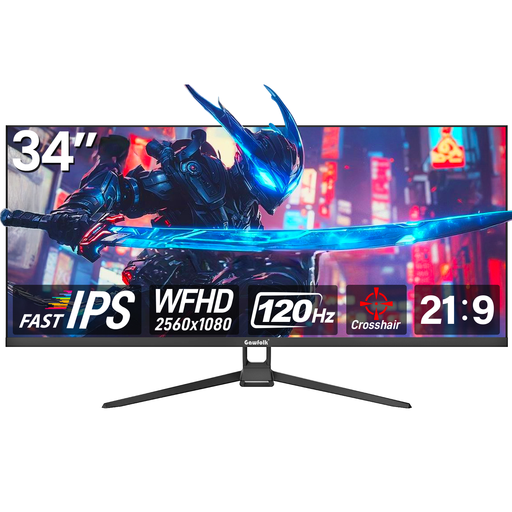 No image available
This could be a 21:9 single-monitor option if your game displays the format correctly.
Specifications include WFHD at 2560 × 1080 pixels, a refresh rate of 120 Hz and a VESA mount measuring 75 × 75 mm.
 No image available
This 21:9 single monitor is an option if you want a wider view and your rally game supports the format.
Specifications include a resolution of 3440 × 1440 pixels, a refresh rate of 180 Hz and 1 ms MPRT. The product description lists an ergonomic stand and VESA mounting.
 No image available
This could work as a wide single monitor if your rally game supports 21:9 output correctly.
Specifications include a resolution of 3440 × 1440 pixels, a refresh rate of 180 Hz and 1500R curvature. The product description lists tilt adjustment.
Measure the distance between your eyes and the screen, as well as the screen width, from your normal driving position. With three monitors, you’ll also need to account for the dimensions and angles of each display. iRacing Support documents a field-of-view setup process. If you’re playing another rally game, use its own settings rather than assuming the iRacing steps apply to every game.
No. The monitor specification describes a supported mode, not how well your game and PC will perform. Check the resolution and refresh rate you want against your graphics output and the connection you’re using. Some models have different specifications for HDMI and DisplayPort.
Follow the care guidance for the specific model. MSI describes static images as a burn-in risk and lists features such as pixel shifting and panel care for compatible devices. This doesn’t guarantee that burn-in can be prevented on all OLED monitors.
The European Commission’s energy labelling rules generally cover computer monitors too. When you buy as a consumer, distinguish your statutory rights against the seller from a voluntary manufacturer’s warranty. For a standard online distance sale, you generally have a 14-day right to cancel, subject to legal exceptions.
The Verbraucherzentrale lists monitors among the product groups covered by the right to repair, which has applied since 31 July 2026. If a specific fault occurs, check your entitlement, the conditions and who to contact separately from your statutory rights against the seller.