If desk space is limited, a 27-inch WQHD monitor is the more compact single-screen option; a 34-inch ultrawide is worth considering if its greater width will fit and your rally game supports the format. MSI lists the MAG 275CQFDE E18 as 611.5 mm wide and 249.7 mm deep with its stand; Xiaomi gives the G34WQi dimensions of 811.3 mm wide and 210 mm deep. Also measure the distance from your eyes to the screen in your usual driving position. iRacing explains how to use this distance and the screen width to set your field of view, while support for your game, connectivity and PC performance should all be checked for your particular setup.
Which monitor suits you?
Rally drivers with a tight cockpit setup
If your wheel and seat already take up most of the room, the screen and stand need to fit the space you have. MSI lists the exact dimensions of the MAG 275CQFDE E18, while iRacing recommends measuring the distance from your eyes in your usual driving position.
Rally drivers who want a wider view
A single ultrawide can give you more horizontal screen space, but it needs more room and your game must display the format correctly. Xiaomi and Samsung list 34-inch 21:9 models, while iRacing explains how to set the field of view for its own simulator.
Rally drivers with a less powerful PC
If you’re aiming for a high frame rate, consider the resolution, refresh rate and connection alongside your system’s performance. TÜV SÜD notes that high frame rates require a suitably powerful PC.
What to look for when buying
First, measure the available width and depth of your driving area, including the wheel setup and monitor stand. Then you can make an informed choice between a compact 16:9 monitor and an ultrawide.
Compact 16:9 single monitor
A good fit if: space is tight and you’re planning to use a single screen for rally practice.
Trade-off: A 16:9 screen gives you less horizontal screen space than a 21:9 ultrawide.
34-inch ultrawide
A good fit if: you want a wider view on a single screen and have enough room for its width.
Trade-off: Your system needs to handle the higher pixel count at 3440 × 1440, and your game needs to support the format.
Triple-monitor setup
A good fit if: you have enough space, mounts and time to get everything set up.
Trade-off: GermanSimRacing describes the extra space, mounts, cables and setup involved compared with using a single ultrawide.
| Consideration |
What to check before buying |
Who it matters most to |
| Space and mounting |
Measure the available width and depth with the stand in place; check the VESA size if you’re considering a mount. MSI lists the MAG 275CQFDE E18’s footprint as 611.5 × 249.7 mm and its VESA size as 100 × 100 mm. |
If my wheel setup leaves very little room, the screen and stand need to fit the space available. That’s why around 36% of consumers put footprint and mounting first. |
| Screen width and field of view |
Check that your game supports 21:9 and measure the distance from your eyes in your usual seated position. The Xiaomi G34WQi is 811.3 mm wide with its stand; other models may differ. |
If I want a wider view on a single screen, I need a compatible game and enough room in my driving area. Around 29% of consumers prioritise screen width. |
| Frame rate and system |
Check the resolution and refresh rate available through each connection, and make sure they match your PC or console’s performance. For the MAG 275CQFDE E18, MSI lists up to 144 Hz over HDMI and up to 180 Hz over DisplayPort at WQHD. |
If smooth motion matters to me, I want to be able to achieve my preferred frame rate with my system and connection. Around 21% of consumers put this compatibility first. |
| Energy use and after-sales considerations |
Compare the EU energy label and the specifications for the exact model; check warranty terms separately from your statutory consumer rights. |
If I’m considering energy use and what support may be available after purchase as well as the initial cost, I’ll check this information before deciding. Around 14% of consumers prioritise these longer-term considerations. |
Common misconceptions
-
Comparing screen diagonals instead of dimensions
The width of the monitor and the depth of its stand can determine whether it will fit your existing setup.
Measure the available space in your driving area and compare it with the dimensions of the exact model, including its stand.
-
Assuming all 1 ms figures are measured in the same way
Xiaomi and Samsung list MPRT for the ultrawide models mentioned here; MSI describes the figure for its 27-inch model as a minimum GtG value. These figures are not a like-for-like measure of total input lag.
Check the measurement method and conditions, and don’t treat manufacturers’ figures as independent real-world tests.
-
Confusing the G34WQi with the G34WQi 2026
The two model variants have different specifications, including different stand depths and VESA sizes.
Check the full model name and relevant dimensions against the exact version in the listing.
Key brands to consider
MSI
The MAG 275CQFDE E18 is a documented 27-inch WQHD example of a compact single monitor.
- MSI lists 180 Hz over DisplayPort, VESA 100 × 100 mm and exact dimensions for this model.
- At WQHD, MSI lists up to 144 Hz over HDMI. The advertised 0.5 ms is a minimum GtG figure, not an independent input-lag test.
Xiaomi
The G34WQi is a documented example of a single, wide 34-inch 21:9 screen.
- For the G34WQi, Xiaomi lists a resolution of 3440 × 1440, a maximum refresh rate of 180 Hz, VESA 75 × 75 mm and a width of 811.3 mm with the stand.
- The G34WQi 2026 has different specifications. Check the model suffix and included accessories for the exact version.
Samsung
The Odyssey G5 G55T, model number LC34G55TWWPXEN, is another documented example of a 34-inch 21:9 monitor.
- For this exact model, Samsung lists a resolution of 3440 × 1440, a refresh rate of 165 Hz and a VA panel.
- The stated 1 ms figure is MPRT and doesn’t prove how its input lag compares in independent testing.
LG
The UltraGear 27GR75Q-B is a documented example of a flat 27-inch WQHD IPS monitor with height adjustment.
- For this model, LG lists VESA 100 × 100 mm and a stand footprint of 613.5 × 291.2 mm.
- LG lists the model as no longer available in its German online shop. This doesn’t tell you whether it’s available from other retailers or say anything about the UltraGear range as a whole.
Joybuy products for a compact setup
This selection features 27-inch monitors for a compact single-screen rally practice setup.
 No image available
TCL 27P2A Pro 27-inch Mini LED gaming monitor
The 27-inch size is a good option if you need a single monitor to fit your existing driving setup.
QHD (2560 × 1440), 320 Hz, HFS (IPS), 1 ms GTG, AMD FreeSync Premium and VESA DisplayHDR 600.
View at Joybuy
 No image available
TCL 27P2A 27-inch Mini LED gaming monitor
The 27-inch size is a good option if you’re looking for a single monitor for a compact driving setup.
QHD (2560 × 1440), 200 Hz, HFS (IPS), 1 ms GTG, AMD FreeSync Premium and VESA DisplayHDR 600.
View at Joybuy
 No image available
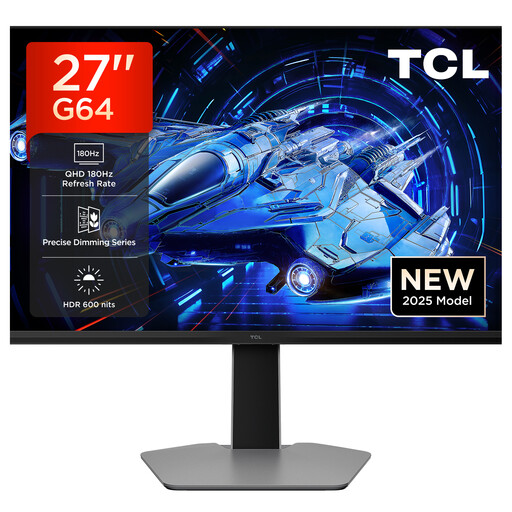
TCL 27G64 27-inch QD Mini LED gaming monitor
A 27-inch 16:9 monitor is a good option for a compact single-screen setup.
QHD, 180 Hz, Fast HVA panel, HDR 600 nits, 1 ms GTG, AMD FreeSync and G-Sync compatibility.
View at Joybuy
 No image available
INNOCN 2751S PLUS 27-inch Mini LED gaming monitor
The 27-inch size is designed for a single screen when space is limited.
QHD 2K, up to 275 Hz, IPS display, 1 ms, 1152 zones, FreeSync and height-adjustable stand.
View at Joybuy
 No image available
KTC H27D9 27-inch QHD monitor
A 27-inch QHD monitor is worth considering if you’re looking for a single screen for a compact driving setup.
2560 × 1440, 120 Hz, IPS panel, Adaptive Sync and VESA mounting option.
View at Joybuy
Frequently asked questions
How do I set the field of view for my driving setup?
In your usual driving position, measure the distance between your eyes and the screen, as well as the screen’s width. iRacing explains how to enter these measurements in its simulator’s monitor menu for a flat or curved single screen. Check whether your rally game has a similar setting.
Is HDMI enough for the maximum refresh rate?
Not necessarily. For the MSI MAG 275CQFDE E18 at 2560 × 1440, the German manufacturer’s specification sheet lists up to 144 Hz over HDMI and up to 180 Hz over DisplayPort. Always check the specifications for your exact monitor and source device.
What should I check about energy ratings and complaints?
Compare the EU energy label with the product specifications for the monitor you’re considering. The Verbraucherzentrale distinguishes statutory consumer rights for faulty goods from a voluntary warranty.
Can I return a monitor bought online if it doesn’t fit my setup?
In Germany, online purchases generally come with a 14-day right to cancel, starting from the day you receive the goods. The Verbraucherzentrale recommends checking the terms of your specific purchase and notifying the seller that you’re cancelling. This is separate from the process for dealing with faulty goods.


